// How We Used Cypress App Context from the Terminal: Real Commands, Tests, and Debugging
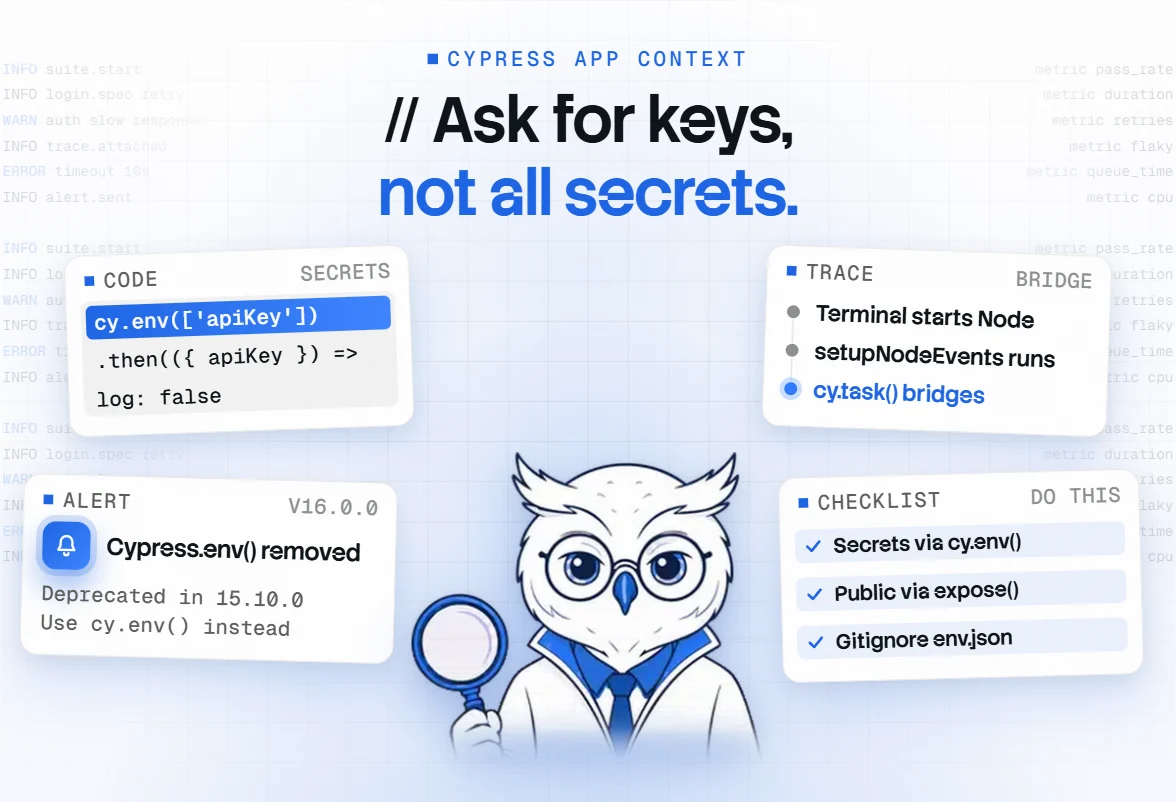
A test suite that reads a secret API key from Cypress.env() and silently ships that key into every browser tab it opens is a real risk, not a hypothetical one. Teams running automation testing against staging environments with real credentials have historically leaned on Cypress.env() because it was the simplest way to pull configuration into a test. The problem is that Cypress.env() hydrates every environment value into the browser context, whether a test reads it or not, which means secrets a test never touches can still end up visible in browser state.
Cypress addressed this directly: Cypress.env() was deprecated in Cypress 15.10.0 and has been removed entirely in Cypress 16.0.0. If your project or a plugin still calls Cypress.env(), it will break on upgrade. This guide, built for QA engineers, developers, testers, and SREs practising modern software testing, explains how Cypress app context actually flows between your terminal, the Node.js process, and the browser, and shows the current, supported way to pass configuration, environment variables, and terminal-side operations into your tests, using real, working endpoints throughout so every example can be copied and run as-is.
What Does "App Context" Mean in Cypress?
Cypress runs as two connected processes: a Node.js process that starts from your terminal, and a browser process that Cypress controls and that runs your actual test code. "App context" is everything that flows between them: configuration values, environment variables, file system access, and the data you deliberately move from one side to the other.
This matters because the two sides have very different capabilities. Code inside your spec files runs in the browser and can interact with the DOM, but it cannot touch the file system, spawn processes, or query a database directly. Code inside setupNodeEvents in your Cypress configuration file runs in Node.js and has direct access to the operating system, but it cannot call Cypress or cy commands. Understanding which side you are in determines which API you reach for, and it is one of the core concepts that separates a reliable QA automation testing services setup from a fragile one.
Practical Example: Identifying Which Side Code Runs On
Scenario
A QA engineer wants to confirm a task-based log step runs correctly before visiting Cypress's own public Kitchen Sink demo app, which is officially hosted and maintained by Cypress for exactly this kind of example.
Implementation
// cypress.config.js - this runs in Node.js
const { defineConfig } = require('cypress')

module.exports = defineConfig({
  e2e: {
    setupNodeEvents(on, config) {
      // Node.js context: file system, child processes, and direct DB access work here
      on('task', {
        'log:seedStarted': () => {
          console.log('Seed step executed in the Node.js process')
          return null
        },
      })
      return config
    },
  },
})
// cypress/e2e/kitchen-sink.cy.js - this runs in the browser
describe('Kitchen Sink smoke test', () => {
beforeEach(() => {
cy.task('log:seedStarted') // bridges into Node.js from the browser-side test
cy.visit('https://example.cypress.io')
})
it('loads the Kitchen Sink homepage', () => {
cy.contains('a', 'Commands').should('be.visible')
})
})Expected Result
Running npx cypress run prints Seed step executed in the Node.js process to the terminal from the Node-side task, then the browser-side test visits https://example.cypress.io, Cypress's own live, official demo application, and confirms the "Commands" navigation link is visible.
How It Works
setupNodeEvents and anything registered with on('task', ...) execute in Node.js, where console.log writes to the terminal running the process. The spec file calls cy.task('log:seedStarted') from the browser-side test code, which sends a message across the bridge and waits for the Node-side handler to finish before continuing.
Engineers building broader test automation frameworks often apply the same process-boundary thinking to other tools; the reasoning used for stable UI element locators in automated tests follows a similar principle of separating what the browser can see from what the framework controls behind the scenes.
How Cypress Bridges the Terminal and the Browser
When you run npx cypress open or npx cypress run, Cypress starts a Node.js process first. That process reads your configuration file, executes setupNodeEvents, and then launches the browser. From that point forward, the Node process and the browser process stay connected for the life of the run: the Node side can intercept lifecycle events like before:run, and the browser side can request Node-side work through cy.task().
This is different from tools that only automate a browser from the outside. Cypress's Node process is the one starting the browser and mediating everything that happens in it, which is also why Cypress can offer commands like cy.task() and cy.exec() that reach into the operating system without any external plumbing.
Practical Example: Logging Run Details From the Terminal
Scenario
A team wants to log which browser and how many specs are about to run every time CI kicks off a Cypress job, directly to the terminal, a common need for teams offering automation testing as part of managed QA delivery.
Implementation
// cypress.config.js
const { defineConfig } = require('cypress')

module.exports = defineConfig({
  e2e: {
    setupNodeEvents(on, config) {
      on('before:run', (details) => {
        if (details.specs && details.browser) {
          console.log(
            `Running ${details.specs.length} specs in ${details.browser.name}`
          )
        }
      })
    },
  },
})
Expected Result
When you run npx cypress run, the terminal prints a line such as Running 12 specs in electron before any test executes. In cypress open, details.specs and details.browser are undefined unless experimentalInteractiveRunEvents is enabled, so the log is skipped in that mode.
How It Works
before:run fires once per machine when Cypress starts, and it is one of several Node events (before:spec, after:spec, after:run, task) that only exist in the Node.js process. This is the mechanism, not a specific product feature, by which the terminal process observes and reacts to the run.
Passing Configuration From the CLI
Cypress configuration normally lives in cypress.config.js, but the CLI lets you override individual values without touching that file. This is the standard way to point the same test suite at different environments from the terminal, and it is a pattern used heavily across automation testing services engagements that run the same suite in dev, staging, and CI.
The --config flag overrides configuration options such as baseUrl, viewportWidth, or defaultCommandTimeout. The --config-file flag points Cypress at a different configuration file entirely. Both are read once, when the Node.js process starts.
Practical Example: Pointing the Same Suite at Cypress's Live Demo App
Scenario
A test needs to run against Cypress's own public Kitchen Sink app, and the base URL should be overridable from the terminal rather than hardcoded into every spec.
Implementation
npx cypress run --config baseUrl=https://example.cypress.io// cypress/e2e/navigation.cy.js
it('visits the commands page using a relative path', () => {
cy.visit('/commands/querying')
cy.get('h1').should('contain', 'Querying')
})Expected Result
Because baseUrl was set to https://example.cypress.io on the command line, cy.visit('/commands/querying') resolves to https://example.cypress.io/commands/querying, a real, live page on Cypress's official demo site.
How It Works
--config accepts a comma-separated list of key=value pairs and merges them into the configuration object that Cypress builds when the Node.js process boots, overriding whatever is in cypress.config.js for that run only.
Environment Variables and Secrets
Cypress exposes five distinct ways to get a value into cy.env(): the env key in your configuration file, a cypress.env.json file in the project root, OS-level CYPRESS_* variables, the --env CLI flag, and values set dynamically inside setupNodeEvents. CLI-supplied values take precedence over all the others.
| Method | Where It's Set | Typical Use |
|---|---|---|
env key in config file | cypress.config.js | Shared, checked-in defaults |
cypress.env.json | Project root, gitignored | Local secrets not committed to source control |
CYPRESS_* OS variable | Shell / CI secrets manager | CI pipeline secrets |
--env CLI flag | Terminal command | One-off overrides, per-run values |
setupNodeEvents | cypress.config.js | Values computed or fetched at config time |
Practical Example: Passing a Real API Base URL via the CLI
Scenario
A test needs to hit Cypress's own public JSONPlaceholder mirror, a genuinely live, working REST API used throughout Cypress's official documentation, and the API base URL should come from the terminal instead of being hardcoded. This mirrors the kind of GET and POST API automation testing pattern used across most modern frameworks.
Implementation
npx cypress run --env api_server=https://jsonplaceholder.cypress.io// cypress/e2e/api-health.cy.js
it('confirms the API server responds', () => {
cy.env(['api_server']).then(({ api_server }) => {
cy.request(`${api_server}/comments`).its('status').should('eq', 200)
})
})Expected Result
The test resolves api_server to https://jsonplaceholder.cypress.io for this run only, and cy.request() receives a real 200 response from this genuinely live API, without the URL being hardcoded anywhere in the spec file.
How It Works
cy.env(keys) is asynchronous, takes an array of keys, and returns only the values you explicitly request. It does not dump every environment variable into browser state.
Migrating Away From Cypress.env(): Why Does It Matter?
This is the most important compatibility change in this area. Cypress.env() (no cy. prefix, called synchronously) was deprecated in Cypress 15.10.0 and is fully removed in Cypress 16.0.0, currently the latest major version. The reason: Cypress.env() serialized every configured environment value into the browser context automatically, including values a given test never read, which made it easy to leak secrets into browser state without realizing it.
Cypress now recommends two replacements, and choosing the right one depends on sensitivity:
| API | Sensitivity | Access Pattern | Browser Exposure |
|---|---|---|---|
cy.env(['key']) | Sensitive values (API keys, tokens, passwords) | Asynchronous, inside command chains | Only requested keys, not auto-serialized |
Cypress.expose('key') | Public / non-sensitive values (feature flags, environment labels) | Synchronous | Explicitly intended to be visible |
Practical Example: The Corrected Environment Variable Pattern
Implementation
// cypress.config.js
const { defineConfig } = require('cypress')

module.exports = defineConfig({
  env: {
    apiUrl: 'https://jsonplaceholder.cypress.io',
    apiKey: 'secret-key-12345', // sensitive - never expose directly
  },
  expose: {
    environment: 'staging', // public - safe to expose
  },
})
// cypress/e2e/secure-request.cy.js
it('authenticates using a scoped secret', () => {
cy.env(['apiUrl', 'apiKey']).then(({ apiUrl, apiKey }) => {
cy.request({
url: `${apiUrl}/comments`,
headers: { Authorization: `Bearer ${apiKey}` },
log: false, // keep the secret out of the Command Log for this request
}).its('status').should('eq', 200)
})
})Expected Result
The request goes out to https://jsonplaceholder.cypress.io/comments, a real live endpoint, using apiKey from configuration. That key is never hydrated into browser state automatically; it exists only inside the .then() callback that explicitly requested it, and log: false keeps it out of the Command Log for this specific command.
How It Works
cy.env() logs only the key names you request, never the values, and yields an ordinary object you control from that point forward. Chaining .its() or .invoke() directly on that object will print the value to the console twice, so Cypress recommends reading properties strictly inside .then().
Notes / Troubleshooting
If you are still on a version between 15.10.0 and 16.0.0, you can set allowCypressEnv: false in your config to make any remaining Cypress.env() calls fail loudly with a migration message rather than silently leaking data. On Cypress 16.0.0, this flag no longer exists: Cypress.env() is gone regardless of configuration, and env values in test-level configuration overrides have also been removed entirely.
Security Note
Treat any value passed through cy.env() as sensitive by default until proven otherwise. Access controls, secrets-manager permissions, and least-privilege CI credentials remain the actual security boundary; cy.env() only reduces accidental exposure inside the test run itself and does not replace proper secret management upstream.
Running Terminal-Side Operations With cy.task()
cy.task() is the supported escape hatch for running arbitrary Node.js code from a browser-side test. It is the correct tool whenever a test needs something the browser cannot do on its own: seeding a database, reading a file that might not exist, running a CLI tool, or querying data outside the DOM.
The handler is registered with on('task', { ... }) inside setupNodeEvents, and it must return a value, null, or a resolved promise; returning undefined fails the test, which catches typos or unregistered task names early.
Practical Example: Writing and Reading a Local Fixture File
Scenario
A test needs to write a small JSON file to disk and confirm the browser-visible Kitchen Sink app is reachable, without depending on any external, unverifiable server.
Implementation
// cypress.config.js
const { defineConfig } = require('cypress')
const fs = require('fs')
const path = require('path')

module.exports = defineConfig({
  e2e: {
    setupNodeEvents(on, config) {
      on('task', {
        writeRunLog(entry) {
          const logPath = path.join(config.fixturesFolder, 'run-log.json')
          fs.writeFileSync(logPath, JSON.stringify(entry, null, 2))
          return logPath
        },
      })
      return config
    },
  },
})
// cypress/e2e/run-log.cy.js
it('records a run entry and visits the live demo app', () => {
cy.task('writeRunLog', { visitedAt: new Date().toISOString() }).then(
(logPath) => {
expect(logPath).to.be.a('string')
}
)
cy.visit('https://example.cypress.io')
cy.contains('a', 'Utilities').should('be.visible')
})Expected Result
writeRunLog creates run-log.json inside the project's fixtures folder on disk, returns its absolute path to the browser-side test, and the test separately confirms the live Kitchen Sink app's "Utilities" link is visible.
How It Works
cy.task('writeRunLog', entry) sends the call across the process bridge and blocks the test until the Node-side handler resolves or times out. Cypress explicitly does not support tasks that never end, such as starting a server, because the task must finish inside taskTimeout or the test fails.
Practical Example: Securely Retrieving a Runtime Secret
Scenario
An API key is only available from an environment variable at runtime, not at the time cypress.config.js is loaded.
Implementation
// cypress.config.js
const { defineConfig } = require('cypress')

module.exports = defineConfig({
  e2e: {
    setupNodeEvents(on, config) {
      on('task', {
        getSecret(secretName) {
          const secret = process.env[secretName]
          if (!secret) {
            throw new Error(`Secret ${secretName} is not set`)
          }
          return secret
        },
      })
      return config
    },
  },
})
// in a test
cy.task('getSecret', 'API_KEY').then((apiKey) => {
cy.request({
method: 'GET',
url: 'https://jsonplaceholder.cypress.io/comments',
headers: { Authorization: `Bearer ${apiKey}` },
}).its('status').should('eq', 200)
})Expected Result
The secret is read fresh from process.env on the Node side every time the task runs, and the request goes to the real, live jsonplaceholder.cypress.io endpoint rather than being baked into configuration at startup, which is useful when secrets rotate or are fetched conditionally.
How It Works
cy.env() is still the preferred approach for secrets available at configuration time; cy.task() is specifically for cases where the value is not available until the test actually runs.
Practical Automation Workflow: Combining Browser and Terminal
The real value of Cypress app context shows up when browser-side assertions and Node-side operations are chained inside a single test flow. A common pattern in mature automation testing pipelines: run a Node-side task first, drive the UI or call a live API, then use a task again to verify something the browser cannot see directly, such as a file on disk.
Practical Example: Chaining a Live API Request With a Terminal-Side File Check
Scenario
A QA engineer wants to fetch data from a real public API, persist the response to a local file via cy.task(), and confirm the file was written correctly, a pattern useful for archiving evidence of API contract checks in a QA company setting.
Implementation
// cypress.config.js
const { defineConfig } = require('cypress')
const fs = require('fs')
const path = require('path')

module.exports = defineConfig({
  e2e: {
    setupNodeEvents(on, config) {
      on('task', {
        saveApiSnapshot({ fileName, data }) {
          const snapshotPath = path.join(config.fixturesFolder, fileName)
          fs.writeFileSync(snapshotPath, JSON.stringify(data, null, 2))
          return snapshotPath
        },
        readApiSnapshot(fileName) {
          const snapshotPath = path.join(config.fixturesFolder, fileName)
          return JSON.parse(fs.readFileSync(snapshotPath, 'utf8'))
        },
      })
      return config
    },
  },
})
// cypress/e2e/api-snapshot.cy.js
it('fetches live data and archives it via a Node.js task', () => {
cy.request('https://jsonplaceholder.cypress.io/users?_limit=1')
.its('body')
.then((users) => {
cy.task('saveApiSnapshot', { fileName: 'user-snapshot.json', data: users })
})
cy.task('readApiSnapshot', 'user-snapshot.json').then((saved) => {
expect(saved).to.be.an('array')
expect(saved[0]).to.have.property('id')
})
})Expected Result
The test fetches a real user record from https://jsonplaceholder.cypress.io, writes it to user-snapshot.json inside the fixtures folder via a Node-side task, then reads it back and confirms the structure, all using a genuinely live API, not a placeholder domain.
How It Works
config.fixturesFolder is resolved to an absolute path by Cypress, so both tasks keep working even if a project overrides the default fixtures location. This combination, live request, task, task, is the core pattern for any workflow where verification requires file-system or system-level access the browser does not have. Teams building similar network-level verification into Playwright suites follow a comparable approach when they intercept and mock API requests for stable, repeatable tests.
Common Mistakes and Limitations
Continuing to call Cypress.env() on Cypress 16.0.0. Any project or plugin still calling Cypress.env() will fail outright on this version because the API has been removed entirely, not just deprecated. Plugins such as @cypress/grep and @cypress/code-coverage required major-version upgrades to remove this dependency. Mitigation: audit package.json dependencies and your own spec files for Cypress.env( before upgrading, and replace each call with cy.env() or Cypress.expose() based on sensitivity.
Assuming cy.env() values are automatically redacted everywhere. cy.env() logs only key names, never values, but that protection stops the moment the value is yielded. Chaining .its() or .invoke() on the returned object, or asserting directly on the object, will print the actual secret to the Command Log and console twice. Mitigation: read values strictly inside .then(), assert on a derived boolean rather than the raw value, and pass { log: false } to any downstream command that receives the secret.
Registering a cy.task() handler that never resolves. Tasks that start a long-running server, watch for file changes, or otherwise never complete are not supported and will fail once taskTimeout is exceeded. Mitigation: use cy.task() only for operations with a clear endpoint, and increase timeout explicitly for genuinely slow operations like archiving large API responses.
Trying to call cy or Cypress commands inside setupNodeEvents. This function executes entirely in the Node.js process; browser-only APIs simply do not exist there. Mitigation: use setupNodeEvents only for file-system access, spawning processes, or registering event handlers, never for anything that needs the DOM.
Best Practices for Managing Cypress App Context
- Separate sensitive from public configuration explicitly. Put API keys, tokens, and passwords under
envand access them withcy.env(); put feature flags and environment labels underexposeand access them withCypress.expose(). This keeps the intent of every value visible in the configuration file itself. - Never commit
cypress.env.jsonto source control. Since it is designed to hold local, per-developer secrets, add it to.gitignoreand rely onCYPRESS_*variables or your CI secrets manager for shared environments. - Prefer the
--envCLI flag for one-off or CI-specific overrides, and keep long-lived defaults in the configuration file so the two do not conflict silently. CLI values always take precedence. - Keep
cy.task()handlers small and synchronous where possible. A task that takes a long time blocks the rest of the test; for anything genuinely slow, pass an explicittimeoutrather than letting the defaulttaskTimeoutfail the run unexpectedly. - Set
allowCypressEnv: falseduring migration, not after. If you are between Cypress 15.10.0 and 16.0.0, turning this on early forces every remainingCypress.env()call to fail with an explicit migration message instead of silently working until the next major upgrade breaks it. - Audit third-party plugins before upgrading to Cypress 16.0.0. Plugins that read
Cypress.env()internally need their own major-version bump; check each plugin's migration guide rather than assuming a patch update is sufficient. - Treat
cy.task()as the boundary for anything requiring human review or elevated access, such as writing files outside the fixtures folder or invoking external CLIs. These should run behind explicit task names with clear logging, not be embedded silently inside shared support files where their side effects are easy to miss.
Teams scaling these patterns across large regression suites often pair this configuration discipline with the broader framework practices covered in our guide on test automation best practices for QA engineers, since the same separation of concerns applies whether the underlying tool is Cypress or Playwright.
Conclusion
Cypress app context is really about knowing which of two processes your code is running in: the Node.js process that starts from your terminal and controls configuration, the file system, and external tools, and the browser process that runs your actual test assertions. The CLI's --config and --env flags, the five ways to set environment variables, and cy.task() are the mechanisms that move data and operations across that boundary deliberately, rather than by accident.
The most consequential change to understand right now is the removal of Cypress.env() in Cypress 16.0.0. Any project still using it will break on upgrade, and the fix is to route sensitive values through cy.env() and genuinely public values through Cypress.expose(). Getting this distinction right, and keeping cy.task() scoped to operations that clearly need Node-level access, keeps both your test suite and your secrets easier to reason about as the project grows.
Witness how our meticulous approach and cutting-edge solutions elevated quality and performance to new heights. Begin your journey into the world of software testing excellence. To know more refer to Tools & Technologies & QA Services.
If you would like to learn more about the awesome services we provide, be sure to reach out.
Happy Testing 🙂