
There is a specific kind of frustration that QA engineers have carried for years, and it rarely gets talked about directly. You know exactly what needs to be tested. You can see the user story, you understand the risk, you have thought through the edge cases. And then you spend the next two hours translating all of that knowledge into code: writing Page Object methods, scaffolding test files, generating test data, building assertions. By the time the test is written, the thinking that produced it was finished hours ago.
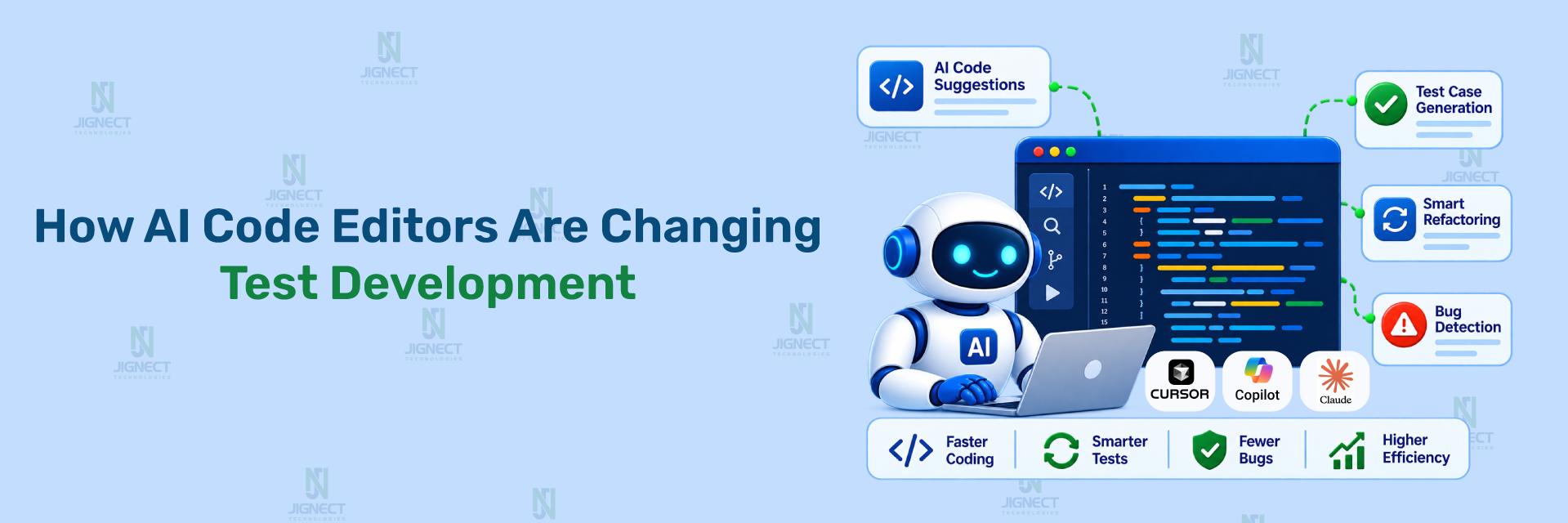
AI code editors are changing this, and not in the way most articles describe it. The conversation around AI in software development tends to land in one of two places: either breathless enthusiasm about “AI writing all your code,” or cautious dismissal about quality and reliability. Neither captures what is actually happening for QA engineers who are integrating these tools into daily work.
What is actually happening is more specific and more useful. AI code editors are absorbing the translation layer between knowing what to test and having the test written. The thinking stays with the engineer. The typing, the structuring, the boilerplate, the boundary case enumeration, the assertion scaffolding: those compress dramatically. And when that compression compounds across a sprint, across a team, across a project, it adds up to something that changes what a QA team can cover in the time they have.
This blog walks through how that works in practice, with real code drawn from the kinds of tests QA teams write every day. The goal is not to convince you that AI code editors are transformative. The goal is to show you specifically where they fit into test development work, where they do not, and how to get the most out of them when you use them.
- The Problem AI Code Editors Actually Solve
- The Tools QA Engineers Are Using
- How the Code Generation Actually Works: A Test Suite Built in Minutes
- Going Deeper: From a Single Spec to a Full Test Architecture
- The Part Nobody Talks About: API Test Generation from Specs
- When Locators Break: AI-Assisted Maintenance
- Test Data Is Where AI Earns Its Credibility
- Legacy Code Migration: The Unglamorous Work AI Can Finally Absorb
- What AI Code Editors Cannot Do
- Getting Good Output: How You Prompt Determines What You Get
- Making This Work Across a Team, Not Just for One Engineer
- How JigNect Integrates AI Code Editors into QA Delivery
- Closing Thoughts
1. The Problem AI Code Editors Actually Solve
Test code has a particular property that makes it especially well-suited to AI assistance: it is highly structured, highly repetitive, and follows patterns that a skilled engineer recognises immediately but still has to write out fully every single time.
A Page Object class for a new module always has the same anatomy: constructor, locators, action methods, assertion methods. A test spec always has the same skeleton: imports, describe blocks, setup, steps, teardown. An API test always covers the same categories: success response, authentication failure, not-found, boundary values. A QA engineer could write these in their sleep. And in a meaningful sense, that is the problem. The work is mechanical enough to be automatic, but not automatic enough to actually be automatic.
This is the gap AI code editors fill. Not the creative, judgment-intensive work of deciding what to test and why. Not the exploratory thinking that finds the failure nobody anticipated. The mechanical translation from intent to implementation. And filling that gap has compounding effects across the test development lifecycle: more coverage gets written per sprint, the coverage that exists gets maintained more efficiently, and QA engineers spend more of their time on the work that actually requires their expertise.
The shift AI code editors enable is not from “QA engineers write tests” to “AI writes tests.” It is from “QA engineers spend most of their time on implementation” to “QA engineers spend most of their time on thinking.” That distinction matters more than it sounds.
Understanding this positions the tools correctly before we look at how they actually work. The question is not “will AI replace QA engineers?” The question is “where in the test development workflow does AI absorb mechanical work, and what does that free engineers to do instead?” With that framing, the practical value becomes much clearer.
2. The Tools QA Engineers Are Using
The AI code editor landscape is not one tool, and the right choice depends significantly on what your team already uses, what languages and frameworks you work in, and how much contextual awareness you need from the AI. Here is where the tools most relevant to QA teams actually stand in 2025 and 2026.
2.1 GitHub Copilot
Copilot is the most widely adopted of these tools, and for most teams it is the natural starting point. Its integration with VS Code and JetBrains IDEs means it slides into existing toolchains without friction. For test development, its core strength is pattern continuation: establish the structure with the first two or three tests in a file, and Copilot picks up the pattern and begins generating the next cases with meaningful awareness of what the test is doing.
The inline completion is useful but often oversold. What tends to produce better results for QA work is Copilot Chat, the conversational interface built into the IDE. Describe a scenario in plain language, ask for the test, and review what comes back. The quality scales directly with the specificity of the prompt. A vague description produces a generic test. A well-structured description with framework conventions, selector strategy, and scenario scope specified produces something a QA engineer can work with immediately.
2.2 Cursor AI
Cursor is built on VS Code but adds a substantially more powerful AI layer. The key difference for QA work is project-level context. Where Copilot works primarily from the files you have open, Cursor can ingest an entire codebase and answer questions about it. For a QA engineer joining a project mid-flight, this changes the onboarding experience significantly: rather than spending days understanding how the application is structured, you can ask Cursor what the authentication module does, how state is managed in the checkout flow, or what the API contracts look like for a specific endpoint, and build your test approach from those answers.
Cursor’s Composer mode, which generates multiple files simultaneously, is particularly well-suited to the kind of work QA engineers do when ramping up coverage on a new module: create the Page Object, the test spec, and the test data file in a single operation rather than three sequential ones. It is also the tool of choice when you want the AI output to match the structural conventions already established in the project, because you can point it at existing files as style references before asking it to generate new ones.
2.3 Claude Code
Claude Code is where the capability profile looks meaningfully different for testing work that involves reasoning rather than pattern completion. It runs in the terminal and operates with an awareness of the entire project through the file system, which means it can build context from your actual test infrastructure, not just the files you have open.
Where Claude Code earns particular credibility in QA work is in tasks that require synthesising across multiple concerns simultaneously: reviewing a test suite for coverage gaps, identifying which test cases are testing the wrong thing, explaining why a specific failure is occurring by tracing through the application logic, or reasoning about what the acceptance criteria imply for boundary and edge case coverage. These are the kinds of tasks that sit between mechanical code generation and genuine engineering judgment, and they are where the more capable models pull ahead noticeably.
For teams running automation testing at scale, Claude Code is also useful for generating and running analysis across large test suites: identifying duplicate coverage, flagging tests that share a dependency and might mask each other’s failures, or summarising the coverage gaps across a module before a sprint begins. The ability to run these analyses against the actual codebase, rather than describing it to the AI and hoping the description is accurate, makes the output significantly more reliable.
2.4 JetBrains AI Assistant
For teams working in IntelliJ IDEA, the JetBrains AI Assistant integrates with the IDE’s native refactoring tools in a way that none of the others match. AI-suggested changes can be immediately validated against the IDE’s own code analysis before being accepted, which is a meaningful quality gate when you are generating test code at speed. It is the natural choice for Selenium with Java teams and for any QA organisation already heavily invested in the JetBrains ecosystem.
| Tool | Best for QA when | Project context | Strongest capability |
|---|---|---|---|
| GitHub Copilot | VS Code / JetBrains, inline completion, getting started | Open files | Pattern continuation, Copilot Chat for spec generation |
| Cursor AI | Multi-file generation, new project onboarding, convention matching | Full codebase | Composer mode, @codebase questions before writing tests |
| Windsurf | Teams wanting Playwright MCP integration and fast multi-file agents | Full codebase via Cascade | Built-in Playwright MCP, real-time codebase context, fast completions |
| Kiro | Regulated industries, AWS teams, spec-driven test planning | Full project | Generates Requirements/Design/Task artifacts before any code is written |
| Cline | Teams wanting open-source, BYOK, on-prem, or full autonomy | Full project via VS Code | Runs test suites autonomously, iterates until passing, approval-gated |
| Google Antigravity | Teams wanting parallel agent execution and structured Artifact reviews | Full project via Gemini agents | Parallel subagents, Artifacts for auditable test generation, browser-native |
| OpenCode | CI/CD-embedded generation, scriptable pipelines, remote/headless servers | Full project via terminal | Terminal-native, 75+ providers, parallelisable, BYOK, MIT licence |
| Claude Code | Coverage analysis, reasoning across the suite, complex debugging | Full project via terminal | Analytical reasoning, synthesis across multiple files |
| JetBrains AI | IntelliJ / Java / Selenium teams, IDE-native refactoring | IDE-integrated | Refactoring with built-in code analysis validation |
2.5 Windsurf
Windsurf, built by Codeium and now part of the OpenAI ecosystem, is a VS Code fork with Cascade as its core agent. What sets it apart for QA engineering specifically is a built-in Playwright MCP integration that allows Cascade to trigger and observe browser test runs directly from the editor, without switching context. A QA engineer can generate a test, ask Cascade to run it, read the failure output, and iterate on the locator or assertion without leaving the IDE. For teams whose automation stack is already Playwright-heavy, this tight loop between writing and executing is a meaningful productivity difference.
Windsurf’s real-time codebase awareness through Cascade also means it tracks which files you have recently edited and weights its completions accordingly. If you just updated a Page Object and switch to the spec file that uses it, Cascade already knows what changed and adjusts its suggestions to match. For QA engineers who frequently move between the Page Object layer and the test layer in a single session, this contextual continuity reduces the friction of switching files.
2.6 Kiro
Kiro is AWS’s agentic IDE, launched in May 2026 as the direct successor to Amazon Q Developer. It is built on VS Code’s open-source foundation and routes AI through Claude via Amazon Bedrock. What makes Kiro meaningfully different from every other tool on this list is its approach to the work before the code: spec-driven development.
When a QA engineer describes a feature or test scenario in Kiro, it does not immediately write code. Instead, it generates a structured specification: a requirements document, a design document, and a task list. Only after that plan is reviewed and approved does it move to implementation. For QA teams working in regulated industries, financial services, healthcare, or any context where traceability between requirements and test coverage is a compliance requirement, this is the most significant feature any AI code editor has shipped. Every test has a documented requirement behind it. Every change has a paper trail. The audit story that is painfully assembled manually in most QA programmes comes out of Kiro’s workflow by default.
For teams already invested in AWS infrastructure, Kiro’s Bedrock integration also means consolidated billing, IAM and SSO authentication, and usage controls that fit naturally into existing governance structures.
2.7 Cline
Cline is the open-source option that has earned a position on this list through adoption rather than marketing: 5 million VS Code installs and 58,000 GitHub stars as of mid-2026. It runs as a standard VS Code extension rather than a fork, which means existing settings, themes, keybindings, and other extensions stay intact. Critically, it uses a bring-your-own-key model: connect it to Anthropic, OpenAI, Google, DeepSeek, or a local Ollama instance, and pay only for model inference. There is no subscription to Cline itself.
For QA engineering work, Cline’s most relevant capability is its test execution loop. It can run your test suite autonomously, read the failure output from stderr, adjust the code, and re-run until the tests pass, all with an approval gate before each action that ensures a QA engineer reviews what Cline is about to do before it does it. This approval-before-execution model makes it well-suited to test maintenance work where the consequences of an incorrect change are visible before they hit the codebase.
For teams with data residency requirements or security constraints that prevent code from leaving the local environment, Cline’s Ollama integration provides a fully on-premise AI code editor option, without giving up the agentic test-run-iterate capability that makes it useful.
2.8 Google Antigravity
Google Antigravity launched in public preview in November 2025 alongside Gemini 3, and its 2.0 release in May 2026 shifted it from an AI-powered IDE into a full agent orchestration platform. It is a VS Code fork built by the core team behind Windsurf, which Google acquired in a $2.4 billion talent-and-licensing deal. The platform runs on Gemini 3.5 Flash by default but supports Claude Sonnet and OpenAI models alongside it.
For QA engineering work, the most relevant aspect of Antigravity is its Artifacts model. When an agent executes a task, rather than streaming raw tool calls that are tedious to audit, it produces structured deliverables: task lists, implementation plans, screenshots, and browser recordings. A QA engineer can review what the agent did and why at a glance, leave inline feedback directly on the Artifact, and the agent incorporates that feedback without stopping its execution flow. For test generation and review cycles, this is meaningfully better than watching a stream of file edits scroll past.
Antigravity 2.0 also introduced parallel agent execution and dynamic subagents for task parallelisation. For a QA team that wants to simultaneously generate a Page Object, a test spec, and a test data file for a new module, Antigravity can delegate those tasks to separate subagents running in parallel and merge the results, rather than producing them sequentially. The free-during-preview pricing, combined with the Antigravity CLI reaching general availability in June 2026 as the replacement for Gemini CLI, makes it an accessible option for teams already in the Google ecosystem.
2.9 OpenCode
OpenCode is a terminal-native, open-source AI coding agent maintained by the SST/Anomaly team, and by mid-2026 it had crossed 160,000 GitHub stars with over 7.5 million monthly active developers, making it the most widely adopted open-source coding agent in the ecosystem. The MIT licence, combined with a bring-your-own-key model across 75 or more AI providers, means no subscription, no vendor lock-in, and full control over which model processes your code at any point.
For QA engineering specifically, OpenCode’s terminal-native architecture has a property that IDE-based tools do not: it is scriptable and parallelisable. A QA engineer can run OpenCode inside a CI pipeline step, trigger test generation from a shell script, or run multiple OpenCode instances in parallel across different test modules. This is not something you can do with Copilot or Cursor. For teams that want AI-assisted test generation embedded in their automation infrastructure rather than limited to an IDE session, OpenCode is the most practical tool on this list for that use case.
OpenCode stores conversations in SQLite locally, supports MCP integrations, and can run against local Ollama models for fully on-premise operation. Its built-in planning and execution agents handle the same generate-run-iterate loop that Cline does inside VS Code, but from the terminal, which means it works on remote servers, headless CI runners, and any environment where opening an IDE is not practical.
The pattern across all nine tools is the same: they are most valuable when the problem is well-defined and the conventions are established. Give the AI a clear picture of what you are working in and what you need, and the output is something you can review and use. Leave it under-specified, and you get plausible-looking code that requires significant rework. That relationship between prompt quality and output quality is the single most consistent finding across every tool on this list, and it shapes everything that follows.
3. How the Code Generation Actually Works: A Test Suite Built in Minutes
The clearest way to understand what AI code editors do in test development is to watch it happen, start to finish, on a realistic scenario. Not a synthetic example constructed to make the tool look good, but the kind of feature that lands in sprint planning on a regular basis.
The feature: password reset via email. The acceptance criteria include the standard happy path, the security consideration around account enumeration (showing the same success message regardless of whether the email is registered), the expired link error state, and post-reset redirect behaviour. A QA engineer reading these acceptance criteria already knows roughly what the test structure looks like. The question is how long it takes to get from that mental model to working test code.
The prompt fed into Cursor’s Composer is structured but not elaborate. It states the framework (Playwright TypeScript, Page Object Model, data-testid selectors), identifies what to generate (a Page Object class and a test spec), specifies the scenario types to cover, and pastes the acceptance criteria. That is the entire input. The output is the following:
pages/PasswordResetPage.ts

import { Page, Locator, expect } from '@playwright/test';

export class PasswordResetPage {
    private readonly page: Page;
    private readonly emailInput: Locator;
    private readonly submitButton: Locator;
    private readonly successMessage: Locator;
    private readonly expiredLinkError: Locator;
    private readonly resetConfirmation: Locator;

    constructor(page: Page) {
        this.page = page;
        this.emailInput = page.getByTestId('email-input');
        this.submitButton = page.getByTestId('submit-button');
        this.successMessage = page.getByTestId('success-message');
        this.expiredLinkError = page.getByTestId('expired-link-error');
        this.resetConfirmation = page.getByTestId('reset-confirmation');
    }

    async navigateTo() {
        await this.page.goto('/forgot-password');
    }

    async requestPasswordReset(email: string) {
        await this.emailInput.fill(email);
        await this.submitButton.click();
    }

    async assertSuccessMessageVisible() {
        await expect(this.successMessage).toBeVisible();
        await expect(this.successMessage).toContainText(
            'If this email is registered, you will receive a reset link.'
        );
    }

    async assertExpiredLinkError() {
        await expect(this.expiredLinkError).toBeVisible();
        await expect(this.expiredLinkError).toContainText(
            'This reset link has expired.'
        );
    }

    async assertRedirectedToLoginWithConfirmation() {
        await expect(this.page).toHaveURL(/\/login/);
        await expect(this.resetConfirmation).toBeVisible();
    }
}
tests/passwordReset.spec.ts
import { test, expect } from '@playwright/test';
import { PasswordResetPage } from '../pages/PasswordResetPage';
test.describe('Password Reset: Happy Path', () => {
test('registered email shows generic success message', async ({ page }) => {
const resetPage = new PasswordResetPage(page);
await test.step('Navigate to Forgot Password page', async () => {
await resetPage.navigateTo();
});
await test.step('Submit registered email', async () => {
await resetPage.requestPasswordReset('registered@example.com');
});
await test.step('Verify success message appears', async () => {
await resetPage.assertSuccessMessageVisible();
});
});
});
test.describe('Password Reset: Security', () => {
test('unregistered email shows identical success message to prevent enumeration',
async ({ page }) => {
const resetPage = new PasswordResetPage(page);
await resetPage.navigateTo();
await resetPage.requestPasswordReset('notregistered@example.com');
await resetPage.assertSuccessMessageVisible();
// Message text must be identical to the registered-email case
}
);
test('expired reset link shows correct error message', async ({ page }) => {
await page.goto('/reset-password?token=expired-token-24h');
const resetPage = new PasswordResetPage(page);
await resetPage.assertExpiredLinkError();
});
});
test.describe('Password Reset: Edge Cases', () => {
test('empty email submission is blocked by form validation', async ({ page }) => {
const resetPage = new PasswordResetPage(page);
await resetPage.navigateTo();
await resetPage.requestPasswordReset('');
await expect(page).toHaveURL(/\/forgot-password/);
});
test('successful reset redirects to login with confirmation', async ({ page }) => {
await page.goto('/reset-password?token=valid-test-token');
const resetPage = new PasswordResetPage(page);
await resetPage.assertRedirectedToLoginWithConfirmation();
});
});The time to produce this output: approximately forty seconds. Not a rough draft that needs significant rework, but a structured, idiomatic Playwright TypeScript test suite that follows the Page Object pattern, uses test.step() for readability, covers all six acceptance criteria, and adds an edge case the criteria did not mention (the empty email submission).
For teams that want this same flow earlier in the cycle, before the AI code editor even opens, Test Suite Studio from AIdriventesting.ai handles the step before this one: taking raw requirements and structuring them into testable scenarios, conditions, and suite-ready coverage maps. By the time the QA engineer opens the IDE, the scenario map already exists. The AI code editor then generates the implementation code from it. The two tools sit at consecutive points in the same workflow.
The QA engineer’s job from here is not to rewrite any of this. It is to validate the data-testid attributes against the actual DOM, confirm the expected message text matches what the application actually displays, wire up the environment configuration, and add any scenario that the AI could not derive from the acceptance criteria alone, typically the domain-specific edge cases that live in a QA engineer’s head from experience with the system. That validation and extension work takes around twenty to thirty minutes. Writing the same suite from scratch takes two to three hours.
The code is not magic. The AI did not make any creative decisions. It applied known patterns to a well-specified problem. But that is exactly the point. Pattern application at this level of speed and correctness is precisely the mechanical work that was consuming QA engineering time before these tools existed.
4. Going Deeper: From a Single Spec to a Full Test Architecture
The password reset example covers one feature. The more significant productivity gain comes when the same approach is applied to a new module being brought under automation coverage from scratch, where the work involves not just the spec but the Page Object, the test data, and the integration with the existing framework architecture simultaneously.
This is where Cursor’s Composer mode shows its real value. Point it at an existing Page Object in your project as a style reference, describe the new module’s HTML structure and interaction patterns, specify what actions and assertion methods are needed, and ask it to generate the complete Page Object. The output matches the naming conventions, locator strategy, and structural patterns of the file you referenced. It is not a generic class built from first principles. It is a class that looks like it was written by someone who had been on the project for months.
The same principle applies to the test spec. Reference an existing spec that represents the style you want, describe the acceptance criteria for the new module, and the generated spec follows the same describe block structure, the same test naming patterns, the same setup and teardown approach. Engineers reviewing the new files during code review see consistency, not a jarring style shift that signals “this was AI-generated.”
That style continuity is not a cosmetic concern. It is the difference between AI-generated code that integrates cleanly into the codebase and AI-generated code that creates maintenance debt. Getting it right requires providing good context. Skipping that step is the most common reason AI-generated test code requires significant rework.
What JigNect observed early in AI code editor adoption
The engineers who got the best output were not the ones who used the most sophisticated prompts. They were the ones who gave the AI the most accurate picture of what already existed in the project before asking it to generate something new. The lesson became a practice: always provide a reference file before generating a new one. Always describe the project’s conventions before asking the AI to follow them.
For teams using Kiro, this convention problem is partially solved by design. Because Kiro generates a requirements document and design artifact before any code is written, the conventions and architecture decisions are encoded in the spec that the implementation follows. QA engineers on Kiro projects can point to that spec as the source of truth when generating tests, rather than having to reconstruct it from open files. The spec becomes the context the AI code editor was otherwise missing.
Antigravity approaches the same challenge through Artifacts. When a QA engineer asks Antigravity to generate coverage for a new module, the agent produces a task list and implementation plan as a reviewable Artifact before touching any test files. The engineer reviews it, leaves inline feedback if something looks wrong, and the agent adjusts without stopping. Compared to watching Cursor’s Composer stream file edits that are difficult to audit mid-flight, the Artifact model gives QA engineers a natural review checkpoint at the planning stage, not just at the output stage.
5. The Part Nobody Talks About: API Test Generation from Specs
There is a category of test development work that gets relatively little attention in the AI conversation but where the productivity gain is arguably the largest: generating API tests from OpenAPI specifications.
An OpenAPI spec contains everything a QA engineer needs to write a comprehensive API test suite. Every endpoint, every parameter, every request and response schema, every status code, every authentication requirement. A skilled QA engineer can read an OpenAPI spec and know immediately what the test matrix looks like: success cases, authentication failures, not-found scenarios, boundary values for every parameter, schema validation for every response. The thinking is quick. Writing it all out in APIRequestContext calls takes a long time.
AI code editors close that gap almost entirely. Feed the relevant portion of the spec into the prompt along with the framework conventions, ask for coverage across the standard scenario categories, and the output is a parametrised test suite that covers the full matrix. Here is what that looks like for a standard resource endpoint:
tests/api/users.api.spec.ts

import { test, expect } from '@playwright/test';

const BASE_URL = process.env.API_BASE_URL ?? 'https://api.staging.example.com';
const VALID_TOKEN = process.env.API_TOKEN ?? '';

function authHeaders(token: string = VALID_TOKEN) {
    return token ? { Authorization: `Bearer ${token}` } : {};
}

test.describe('GET /users/{id}: Success', () => {

    test('returns 200 with valid schema for existing user', async ({ request }) => {
        const response = await request.get(`${BASE_URL}/users/1`, {
            headers: authHeaders()
        });
        expect(response.status()).toBe(200);
        const body = await response.json();
        expect(body).toMatchObject({
            id: expect.any(Number),
            email: expect.stringContaining('@'),
            name: expect.any(String),
        });
    });
});

test.describe('GET /users/{id}: Authentication', () => {

    test('returns 401 when no token is provided', async ({ request }) => {
        const response = await request.get(`${BASE_URL}/users/1`);
        expect(response.status()).toBe(401);
    });

    test('returns 401 for expired token', async ({ request }) => {
        const response = await request.get(`${BASE_URL}/users/1`, {
            headers: authHeaders('expired.jwt.token')
        });
        expect(response.status()).toBe(401);
    });
});

test.describe('GET /users/{id}: Boundary Values', () => {

    const invalidIds = [
        { label: 'zero', id: 0 },
        { label: 'negative', id: -1 },
        { label: 'string', id: 'abc' },
    ];

    for (const { label, id } of invalidIds) {
        test(`handles ${label} id (${id}) gracefully`, async ({ request }) => {
            const response = await request.get(`${BASE_URL}/users/${id}`, {
                headers: authHeaders()
            });
            expect([400, 404, 422]).toContain(response.status());
        });
    }
});
Notice the parametrised boundary value loop. A QA engineer writing this manually would often end up with three separate test functions that are structurally identical except for the input. The AI generates the loop. The QA engineer confirms that the expected status code range [400, 404, 422] matches what the actual API returns for each input, updates the base URL and token from the project’s environment configuration, and adds any business-specific edge cases the spec does not cover. That is the review work. The generation work is done.
This approach to API test coverage connects to the broader automation testing methodology JigNect has been building across engagements: structured coverage of every scenario category from the contract specification, before a single line of implementation exists. For teams that want a dedicated environment for designing and executing API test cases without switching between IDE and browser, API Testing Studio from AIdriventesting.ai handles both: test case design from spec and live execution in one place, without framework setup.
6. When Locators Break: AI-Assisted Maintenance
If there is one maintenance task that consumes QA engineering time in proportion to its actual importance, it is fixing broken locators. A developer renames a class, restructures a form, or moves an element to a different container. Ten tests fail in CI. A QA engineer spends an hour reading error messages, inspecting the DOM, updating selectors, and re-running to confirm the fix. Multiply that by a suite of any significant size and the maintenance overhead becomes a material cost every sprint.
AI code editors address this in two directions. Proactively, they suggest more resilient locator strategies when generating new tests. Reactively, they dramatically compress the time between “locator broken” and “locator fixed.”
The proactive side is visible in every code example in this blog: the AI defaults to getByTestId(), getByRole(), and getByLabel() when asked to write Playwright tests with modern locator conventions. These selectors survive the kinds of UI refactoring that break CSS class-based selectors constantly. When an AI editor generates page.getByRole('button', { name: 'Checkout' }) instead of page.locator('.btn-primary.checkout-btn'), it is making a choice that will save maintenance time six months from now, without the QA engineer having to explicitly request it.
The reactive side is more immediately visible. When a locator breaks in CI, paste the error, the old selector, and the new HTML into Copilot Chat or Claude Code. The AI reads the structural change, identifies why the original selector no longer works, and suggests a corrected locator with an explanation of what changed. What used to require DOM inspection, manual testing of selector candidates, and back-and-forth with a developer now takes a few minutes. Across a suite with regular UI updates, that compression adds up to hours of recovered QA capacity per sprint.
The pattern that emerges when teams adopt this consistently: they stop treating locator maintenance as a significant time cost and start treating it as a quick correction step. The cognitive overhead of “another broken selector” drops. Engineers spend less time on browser DevTools and more time on the test logic that actually catches bugs.
Two tools take this further than the others. Windsurf’s built-in Playwright MCP integration means the AI can see the actual test execution output and observe which locators are failing without you pasting the error manually: it reads the runner output directly and proposes fixes in context. Cline takes the most autonomous approach: it runs the failing test, reads the stderr output, proposes an updated locator, and asks for approval before making the change. If the first fix does not work, it iterates again. The human stays in the loop through the approval gate at each step, but the back-and-forth between failure and correction happens inside the tool rather than across browser DevTools, the terminal, and the editor.
7. Test Data Is Where AI Earns Its Credibility
Test data generation is where AI code editors consistently impress QA engineers who are sceptical of the broader hype. Not because it is the most dramatic capability, but because it solves a problem that is genuinely tedious and where manual approaches consistently fall short in the same predictable ways.
When a QA engineer creates test data manually under time pressure, the happy path is always well-covered, one or two obvious error cases get included, and the edges get cut. The empty string gets tested. The SQL injection attempt does not. The locale-specific date format for a new market gets forgotten. The password that is exactly one character over the maximum length never gets written. These are the gaps that surface in production as inexplicable failures for specific user types, and they are structurally the same gaps that appear repeatedly across manual test data creation.
AI-generated test data covers the full matrix because it does not get tired or skip things to save time. Here is what a structured test data factory looks like when the AI generates it from a specification:
export interface UserTestData {
    name: string;
    email: string;
    password: string;
    description?: string;
}

export const validUsers: UserTestData[] = [
    { name: 'Alice Johnson', email: 'alice@example.com', password: 'Secure@123', description: 'Standard valid user' },
    { name: 'Jean-Pierre Dumont', email: 'jp.dumont@example.fr', password: 'Motdepasse!9', description: 'International name with hyphen' },
    { name: 'A', email: 'a@example.com', password: 'Secure@123', description: 'Minimum name length (1 char)' },
    { name: 'Test User', email: 'user+qa-tag@example.com', password: 'QA$ecure99', description: 'Plus-addressed email' },
];

export const invalidEmails: UserTestData[] = [
    { name: 'Test', email: 'notanemail', password: 'Valid@123', description: 'Missing @ symbol' },
    { name: 'Test', email: 'user@', password: 'Valid@123', description: 'Missing domain' },
    { name: 'Test', email: 'user..name@domain.com', password: 'Valid@123', description: 'Consecutive dots' },
    { name: 'Test', email: '', password: 'Valid@123', description: 'Empty email field' },
    { name: 'Test', email: "' OR '1'='1'; --", password: 'Valid@123', description: 'SQL injection attempt' },
    { name: 'Test', email: '<script>alert(1)</script>', password: 'Valid@123', description: 'XSS attempt in email field' },
];

export const invalidPasswords: UserTestData[] = [
    { name: 'Test', email: 'valid@example.com', password: 'Ab1!', description: 'Too short' },
    { name: 'Test', email: 'valid@example.com', password: 'secure@123', description: 'No uppercase letter' },
    { name: 'Test', email: 'valid@example.com', password: 'SecurePass1', description: 'No special character' },
    { name: 'Test', email: 'valid@example.com', password: 'A1@' + 'x'.repeat(126), description: 'Exceeds 128 char maximum' },
];

export const localeVariants: UserTestData[] = [
    { name: 'Elodie Beaumont', email: 'elodie@example.fr', password: 'Motdepasse!9', description: 'French accented characters' },
    { name: '\u0645\u062D\u0645\u062F', email: 'user@example.sa', password: 'Secure@Pass1', description: 'Arabic Unicode name' },
];
The SQL injection and XSS entries are what distinguish AI-generated test data from manually-written test data under sprint pressure. A QA engineer who is tired and has three other tasks open will write the happy path and the empty field case and move on. The AI includes the attack vectors every time, because it knows what a registration form security test matrix is supposed to look like.
The QA engineer’s job after reviewing this output: confirm the password rules match the actual validation logic in the application, adjust the maximum length value if it differs from 128, and add any product-specific edge cases that the AI could not know about from the field specifications alone. Ten minutes of review on top of near-instant generation.
For teams that need this capability without writing code at all, Test Data Genius from AIdriventesting.ai generates realistic names, addresses, payment details, and domain-specific values directly in the browser as a Chrome extension. Profiles include valid data, boundary values, special characters, SQL injection, and XSS variants, the same categories the AI code editor generated programmatically above, but surfaced in the browser for exploratory testing and manual QA workflows without any code required.
8. Legacy Code Migration: The Unglamorous Work AI Can Finally Absorb
There is a category of QA work that every team knows needs to happen and almost no team has the bandwidth to do: migrating legacy test code to modern frameworks and patterns. Selenium suites written years ago with Thread.sleep() calls scattered throughout. Tests with implicit waits set globally and then forgotten. Page locators built on CSS class selectors that break every time a developer updates the stylesheet. Test files that have grown to two thousand lines without clear structure.
This code works, technically. It catches bugs. But it is slow, it is brittle, and maintaining it consumes more QA engineering time every quarter. The refactoring never gets done because the tests still pass, the sprint backlog is always full, and rewriting working code is hard to justify in planning.
AI code editors change this calculation. Not by making the decision easy, but by making the execution fast. Here is the before and after on a login test that represents the kind of legacy Selenium code many QA teams are still running:
LoginTest.java (before)

@Test
public void testLoginWithValidCredentials() throws InterruptedException {
    driver.get("https://app.example.com/login");
    Thread.sleep(2000);  // wait for page load

    driver.findElement(By.id("username")).sendKeys("testuser@example.com");
    driver.findElement(By.id("password")).sendKeys("TestPass123!");
    Thread.sleep(500);   // wait before click
    driver.findElement(By.cssSelector(".login-btn")).click();
    Thread.sleep(3000);  // wait for redirect

    Assert.assertTrue(driver.getCurrentUrl().contains("/dashboard"));
    Assert.assertTrue(driver.findElement(
        By.cssSelector(".welcome-message")).isDisplayed());
}
tests/login.spec.ts (after: AI-generated Playwright)
import { test, expect } from '@playwright/test';
import { LoginPage } from '../pages/LoginPage';
test.describe('Login: Valid Credentials', () => {
test('successful login redirects to dashboard with welcome message',
async ({ page }) => {
const loginPage = new LoginPage(page);
await test.step('Navigate to login page', async () => {
await loginPage.navigateTo();
// Playwright auto-waits for page load: no sleep needed
});
await test.step('Enter credentials and submit', async () => {
await loginPage.login('testuser@example.com', 'TestPass123!');
});
await test.step('Verify redirect and welcome state', async () => {
// Auto-waits for URL: eliminates the 3s sleep
await expect(page).toHaveURL(/\/dashboard/);
// Auto-waits for element: no race condition
await expect(page.getByTestId('welcome-message')).toBeVisible();
});
}
);
});Three Thread.sleep() calls totalling 5.5 seconds of guaranteed wait time, replaced with Playwright’s built-in auto-waiting. The test no longer passes because it waited long enough. It passes because the conditions it is asserting are actually met. The difference in reliability is immediate and measurable: the Playwright version does not produce intermittent failures on slow CI runners, and it catches regressions that the sleep-based version masks by waiting past the failure window.
For a 200-test Selenium suite with an average of three sleeps per test at an average of 1.5 seconds each, removing those sleeps saves around 15 minutes of pure wait time per suite run. On a pipeline running twice daily, that is five hours of execution time recovered per week, without touching the test coverage. The AI-assisted migration makes this achievable inside a sprint rather than requiring a dedicated migration quarter.
9. What AI Code Editors Cannot Do
Every section so far has shown AI code editors working. That picture is incomplete without an equally clear account of where they do not work, because the failure modes matter as much as the successes.
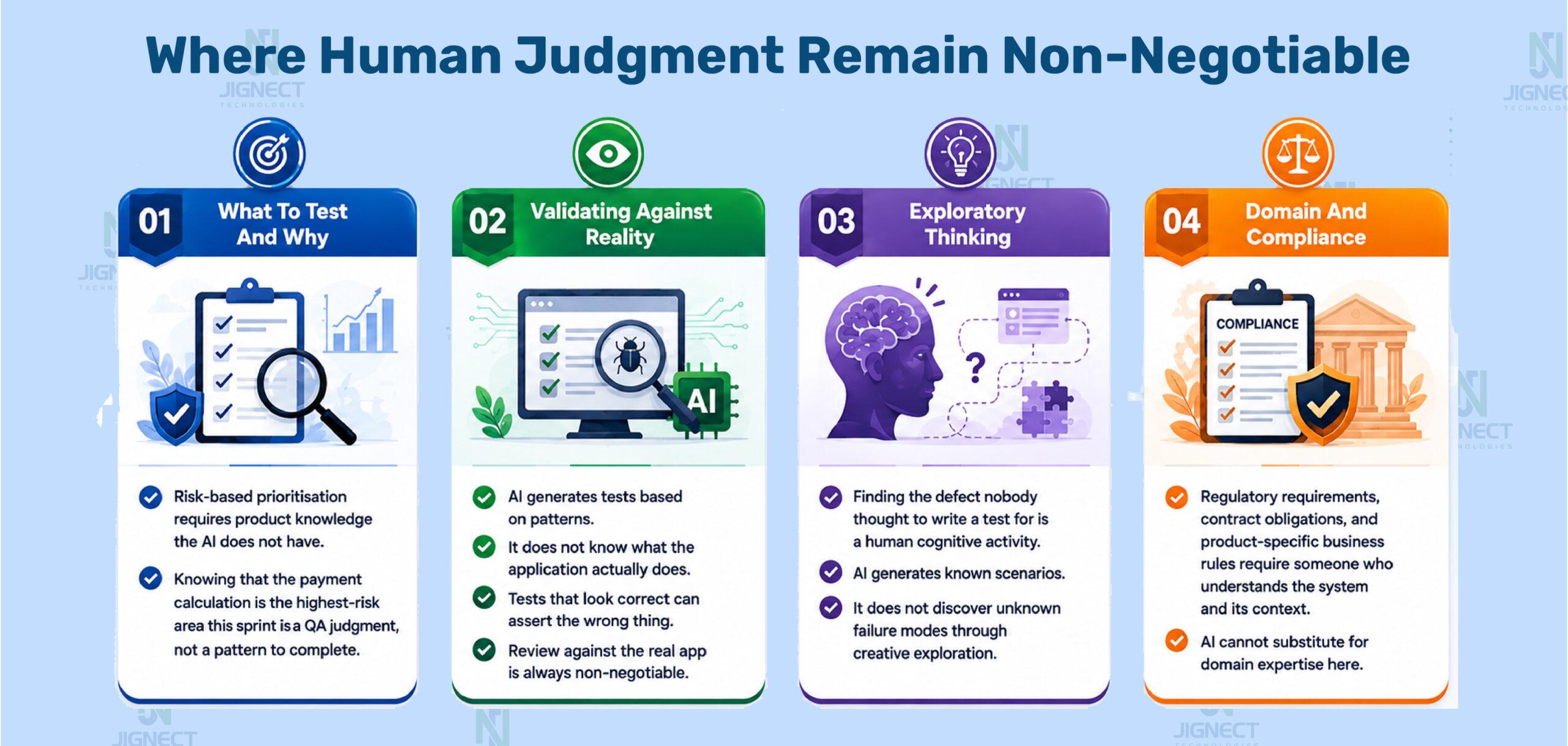
The most dangerous failure mode is the test that looks right and tests the wrong thing.
An AI might generate an assertion that checks whether a success message is visible without checking whether its content is correct. It might write a negative test that always passes because the condition it checks is never false given the test setup. These are the outputs that get committed in code review because they look structurally reasonable, and they only fail when the thing they are supposed to catch actually breaks in production and the test does not catch it.
This is why the review step in AI-assisted test development is not a rubber stamp. It is the point where a QA engineer reads each assertion and asks: does this test actually fail when the feature is broken? Answering that question requires knowing what the feature does. The AI does not know what the feature does. You do.
The other limitation worth naming directly is context about the system’s behaviour. An AI editor working from acceptance criteria and HTML structure knows the contract. It does not know that this particular module has a known defect pattern around promotional code stacking, that the third-party payment gateway behaves unexpectedly when a card is declined mid-authorisation, or that the mobile layout breaks below 375px in a way that the desktop tests do not catch. That knowledge lives with the team, and it needs to be added to the AI-generated test suite during review.
When defects are found during that review or during execution, the workflow around capturing and reporting them matters. Bug Genius captures bugs directly from the browser with console logs, network traces, screenshots, and environment metadata in a single click, giving developers everything they need to reproduce without a follow-up conversation. On the reporting side, Reporting Genius takes CI pipeline output or log files and generates structured failure breakdowns with six shareable report formats, removing the manual overhead of translating a failed pipeline into a readable QA report. Both sit at the boundary between what AI code editors generate and what humans need to act on.
Understanding both sides of this clearly, what AI code editors do well and what they genuinely cannot do, is what allows a QA team to use them effectively rather than either over-trusting the output or dismissing the tools as unreliable.
10. Getting Good Output: How You Prompt Determines What You Get
The single most consistent observation across every team that has integrated AI code editors into test development is this: the output quality tracks the prompt quality almost perfectly. Generic prompts produce generic tests. Structured prompts produce tests that a QA engineer can work with immediately.
This is not a minor tuning concern. It is the central variable. The difference between a prompt that produces a test suite requiring significant rework and one that produces a suite requiring only a brief validation review is almost entirely in how the prompt was constructed, not in which tool was used.
The prompt elements that consistently matter most for test generation:
Framework and conventions stated explicitly. Do not assume the AI will detect your setup from context alone. “Playwright TypeScript, Page Object Model, data-testid selectors, test.step() for readability” removes ambiguity before the generation starts.
Acceptance criteria pasted, not summarised. “Write tests for login” produces something generic. Pasting the actual acceptance criteria produces tests aligned to the actual requirements.
Scenario types named. Ask explicitly for positive paths, negative paths, boundary values, security inputs, and integration scenarios. If you do not name a category, the AI defaults to the happy path and one or two obvious negatives.
A reference file for style matching. In Cursor or Copilot Chat, pasting an existing test from the project before asking for a new one tells the AI what conventions you are following. The generated output matches the style of the reference rather than inventing its own.
This practice of structuring prompts carefully, and keeping the best-performing prompt structures for reuse, is what turns individual productivity gains into consistent team-level output. The engineers at JigNect who see the most reliable results from AI code editors are the ones who treat prompt construction as a skill to develop, not as an afterthought before clicking generate. This is exactly the discipline behind the prompt engineering practice we have built across our QA delivery work.
For teams that are not yet writing automation code but want to get test scenarios running immediately, Test Automation Genius offers a lower-friction entry point: upload test scenarios as a Markdown file, and the extension runs and tracks them step by step with AI fixing malformed files automatically, no framework setup required. For teams taking a step further toward automation without writing scripts from scratch, One-Click Automation converts manual test steps into automation scripts in a single operation. These tools sit at different points on the automation maturity curve: Test Automation Genius for teams running scenario-based checks today, One-Click Automation for teams making the transition from manual to scripted coverage, and AI code editors like Copilot, Cursor, and Claude Code for teams building full automation frameworks at scale.
11. Making This Work Across a Team, Not Just for One Engineer
Individual engineers adopting AI code editors see individual productivity gains. A team that systematises the practice sees compound gains. The gap between those two outcomes is wider than it sounds, and the path from one to the other requires a few specific investments.
The most important is a shared prompt library. When one engineer discovers a prompt structure that reliably produces good Playwright test output for the team’s conventions, that prompt should be in a shared repository, versioned, and accessible to everyone on the team. Without that, each engineer rediscovers effective prompt structures independently, some never do, and the team’s collective output from AI tools is significantly below its potential.
This is the specific problem Orkestraa is built to solve at the organisational level. Where a shared folder in version control is a starting point, Orkestraa provides the infrastructure that makes prompt sharing sustainable at scale: a Prompt Studio for authoring, enhancing, and sharing prompts across teams; collaborative workspaces per project so QA teams working on different products share context without collision; centralised AI token governance so teams are not managing API costs individually; and multi-LLM access across OpenAI, Claude, and Gemini from a single interface. For a QA team whose AI code editor workflow depends on quality prompts, Orkestraa is the management layer that turns the prompt library from a static file into a living, governed team asset.
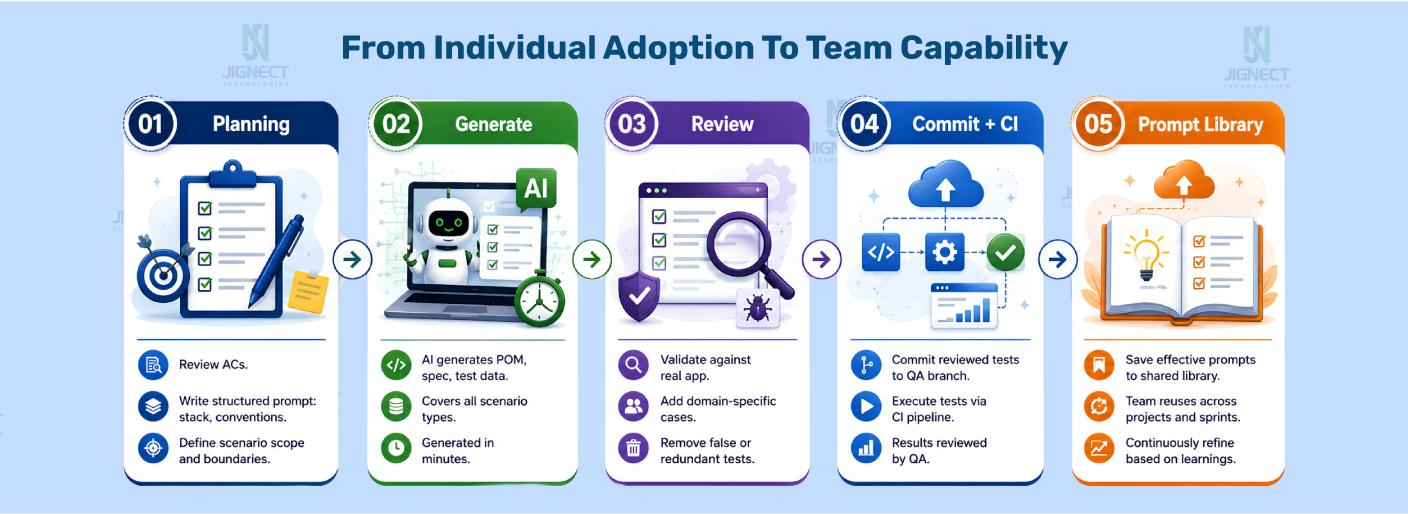
The second investment is a clear review standard for AI-generated test code. This does not need to be elaborate. It needs to answer three questions: Does each assertion check the right condition? Are the locators stable enough to survive routine UI updates? Is any data hardcoded that should be parameterised? A QA engineer who reviews AI-generated tests against those three questions catches the most common failure modes before the code reaches the main branch.
The third is tracking what requires rework. Over several sprints, patterns will emerge: certain scenario types consistently need more human correction than others, certain prompt structures produce output that barely needs review. That information is valuable feedback for refining the team’s prompt library and for understanding which parts of the test development workflow benefit most from AI assistance.
The prompt library is the mechanism that makes this sustainable, and Orkestraa is what makes it manageable as the team and the library grow. For teams that want to go further and embed AI-assisted test generation into the CI/CD pipeline itself rather than limiting it to IDE sessions, OpenCode’s terminal-native, scriptable architecture is what makes that possible: a shell script can invoke OpenCode against a new requirements file, generate the test scaffold, and commit it to the QA branch automatically, without an engineer having to open an IDE at all.
12. How JigNect Integrates AI Code Editors into QA Delivery
Across JigNect’s delivery engagements, AI code editors have moved from being something individual engineers experiment with to a standard part of how automation teams work. The shift did not happen because the tools became significantly better overnight. It happened because the team developed consistent practices around how to use them, built a prompt library that captured what worked, and established clear review standards that kept the output quality high.
The practical model looks like this: when a feature lands in sprint planning, the QA engineer builds the test prompt during the planning review itself, before a line of implementation code has been written. The prompt encodes the acceptance criteria, the framework conventions, and the scenario types required. Generation happens in minutes. The review and extension work happens alongside development, in parallel rather than at the end. By the time the feature is ready for QA, the test suite structure already exists. The engineer’s job shifts from starting from scratch to validating and completing.
The prompts that produce the best output are saved. The ones that require significant rework are studied: what was missing in the prompt that led to output that did not fit? That analysis feeds the next iteration of the library. Over successive sprints, the library becomes a significant institutional asset that new engineers onboard from, that senior engineers contribute to, and that the whole team benefits from.
Our automation testing practice covers Playwright TypeScript, Cypress, Selenium with Java, and Selenium with C#. AI code editor integration applies across all of them, with framework-specific prompt templates for each. The same approach extends to performance testing script generation and to the accessibility testing documentation that WCAG compliance requires. For accessibility specifically, Accessibility Genius runs one-click WCAG compliance scans directly in the browser, returning severity-ranked findings, contrast failures, and keyboard trap detection with developer-ready fix guidance, without leaving the page under test. It sits alongside the AI code editor workflow rather than inside it: the code editor generates the test scripts, Accessibility Genius handles the live compliance verification during execution. The tools are different but the discipline is the same: well-structured prompts, rigorous review, shared library.
If your team is evaluating how to integrate AI code editors into your test development workflow, or looking to build the prompt library and governance structure that makes the practice systematic, get in touch. The right starting point depends on your framework, your current test maturity, and where in the development cycle the biggest time costs are concentrated. We can walk through that with you.
Ready to make AI-assisted test development systematic for your team?
JigNect can help you build the workflow, the prompt library, and the review practice that turns AI code editors from individual experiments into a team-level engineering capability.
13. Closing Thoughts
The shift AI code editors are enabling in test development is not the dramatic one that gets written about most often. It is quieter and more specific than “AI will write all your tests.” What is actually happening is that the translation layer between knowing what to test and having the code written is compressing significantly, and that compression is changing what a QA team can achieve in the time they have.
A QA engineer who is not spending two hours writing a test suite from scratch is spending that time on the work that actually requires their expertise: understanding the system, identifying the risks that matter most, designing the test strategy, doing the exploratory testing that surfaces failure modes nobody anticipated. That rebalancing, from implementation time toward thinking time, is the real value. The code generation is just the mechanism.
The teams getting the most out of these tools are not the ones using them most aggressively. They are the ones using them most deliberately: with structured prompts, rigorous review, shared libraries that accumulate team knowledge over time, and a clear understanding of where human judgment is not replaceable. That discipline is learnable, and it starts with one workflow, one prompt that works well, one test suite that comes back better than expected.
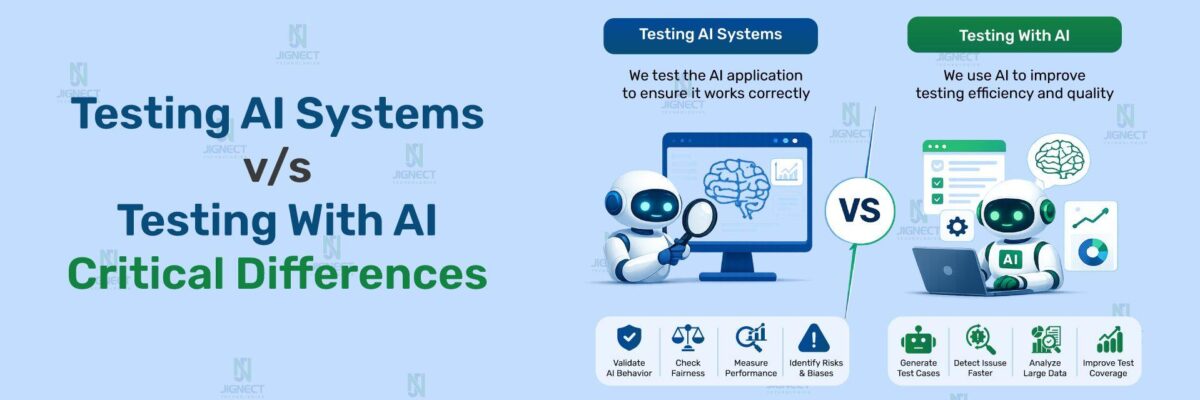
The broader context for these tools sits in the shift from automation-first to AI-first quality engineering that we have been building toward across our practice. The blog on why automation alone is no longer enough covers the strategic dimension. The blog on prompt engineering for QA covers the foundational skill that makes everything in this blog work better. And the blog on testing AI systems versus testing with AI covers the distinction that matters when the product itself uses AI, not just the tools you use to test it.
Witness how our meticulous approach and cutting-edge solutions have elevated quality and performance to new heights. To know more, refer to Tools and Technologies and QA Services.
If you would like to learn more about the services we provide, be sure to reach out.
Happy Testing 🙂