// Domain-Based Software Testing: Challenges in FinTech, Healthcare, and eCommerce
Not all software is created equal, and neither is its testing. Quality Assurance (QA) in software development isn’t a one-size-fits-all process. While the fundamental goal is the same - ensuring that the software works as intended and the approach can vary significantly depending on the industry. Nowhere is this more evident than in healthcare, finance, and e-commerce applications. Each of these sectors has unique priorities, challenges, and user expectations that directly influence how QA is approached. If you’re partnering with top app development companies in Kuwait, understanding these industry-specific differences can help you achieve more reliable results.
At Design Master, we help businesses across diverse industries develop reliable, secure, and high-performance apps by tailoring QA strategies to fit the specific demands of their field. Here’s a closer look at how QA differs across these three critical domains.
Introduction
Today software is built for different industries, and each industry works in its own way. Every sector has its rules and risks, and people who use the software have different expectations. Because of this, we cannot test the software in the way we do everywhere. A way of testing that works well for one industry might not work at all for another industry. That is why it is so important to test the software in a way that's specific to each industry.
For example, financial applications need to be very secure and follow all the rules. Healthcare systems need to be extremely accurate because they deal with information and safety. E-commerce platforms, on the other hand, need to be able to handle a lot of traffic, make payments smoothly, and provide a great experience for the people who use them. Each industry has its challenges. When the people who test the software understand these differences, they can create plans for testing, reduce the risks, and make sure the software works well in real-life situations.
Generic Testing vs Domain-Specific Testing
Generic Testing
Generic testing is a way of testing that can be used for any software application no matter what industry it is for. It checks the things like the following:
- Does the feature work as it should?
- Is the interface easy to use?
- Did the new changes break anything that was already working?
- Is the system fast and stable?
These checks make sure the software works correctly from a point of view.
Example:
If you are testing a login page, generic testing would check the following:
- Can people enter their login information correctly?
- Does it show an error when they enter the password?
- Does the "Forgot Password" link work?
These checks are the same for every application, whether it is for banking, healthcare, or shopping.
Domain-Specific Testing
Domain-specific testing goes a step further. It checks the business rules, regulations, risks, and real-life situations of an industry. Here it is very important to understand the industry.
Example:
In a banking application we need to check things like interest calculations, limits on transactions, rules for detecting fraud, and rules we have to follow.
In a healthcare system we need to check things like patient records, how prescriptions are handled, and rules for keeping data private.
In an e-commerce platform, we need to test things like calculations for taxes, logic for discounts, how the payment system works, and how it handles a lot of traffic during sales.
This type of testing makes sure the software is not just technically correct but correct from a business point of view and follows all the rules.
Why Does the Same Test Strategy Not Work Everywhere?
The main reason is that every industry has risks, priorities, and consequences if something goes wrong.
A small mistake in the interface of an e-app might just be annoying.
A small mistake in a calculation in a banking system can cause people to lose money.
A mistake in the data of a healthcare system can affect patient safety.
So the plan for testing needs to change based on:
- How much risk is involved
- What the laws and rules require
- How sensitive the data is
- How much the business will be affected
- What the people who use the software expect
For example:
In FinTech, testing for security and checking that we follow all the rules are the priorities.In healthcare testing, accuracy and privacy of data are critical.In e-commerce, performance, scalability, and user experience are the things to focus on.
If we just use a checklist for testing everywhere, we might miss important risks that are specific to each industry. That is why understanding the context of the industry helps the people who test the software design more effective plans for testing.
Understanding Industry-Specific Testing
Software testing is not about checking if a feature works the way it should. In the world every type of business has its own set of rules and things that can go wrong. People who use the software also have expectations. Because of this, the way we test software for one type of business may not work for another.
For example, if something goes wrong with a social media platform, it is usually just annoying for the people who use it. If something goes wrong with a banking or healthcare system, it can cause people to lose money, get in trouble with the law, or even get hurt.
This is where testing software in a way that's specific to the type of business becomes really important. It makes sure that the software is checked to see if it works and also if it follows all the rules and laws for that type of business and that it is secure and meets all the standards it needs to meet.
What is Industry-Specific Testing?
Definition
When we talk about "industry testing," we are referring to the process of checking software to make sure it works according to the special rules and standards of a certain industry.
Testing software is not a one-size-fits-all thing.
Instead of using the same testing method for every software tester, create a plan that is based on what they know about the industry and the specific things that could go wrong in that industry.
Different industries need things to be tested, so the priorities are not the same, for every industry.
Examples:
| Industry | Testing Focus |
| Banking & Finance | Security, transaction integrity, fraud detection |
| Healthcare | Patient data privacy, medical accuracy |
| E-commerce | High traffic handling, payment gateway reliability |
| Logistics | Real-time tracking accuracy, route optimization |
This means the test scenarios, test data, and validation rules change depending on the industry.
Difference between functional testing and domain-focused testing
Functional testing verifies whether the application works according to the defined requirements.
Domain-focused testing goes a step further. It ensures that the system behaves correctly according to industry-specific rules and workflows.
Functional Testing Example
Consider a banking application login feature.
Functional testing checks:
- The user can enter the username and password
- The login button works
- The user is redirected to the dashboard after successful login
- An error message appears for invalid credentials
Here, the focus is only on feature functionality.
- Business-rule validation vs UI validation
- Compliance-driven QA strategy
Domain-Focused Testing Example
In a banking system, domain testing would include:
- Account lock after 5 failed login attempts
- Two-factor authentication for high-value transactions
- Automatic logout after inactivity for
- Fraud detection triggers for suspicious transactions
Here, the tester validates business logic and security policies, not just UI behavior.
Business Rule Validation vs UI Validation
Many testers focus mainly on UI validation, but in industry-specific testing, business rules are more critical.
UI Validation
UI validation ensures that the interface behaves correctly.
Example:
In an e-commerce website:
- “Add to Cart” button works
- The product price is displayed
- The checkout page loads correctly
This is UI-level testing.
Business Rule Validation
Business rule validation ensures that the system follows the organization’s operational policies.
Example:
In an insurance system:
Rule: A customer above age 60 cannot buy certain policies.
Test cases:
- Age 61 → Policy purchase blocked
- Age 59 → Policy purchase
- Correct validation message displayed
Another example in banking:
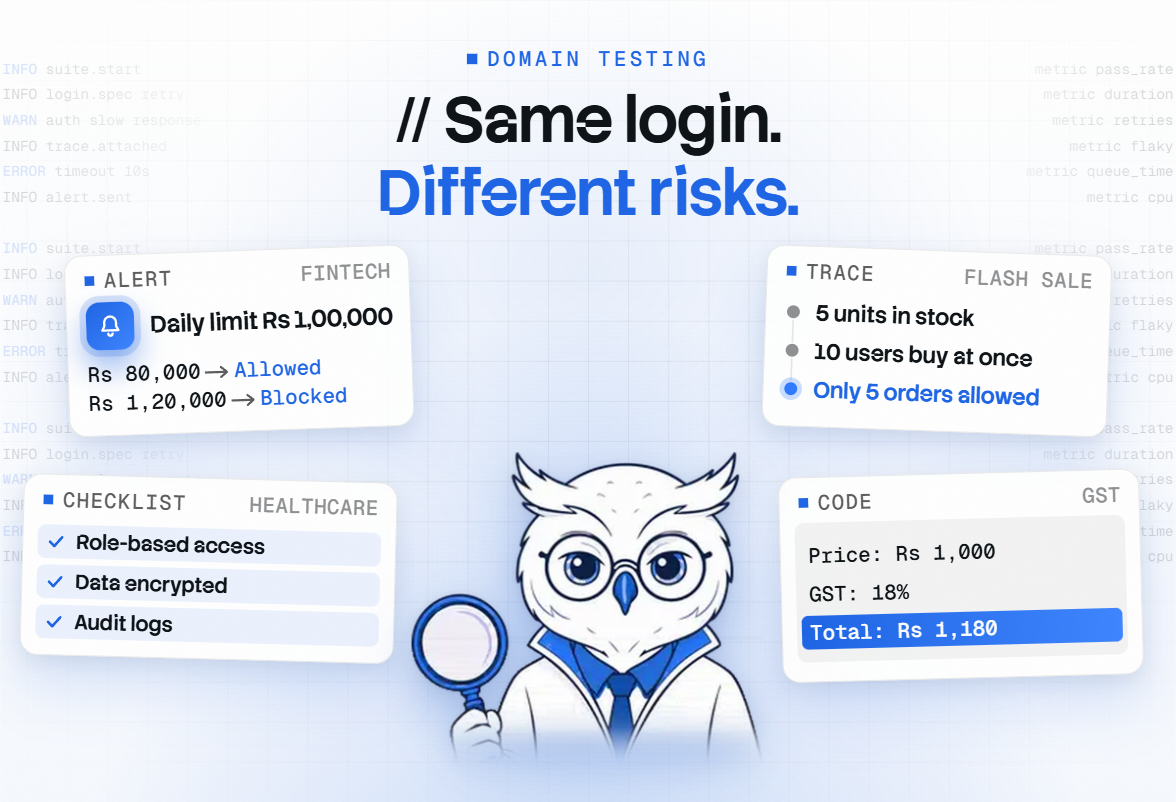
Rule: Daily transaction limit = Rs 1,00,000
Test scenarios:
- Transfer Rs 80,000 → Allowed
- Transfer Rs 1,20,000 → Blocked
- Multiple transfers exceeding limit → Blocked
These validations are business-critical rules.
Compliance-Driven QA Strategy
Many industries must follow government regulations and compliance standards. Testing must ensure the application complies with these legal requirements.
If the software fails compliance testing, the company may face the following:
- Legal penalties
- Business shutdown
- Loss of customer trust
Therefore, QA teams must include compliance validation in their testing strategy.
Example: Healthcare Industry
Healthcare applications must follow patient data protection regulations.
Testing scenarios include:
- Patient records should only be accessible by authorized doctors
- Data must be encrypted
- Audit logs should track who accessed patient data
Example: Finance Industry
Banking systems must follow financial regulations and anti-fraud mechanisms.
Testing includes:
- Secure authentication
- Transaction monitoring
- Prevention of unauthorized transfers
Compliance testing ensures that the system is legally safe and secure.
Why Test Strategy Must Align with Industry Requirements
A testing strategy cannot be the same for every product. Each industry has different risks, regulations, and performance expectations. Because of this, the test strategy must align with industry-specific needs.
Regulatory Compliance Testing
Many industries operate under strict government regulations.
Examples:
| Industry | Regulatory Focus |
| Banking | Financial regulations and fraud prevention |
| Healthcare | Patient data protection |
| E-commerce | Payment security |
| Education | Student data privacy |
Testing must ensure that software complies with these rules.
Example:
In a digital payment application:
Compliance testing verifies:
- Secure payment processing
- Proper transaction logging
- User authentication for transactions
Failure in compliance can lead to heavy fines or legal consequences.
Data Privacy and Sensitivity
Different industries handle different levels of sensitive data.
For example:
| Industry | Data Sensitivity |
| Healthcare | Patient's medical history |
| Banking | Financial transactions |
| E-commerce | Customer personal data |
| Social Media | User activity data |
Testing must ensure:
- Data encryption
- Secure storage
- Restricted access
- Protection from unauthorized usage
Example:
In a hospital management system, only doctors should be able to view patients' medical records.
Test case:
User Role = Receptionist
Attempt to view the patient's medical report → Access should be denied
Performance Expectations by Industry
Performance expectations vary significantly across industries.
Example:
E-commerce Platform
During sales events (like festival sales), thousands of users access the system simultaneously.
Testing must verify:
- The website handles heavy traffic
- The checkout process remains fast
- The payment system does not fail
Stock Trading Platform
Trading platforms require extremely fast response times.
Even a 1-second delay can cause financial loss.
Testing must verify:
- Real-time market data
- Instant order execution
- High availability
This makes performance testing critical in certain industries.
Security-First Approach
In industries like banking, healthcare, and fintech, security testing becomes the top priority.
Testing should include:
- Authentication validation
- Authorization checks
- Encryption testing
- Vulnerability testing
- API security validation
Example:
In a banking application:
Test scenarios:
- Attempt unauthorized account access
- Test SQL injection attacks
- Validate secure session management
These tests ensure the application is protected against cyber threats.
Customer Trust and Risk Exposure
Software failures affect customer trust differently depending on the industry.
Example comparison:
| Industry | Impact of Failure |
| Social Media | Temporary Inconvenience |
| E-commerce | Lost sales |
| Banking | Financial loss |
| Healthcare | Risk to human life |
Because of this, QA teams must design risk-based testing strategies.
Example:
In a hospital monitoring system, if a patient’s vital data is displayed incorrectly, it could lead to wrong medical decisions.
Therefore, testing must be extremely thorough.
FinTech Testing Challenges
Testing FinTech applications comes with several unique challenges because these systems deal directly with users’ money and sensitive financial information. Unlike regular applications, even a small mistake in a financial platform can cause serious problems such as incorrect transactions, financial loss, or security risks. Testers need to make sure that the application properly protects user data, follows financial regulations, and performs accurate calculations for things like balances and pay. Testing FinTech apps is tricky because they handle users' money and sensitive financial info.
These systems are different from apps, as even a small mistake can lead to big problems like wrong transactions, financial losses, or security threats.
Testers must ensure that the app protects user data well, follows rules, and makes accurate calculations for things like account balances and transaction records.
Another big challenge is dealing with transactions and connecting to multiple systems.
FinTech platforms often talk to banks, payment gateways, and other outside services, so testers have to check that data moves correctly between systems.
The app must also process transactions fast and reliably.
FinTech testing needs checking to ensure the system stays secure, accurate, and reliable for users.
Testers need to validate FinTech systems to ensure they can handle FinTech transactions securely.
The FinTech app must be tested to ensure it protects user data and follows regulations.
FinTech testing requires a lot of attention to detail to prevent losses and security risks. Another challenge is handling real-time transactions and multiple system integrations. FinTech platforms often communicate with banks, payment gateways, and other third-party services, which means testers must ensure that data flows correctly between systems. At the same time, the application must be able to process a large number of transactions quickly and reliably. Because of these factors, FinTech testing requires careful validation to ensure the system remains secure, accurate, and reliable for users.
Regulatory & Compliance Requirements
FinTech applications operate in a highly regulated environment because they manage financial transactions and sensitive user data. Governments and financial authorities enforce strict rules to ensure that user data is protected, financial activities are transparent, and illegal activities such as fraud or money laundering are prevented. While testing FinTech systems, QA engineers must verify that the application not only works correctly but also follows all required regulatory and compliance standards.
Below are some important compliance areas that are commonly tested in FinTech applications.
PCI-DSS Validation
PCI-DSS (Payment Card Industry Data Security Standard) is a global security standard designed to protect credit and debit card information during payment transactions. Any system that processes or stores card details must follow these security guidelines.
From a testing perspective, QA engineers verify that cardholder data is handled securely. This includes checking that sensitive details such as card numbers, CVV codes, and expiration dates are properly protected.
Real-time example:
Suppose a user makes an online payment on an e-commerce website using a credit card. The system should display the card number in a masked format such as XXXX-XXXX-XXXX-1234 instead of showing the full number. Testers must also verify that card details are not stored in application logs, database tables, or API responses in plain text.
GDPR Compliance Testing
GDPR (General Data Protection Regulation) focuses on protecting personal data and user privacy. Applications that collect user information such as names, phone numbers, addresses, or financial details must follow strict data protection rules.
During testing, QA engineers ensure that the system properly manages user consent and data rights.
Real-time example:
When a user signs up for a financial app, they may be asked to accept a privacy policy before their personal information is collected. Testers must verify that users can also download their data, update personal details, or request account deletion. If a user chooses to delete their account, the system should remove or anonymize their personal data from the database.
KYC / AML Validation Testing
KYC (Know Your Customer) and AML (Anti-Money Laundering) processes are used by financial institutions to verify customer identities and detect suspicious financial activities.
Testing these processes involves validating user identity verification workflows and transaction monitoring mechanisms.
Real-time example:
When a user opens a new account in a digital banking application, they may be asked to upload documents such as an Aadhaar card, passport, or driver’s license for identity verification. Testers must verify that the system correctly validates uploaded documents and approves or rejects the account accordingly.Another example is suspicious transaction monitoring. If a user suddenly transfers a very large amount of money to multiple accounts within a short period, the system should flag this activity and trigger a fraud alert. QA engineers must test these scenarios to ensure the system properly detects and handles such cases.
Audit Traceability
Audit traceability ensures that all important actions performed within the system are recorded and can be tracked later. This is extremely important for financial systems because organizations must be able to investigate issues and demonstrate compliance during audits.
Testers verify that the system maintains detailed logs of key activities such as transactions, account changes, approvals, and administrative actions.
Real-time example:
If an administrator updates a user’s transaction limit from ₹50,000 to ₹1,00,000, the system should record the change in an audit log. The log should include details such as who made the change, when the change was made, and what the previous and updated values were. This ensures transparency and helps organizations trace actions during security reviews or regulatory audits.
High Security & Data Protection
Security and data protection are critical in FinTech applications because these systems handle highly sensitive information such as bank details, personal identity data, and financial transactions. Any security weakness can lead to data breaches, fraud, or financial loss. Therefore, testing in FinTech must focus heavily on validating security mechanisms that protect data during storage, transmission, and system interactions.
Below are some important areas where QA teams focus while testing security in FinTech systems.
Encryption Validation
Encryption ensures that sensitive data is converted into a secure format so that unauthorized users cannot read or misuse it. FinTech applications use encryption to protect information such as passwords, payment details, and personal data.
During testing, QA engineers verify that sensitive information is properly encrypted both at rest (stored in databases) and in transit (while being transmitted between systems).Real-time example:
When a user logs into a banking application, their password should not be stored as plain text in the database. Instead, it should be stored in an encrypted or hashed format. Similarly, when users submit payment information through a website, the data should be transmitted over HTTPS rather than HTTP to ensure secure communication.
Secure API Testing
FinTech applications rely heavily on APIs to communicate with external services such as banks, payment gateways, and third-party financial providers. If these APIs are not properly secured, attackers could gain unauthorized access to financial data or manipulate transactions.
In secure API testing, testers verify authentication mechanisms, authorization rules, and input validation. They check whether APIs require proper tokens, restrict unauthorized access, and prevent malicious requests.
Real-time example:
Consider a money transfer API that allows users to transfer funds between accounts. Testers must verify that only authenticated users can call this API. If someone tries to access the API without a valid token or attempts to transfer money from another user’s account, the system should block the request and return an appropriate error response.
Penetration & Vulnerability Testing
Penetration testing and vulnerability testing are performed to identify security weaknesses that attackers could exploit. These tests simulate real-world cyberattacks to check whether the system can withstand malicious attempts such as data theft, unauthorized access, or system manipulation.
QA teams or security specialists analyze the application to detect vulnerabilities such as SQL injection, cross-site scripting (XSS), insecure authentication, or misconfigured access controls.
Real-time example:
If a login form does not properly validate input fields, an attacker might try entering malicious SQL commands instead of a username or password. Vulnerability testing helps identify such weaknesses and ensures that the application properly validates inputs and prevents unauthorized access.
Complex Financial Calculations
Financial applications must handle many complex calculations related to money, interest, taxes, and currency conversions. Even a very small calculation error can lead to incorrect balances, financial disputes, or regulatory issues. Because of this, testing financial calculations is extremely important in FinTech systems. QA engineers must verify that the system follows correct formulas, handles different scenarios accurately, and maintains proper precision when dealing with monetary values.
Below are some key areas where testers validate financial calculations.
Interest Calculation Validation
Many financial platforms such as banking apps, loan systems, and investment platforms involve interest calculations. The system must calculate interest correctly based on the defined rules such as interest rate, time period, and compounding frequency.
Real-world example:
If a user takes a loan of ₹1,00,000 with an interest rate of 10% per year, the system should correctly calculate the interest and total payable amount. Testers must verify different scenarios such as monthly interest calculation, compound interest, and early repayment cases to ensure the calculations remain accurate.
Tax Rule Verification
Financial systems often need to apply tax rules based on government regulations. These rules may vary depending on the type of transaction, country, or user category.
During testing, QA engineers verify that the correct tax percentages are applied and calculated properly in different situations.
Real-world example:
In an e-commerce payment system, if a product costs ₹1,000 and the GST is 18%, the system should correctly calculate the final payable amount as ₹1,180. Testers must also verify cases where tax exemptions or different tax slabs apply.
Multi-Currency Handling
Many FinTech platforms support multiple currencies for international transactions. The system must correctly convert amounts based on current exchange rates and display accurate values to users.
Testers must verify currency conversions, formatting, and rounding rules for different currencies.
Real-world example:
If a user sends 100 USD to an account that receives money in INR, the system should convert the amount using the correct exchange rate and show the final value in INR. Testers must ensure the system uses updated exchange rates and displays the correct converted amount.
Rounding Precision Issues
Handling money requires high precision, and rounding errors can cause financial discrepancies over time. Financial systems usually follow specific rounding rules depending on the currency or financial policy.
Testers must verify that the system maintains consistent rounding logic in all calculations.
Real-world example:
If a transaction amount is ₹99.999, the system may round it to ₹100.00 depending on the defined rounding rule. QA engineers must ensure that rounding is handled consistently across reports, invoices, and transaction records.
Real-World Calculation Scenarios
FinTech systems often involve multiple calculations happening together, such as interest, tax, service charges, and currency conversion in a single transaction. Testing these combined scenarios is important to ensure the final results remain accurate.Real-world example:
Suppose a user makes an international investment transaction where currency conversion, transaction fees, and taxes are applied together. The system must correctly calculate each component and display the final amount clearly. Testers must validate such real-world scenarios to ensure users always see accurate financial information.
Real-Time Transaction Processing
Real-time transaction processing is one of the most critical aspects of FinTech applications. Financial systems must process transactions instantly while ensuring accuracy, consistency, and reliability. Since users expect immediate updates for payments, transfers, or investments, the system must handle large volumes of transactions without delays or errors. Testing real-time transaction systems requires validating how the application behaves under heavy load, concurrent requests, and unexpected failures.
Below are some important areas that testers focus on when validating real-time transaction processing.
Transaction Consistency
Transaction consistency ensures that financial data remains accurate and synchronized across the system. When a transaction occurs, all related records must update correctly so that users always see the correct balance and transaction history.Real-world example:
If a user transfers ₹5,000 from Account A to Account B, the system must immediately deduct ₹5,000 from Account A and add ₹5,000 to Account B. Testers must verify that both accounts reflect the correct balance and that no duplicate or partial transactions occur.
Concurrency Handling
In real-world financial systems, many users may perform transactions at the same time. The system must handle multiple simultaneous requests without causing data conflicts or incorrect balances.
Testing concurrency ensures that the system can process multiple operations safely without overwriting data.Real-world example:
Suppose two users try to book the last available investment slot or make withdrawals from the same account at the same time. The system must correctly process only valid transactions and prevent double processing or balance inconsistencies.
Load Testing During Peak Hours
Financial platforms often experience high traffic during peak times, such as during stock market openings, sale events, or salary credit days. The system must be able to process thousands of transactions without slowing down or crashing.
Load testing helps QA teams evaluate how the system performs under heavy traffic conditions.
Real-world example:
During a major online sale or IPO launch, thousands of users may attempt to make payments at the same time. Testers simulate such scenarios to ensure the system can handle the increased load while maintaining fast response times and successful transaction processing.
Failover & Rollback Validation
Failures can sometimes occur due to network issues, server crashes, or system errors. In such situations, financial systems must ensure that incomplete transactions do not leave the system in an inconsistent state.
Failover and rollback testing ensures that the system can recover safely from failures and maintain data integrity.
Real-world example:
If a user initiates a ₹10,000 bank transfer but the system crashes before the transaction completes, the system should either fully complete the transfer or roll it back so that the amount is not deducted from the sender’s account. Testers must verify that partial transactions never occur and that the system recovers properly after failures.
Integration with Third-Party Banking Systems
Most FinTech applications do not work in isolation. They rely heavily on third-party banking systems, payment gateways, credit bureaus, and financial service providers to process transactions and retrieve financial data. Because these external systems are outside the direct control of the application, testing integrations becomes very important. QA teams must verify that the application communicates reliably with external systems and handles failures or delays properly.
Below are some key areas that testers focus on when validating third-party integrations.
API Reliability
FinTech platforms use APIs to communicate with external banking systems and financial services. These APIs must work reliably so that financial transactions and data exchanges happen smoothly.
During testing, QA engineers verify whether APIs consistently return correct responses and handle requests properly under different scenarios.
Real-world example:
When a user checks their bank balance through a digital wallet app, the application sends an API request to the bank’s system. Testers must ensure that the API returns the correct balance and that the application handles the response properly without showing incorrect or outdated information.
Timeout Handling
External banking systems may sometimes respond slowly due to network delays or high server load. If the application waits indefinitely for a response, it can cause poor user experience or incomplete transactions.
Testing timeout handling ensures that the system properly manages delayed responses and informs users appropriately.
Real-world example:
If a user initiates a payment through a banking API, but the bank server takes too long to respond, the system should show a message like “Transaction is taking longer than expected." Please wait or try again.” Testers must verify that the system handles such delays gracefully without freezing the application.
Failure Fallback Validation
Since external systems may occasionally fail or become unavailable, FinTech applications must have fallback mechanisms to maintain system stability.
Testing fallback scenarios ensures that the application can safely handle situations where a third-party service is temporarily unavailable.Real-world example:
If a bank verification service is down, the application might temporarily allow users to retry the verification later or switch to an alternative verification method. QA engineers must test these fallback options to ensure the system continues functioning without breaking the user experience.
Payment Gateway Resilience
Payment gateways are critical components of many FinTech systems because they handle online payments, card processing, and fund transfers. Any issue with the payment gateway can directly affect transactions and user trust.
Testing payment gateway resilience involves validating how the system behaves when payment services respond slowly, fail, or return unexpected errors.
Real-world example:
During an online purchase, if the payment gateway fails after the user completes the payment, the system must verify whether the transaction was actually completed or not. The application should prevent duplicate payments and update the order status correctly. Testers must ensure that the system properly handles such cases to avoid financial confusion for users.
Fraud Detection & Risk Systems
Fraud detection and risk management are critical components of modern FinTech systems. Financial platforms must continuously monitor transactions and user activities to detect suspicious behavior and prevent fraud. Since fraud detection systems often rely on predefined rules, machine learning models, and risk scoring mechanisms, testing these systems requires validating how accurately they identify risky transactions without blocking legitimate ones.
Below are some important aspects that QA teams focus on while testing fraud detection and risk systems.
False Positives / False Negatives
One of the biggest challenges in fraud detection is balancing accuracy. The system must detect fraudulent activities while ensuring that legitimate users are not unnecessarily blocked.
A false positive occurs when the system incorrectly marks a valid transaction as fraudulent. A false negative occurs when an actual fraudulent transaction is not detected.
Real-world example:
Suppose a user who usually makes small payments suddenly makes a ₹50,000 online purchase while traveling in another city. The system may flag this as suspicious and temporarily block the transaction. Testers must verify that such cases are handled properly and that users can verify their identity to complete the transaction.
At the same time, QA teams must also test scenarios where actual fraud attempts occur, ensuring that the system successfully blocks unauthorized activities.
Rule Engine Validation
Many FinTech fraud detection systems use rule engines that define conditions to identify suspicious behavior. These rules may be based on transaction amount, frequency, location, or user behavior patterns.
During testing, QA engineers verify that these rules are applied correctly and trigger the appropriate alerts or actions.
Real-world example:
A rule might state that if a user performs more than five high-value transactions within one minute, the system should temporarily block the account and trigger a security alert. Testers must validate whether the rule engine correctly detects this pattern and takes the expected action.
AI-Based Risk Scoring Testing
Modern FinTech systems often use AI or machine learning models to analyze transaction patterns and assign a risk score to each transaction. This score helps determine whether the transaction is safe, suspicious, or high risk.
Testing AI-based risk systems involves validating whether the system properly evaluates different risk factors and produces reasonable risk scores.
Real-world example:
If a user suddenly logs in from a new country, uses a new device, and attempts a large fund transfer, the system may assign a high-risk score and request additional verification such as OTP or biometric authentication. QA engineers must test such scenarios to ensure the system correctly identifies risky activities while allowing normal transactions to proceed smoothly.
Healthcare Software Testing Challenges
Healthcare software plays a critical role in managing patient data, medical records, hospital operations, and clinical decisions. Because these systems directly impact patient care and safety, testing healthcare applications is much more sensitive and complex than regular software testing. Even a small error in a healthcare system can lead to incorrect medical information, treatment delays, or serious risks to patient health.
One of the major challenges in healthcare testing is ensuring data privacy, regulatory compliance, and system accuracy. Healthcare applications must follow strict regulations related to patient data protection and medical standards. Testers must also validate integrations with different systems such as hospital management systems, laboratory systems, medical devices, and insurance platforms. In addition, healthcare systems must handle large volumes of patient data securely while maintaining high reliability and performance, making thorough testing essential for safe and effective healthcare operations.
Strict Compliance & Regulations
Healthcare applications must follow very strict regulations because they store and manage sensitive patient information such as medical records, diagnosis details, prescriptions, and insurance data. These regulations are designed to protect patient privacy and ensure that healthcare organizations handle medical data responsibly. During testing, QA teams must verify that the system properly protects patient data, restricts unauthorized access, and maintains accurate records of system activities.
Below are some key compliance areas that are important in healthcare software testing.
HIPAA Compliance Testing
HIPAA (Health Insurance Portability and Accountability Act) is a regulation that focuses on protecting patient health information. Any healthcare application that stores or processes patient data must ensure that this information is secure and only accessible to authorized individuals.
During testing, QA engineers verify that proper authentication, access control, and data protection mechanisms are implemented.
Real-world example:
In a hospital management system, a doctor should be able to view a patient’s medical records, but a receptionist may only be allowed to see appointment details and basic patient information. Testers must verify that the system correctly restricts access based on user roles to prevent unauthorized access to sensitive medical data.
Patient Data Confidentiality
Patient data confidentiality ensures that personal health information is protected from unauthorized access, leaks, or misuse. Healthcare systems often store highly sensitive data such as medical history, lab results, prescriptions, and diagnostic reports.
Testers must verify that patient data is securely stored, properly encrypted, and only visible to authorized users.
Real-world example:
If a patient logs into a hospital portal to check their lab reports, the system must ensure that they can only access their own records and not those of other patients. QA engineers must test scenarios where users try to access records using manipulated URLs or unauthorized access methods to ensure the system blocks such attempts.
Audit Logging Validation
Audit logging is extremely important in healthcare systems because every action related to patient data must be traceable. Hospitals and healthcare organizations often need to track who accessed or modified medical records for compliance and security purposes.
During testing, QA teams verify that the system records all critical actions in audit logs.
Real-world example:
If a doctor updates a patient’s diagnosis or prescription, the system should record details such as who made the change, what was modified, and when the update occurred. Testers must validate that these logs are accurate and cannot be altered, ensuring accountability and transparency in healthcare systems.
Data Accuracy & Patient Safety
In healthcare systems, data accuracy is directly connected to patient safety. Medical applications store critical information such as patient history, diagnosis details, lab reports, and treatment plans. If this data is incorrect or incomplete, it can lead to wrong medical decisions or treatment errors. Therefore, testing healthcare software requires careful validation to ensure that all medical data is recorded, displayed, and processed accurately.
Below are some key areas that testers focus on while validating data accuracy and patient safety in healthcare systems.
Medical Record Validation
Medical records contain important information such as patient demographics, medical history, allergies, diagnosis, and treatment details. Testers must verify that these records are correctly created, updated, and retrieved without any data loss or inconsistency.
Real-world example:
When a doctor updates a patient’s allergy information in an Electronic Health Record (EHR) system, the updated details should immediately reflect in the patient’s record. Testers must ensure that the system correctly saves the information and displays the updated data across all related modules such as appointment systems, prescription systems, and hospital dashboards.
Prescription Dosage Accuracy
Prescription management systems help doctors prescribe medicines with specific dosages and instructions. Even a small mistake in dosage calculation or display can lead to serious health risks for patients.
During testing, QA engineers verify that medication dosage, frequency, and duration are recorded and displayed correctly.
Real-world example:
If a doctor prescribes 500 mg of a medicine to be taken twice a day for 5 days, the system should accurately display these instructions in the patient’s prescription and pharmacy records. Testers must also verify that the system prevents invalid inputs such as extremely high dosages or incorrect medication combinations.
Clinical Data Correctness
Healthcare systems also manage various types of clinical data such as lab results, vital signs, diagnostic reports, and imaging results. This information must be stored and presented accurately because doctors rely on it to make treatment decisions.
Testers must validate that clinical data is correctly captured, transmitted between systems, and displayed without errors.
Real-world example:
If a laboratory system uploads a blood test report showing a patient’s glucose level, the value should appear correctly in the hospital’s medical records system. QA engineers must ensure that there are no data mismatches, incorrect units, or missing information when the data is transferred between systems.
Interoperability Between Systems
Healthcare systems rarely work as standalone applications. Hospitals usually use multiple software systems such as Electronic Health Records (EHR), Laboratory Information Systems (LIS), Hospital Management Systems (HMS), pharmacy systems, and insurance platforms. These systems must communicate with each other to exchange patient data, medical reports, and treatment information. This communication between different systems is known as interoperability.
Testing interoperability is challenging because different systems may follow different standards, formats, and technologies. QA engineers must verify that data flows correctly between systems without loss, duplication, or misinterpretation.
HL7 / FHIR Integration Testing
Healthcare systems often use standard communication protocols such as HL7 (Health Level Seven) and FHIR (Fast Healthcare Interoperability Resources) to exchange medical data between different applications.
During testing, QA engineers verify that the system correctly sends and receives messages using these standards.Real-world example:
When a patient’s lab test results are generated, the laboratory system may send the report to the hospital’s Electronic Health Record system using an HL7 or FHIR message. Testers must ensure that the patient ID, test name, and result values are correctly transferred and properly displayed in the patient’s medical record.
Hospital Management Systems Integration
A hospital management system (HMS) manages various hospital operations such as patient registration, appointments, billing, and medical records. It often integrates with other systems like pharmacy platforms, insurance providers, and diagnostic systems.
Testers must verify that data is correctly synchronized between these integrated systems.
Real-world example:
When a patient registers at a hospital, their details should automatically appear in the appointment system, billing system, and medical records system. QA engineers must validate that patient information remains consistent across all modules without duplication or missing data.
Lab System Interoperability
Laboratory Information Systems (LIS) are used to manage medical tests, sample tracking, and diagnostic reports. These systems must communicate with hospital systems to share test results with doctors and patients.
Testing ensures that laboratory results are accurately transferred and displayed in the main healthcare system.
Real-world example:
If a doctor orders a blood test through the hospital system, the request should automatically appear in the laboratory system. Once the test is completed, the results should be sent back to the hospital system and attached to the patient’s record without errors.
Data Exchange Consistency
When multiple systems exchange data, it is important that the information remain consistent and accurate across all platforms. Data mismatches or synchronization issues can create serious problems in patient care.
QA engineers must verify that all integrated systems maintain the same data values and updates.
Real-world example:
If a patient’s contact number or address is updated in the hospital system, the change should also be reflected in related systems such as billing or appointment platforms. Testers must ensure that updates are properly synchronized and that no outdated information remains in the system.
Performance Under Critical Conditions
Healthcare systems must remain reliable and responsive even during critical situations. Hospitals and medical platforms often face sudden spikes in usage, especially during emergencies, disease outbreaks, or high patient inflow. In such scenarios, the system must continue functioning smoothly without delays or failures because medical staff rely on these systems for quick decision-making. Testing performance under critical conditions helps ensure that the system can handle heavy loads while maintaining stability and fast response times.
Below are some key areas that QA teams focus on when testing healthcare systems under critical conditions.
Emergency System Load Testing
During emergencies such as accidents, natural disasters, or public health crises, a large number of patients may need to be registered and treated at the same time. The healthcare system must be capable of handling a sudden increase in system usage without slowing down or crashing.
Real-world example:
During a disease outbreak or emergency situation, hundreds of patients may be registered in a hospital system within a short period. Testers simulate such scenarios to ensure the system can handle multiple patient registrations, record updates, and doctor consultations simultaneously.
Appointment Scheduling Under High Demand
Many hospitals and healthcare platforms allow patients to book appointments online. During peak hours or special health campaigns, a large number of users may try to book appointments at the same time.
Testing ensures that the appointment system can handle high traffic while preventing issues like duplicate bookings or system slowdowns.
Real-world example:
When a hospital opens online booking for vaccination or a specialized doctor consultation, thousands of patients may attempt to book slots simultaneously. QA engineers must test whether the system can manage these requests without creating duplicate appointments or displaying incorrect availability.
Disaster Recovery Testing
Healthcare systems must also be prepared for unexpected failures such as server crashes, power outages, or data center issues. In such situations, the system should quickly recover and restore critical medical data without losing important patient information.
Disaster recovery testing ensures that backup systems and recovery mechanisms work properly.
Real-world example:
If the hospital’s main server suddenly fails, the system should switch to a backup server or recovery system so that doctors can still access patient records and continue treatment without interruption. Testers verify that data backups are properly maintained and that the system can recover quickly in case of failures.
Security & Access Control
Healthcare systems store extremely sensitive information such as patient medical records, prescriptions, lab reports, and personal details. Because of this, strong security and access control mechanisms are essential to prevent unauthorized access and protect patient privacy. Testing security in healthcare applications focuses on ensuring that only authorized users can access specific information and that all sensitive activities are properly monitored and recorded.
Below are some important areas that QA teams validate while testing security and access control in healthcare systems.
Role-Based Access (Doctors, Nurses, and Admin)
Healthcare applications usually implement role-based access control (RBAC) to restrict what different users can see or modify in the system. Each role, such as doctor, nurse, receptionist, or administrator, has different permissions based on their responsibilities.
During testing, QA engineers verify that the system correctly enforces these role-based permissions.
Real-world example:
A doctor should be able to view and update patient diagnoses and prescriptions, while a nurse may only be allowed to view patient records and update treatment notes. An administrator might have access to system settings and user management. Testers must ensure that users cannot access features or data that are outside their assigned roles.
Multi-Factor Authentication
To increase security, many healthcare systems use multi-factor authentication (MFA). This means users must provide more than one form of verification when logging into the system, such as a password combined with a one-time password (OTP) or biometric authentication.
Testing MFA ensures that the authentication process works correctly and prevents unauthorized access.
Real-world example:
When a doctor logs into a hospital management system from a new device, the system may require an additional OTP sent to the doctor’s registered mobile number or email. QA engineers must verify that the system correctly triggers this verification and allows access only after successful authentication.
Audit Logs Validation
Audit logs are essential in healthcare systems because every action related to patient data must be traceable. These logs help organizations track system activities and investigate any suspicious access or modifications.
During testing, QA teams verify that all important actions are properly recorded in the audit logs.
Real-world example:
If a doctor updates a patient’s prescription or modifies medical notes, the system should record details such as who made the change, what information was updated, and the exact timestamp. Testers must ensure that these logs are accurate, secure, and cannot be modified or deleted by unauthorized users.
Testing Medical Devices & IoT Integration
Modern healthcare systems often integrate with medical devices and IoT (Internet of Things) equipment such as heart monitors, glucose meters, wearable health trackers, and smart hospital equipment. These devices continuously collect patient data and send it to healthcare software systems for monitoring and analysis. Because these systems directly impact patient care, testing device integration is very important to ensure that data is transmitted accurately and in real time.
Testing medical device integrations can be challenging because it involves validating communication between hardware devices and software platforms. QA engineers must ensure that devices connect properly, transmit correct data, and work reliably under different conditions.
Device Connectivity Validation
Medical devices must be able to connect smoothly with healthcare systems through networks such as Wi-Fi, Bluetooth, or hospital monitoring networks. Testing ensures that the system can establish stable connections and maintain communication with devices.
Real-world example:
If a smart heart rate monitor is connected to a hospital monitoring system, the device should successfully connect and continuously send heart rate data to the patient dashboard. Testers must verify that the connection remains stable and that the system can reconnect automatically if the device temporarily disconnects.
Real-Time Monitoring Systems
Many healthcare systems rely on real-time monitoring devices to track patient health conditions continuously. These systems must display accurate and up-to-date information so that doctors can quickly respond to any critical changes.
Testing ensures that real-time data is transmitted without delays and displayed correctly in monitoring dashboards.
Real-world example:
In an ICU, a patient monitoring system may continuously track vital signs such as heart rate, oxygen level, and blood pressure. If the patient’s oxygen level drops below a certain threshold, the system should immediately trigger an alert for medical staff. QA engineers must test these real-time alert scenarios to ensure they work reliably.
Firmware Integration Testing
Medical devices often run on firmware, which is the embedded software controlling the device hardware. When firmware updates or changes occur, it is important to ensure that the device continues to work properly with the healthcare system.
Testing verifies that firmware updates do not break the communication between the device and the software platform.
Real-world example:
If a glucose monitoring device receives a firmware update, it should still be able to send blood sugar readings to the hospital’s medical system without errors. Testers must verify that the updated firmware remains compatible with the healthcare application and that data transmission continues smoothly.
eCommerce Testing Challenges
eCommerce platforms handle a wide range of activities such as product browsing, shopping carts, online payments, order processing, and delivery tracking. Since these platforms directly interact with customers and process financial transactions, they must provide a smooth, secure, and reliable user experience. Any issue in the system, such as incorrect pricing, payment failures, or slow page loading, can lead to customer frustration and potential revenue loss.
Testing eCommerce applications can be challenging because these platforms must handle high traffic, multiple integrations, different payment methods, and complex business rules like discounts, taxes, and shipping calculations. QA engineers need to verify that all components of the system work correctly together, from product listing to final order delivery. In addition, testers must ensure that the platform performs well during peak shopping periods, protects customer data, and provides a seamless shopping experience across different devices and browsers.
High Traffic & Scalability
One of the biggest challenges for eCommerce platforms is handling large numbers of users at the same time. During special events, sales campaigns, or festival seasons, thousands or even millions of users may visit the website simultaneously. If the system is not designed to scale properly, it may slow down, crash, or fail to process orders. Therefore, testing high-traffic scenarios is essential to ensure that the platform remains stable and responsive even during peak demand.
Below are some important areas that QA teams focus on while testing high traffic and scalability in eCommerce applications.
Flash Sales Testing
Flash sales are short-duration promotional events where products are offered at heavily discounted prices. These sales attract a large number of users in a very short time, which can put heavy pressure on the system.
Real-world example:
During a limited-time flash sale, thousands of users may try to purchase the same product within minutes. Testers must verify that the system correctly handles multiple purchase requests, updates product stock accurately, and prevents issues like overselling items that are already out of stock.
Black Friday Traffic Simulation
Events like Black Friday, Cyber Monday, or festive sales generate extremely high website traffic. eCommerce platforms must be able to handle this surge without performance issues.
Real-world example:
During a Black Friday sale, millions of users may browse products, add items to their cart, and make payments simultaneously. QA engineers simulate such heavy traffic to check whether the system maintains fast page loading, stable checkout processes, and successful order placements.
Performance and Stress Testing
Performance testing evaluates how the system behaves under normal and high loads, while stress testing pushes the system beyond its limits to identify breaking points.
Real-world example:
Testers may simulate 50,000 concurrent users browsing products and placing orders to see how the platform performs. They monitor metrics such as response time, server performance, and database load to ensure the system remains stable.
Auto-Scaling Validation
Modern eCommerce platforms often use cloud infrastructure that automatically increases or decreases resources based on traffic demand. This feature is called auto-scaling.
Testing ensures that the system can dynamically add servers when traffic increases and reduce resources when demand drops.
Real-world example:
If the number of users suddenly increases during a festival sale, the system should automatically scale up server resources to handle the extra load. QA engineers must verify that this scaling happens smoothly without affecting the user experience.
Payment Gateway Integration
Payment processing is one of the most critical parts of an eCommerce platform. Customers expect a fast, secure, and reliable payment experience when completing their purchases. Since eCommerce applications integrate with multiple payment gateways and banking systems, testing payment workflows becomes complex. QA engineers must ensure that payments are processed correctly, errors are handled properly, and customers are not charged incorrectly.
Below are some important areas testers focus on while validating payment gateway integrations.
Multiple Payment Methods
Modern eCommerce platforms support various payment options to provide flexibility for customers. These may include credit cards, debit cards, UPI, net banking, digital wallets, and “Buy Now Pay Later” services. Testing ensures that all payment methods work correctly and that the system processes transactions accurately.
Real-world example:
When a customer selects UPI payment during checkout, the system should redirect them to their banking or payment app, complete the transaction, and then return them to the order confirmation page. Testers must verify that the order status updates correctly and the payment is recorded successfully in the system.
Failed Transaction Handling
Sometimes transactions may fail due to network issues, insufficient balance, bank server errors, or timeout problems. The system must handle these failures properly without causing confusion or duplicate charges.
Real-world example:
If a customer attempts to pay for an order but the bank server does not respond, the system should display a clear error message such as “Payment failed. Please try again.” Testers must ensure that the order is not marked as successful and that the customer is not charged for the failed transaction.
Refund Workflows
Refunds are an important part of eCommerce platforms, especially when customers cancel orders or return products. Testing refund workflows ensures that the refund process works correctly and that the correct amount is returned to the customer.
Real-world example:
If a customer cancels an order after making an online payment, the system should automatically trigger a refund request to the payment gateway. QA engineers must verify that the refund amount is correct and that the payment status updates properly in both the eCommerce system and the payment gateway.
Fraud Detection Validation
eCommerce platforms must also protect users and businesses from fraudulent transactions. Fraud detection systems analyze transaction patterns and flag suspicious activities. Testing ensures that these systems can correctly identify risky transactions without blocking genuine purchases.
Real-world example:
If multiple high-value transactions are attempted using the same credit card from different locations within a short time, the system may flag the activity as suspicious and request additional verification. Testers must validate that such fraud detection rules work correctly and that legitimate users can still complete their purchases safely.
Cart & Checkout Complexity
The cart and checkout process is one of the most important parts of an eCommerce platform because it directly impacts whether a customer completes a purchase or leaves the website. Even small issues in this flow, such as incorrect discounts, wrong tax calculations, or shipping errors, can lead to failed orders and poor customer experience. Testing the cart and checkout functionality ensures that all calculations and business rules work correctly from the moment a product is added to the cart until the order is successfully placed.
Coupon Validation
Many eCommerce platforms offer discount coupons and promotional codes to attract customers. These coupons often come with specific conditions such as minimum order value, product eligibility, expiration dates, or usage limits.
Real-world example:
If a coupon offers a 10% discount on orders above ₹1000, the system should apply the discount only when the cart value crosses ₹1000. Testers must verify scenarios such as applying expired coupons, using the same coupon multiple times, or applying coupons to products that are not eligible for the offer.
Tax Calculation Logic
Tax calculation is another complex area in eCommerce systems because taxes may vary depending on the product type, customer location, and government regulations. The system must correctly calculate and display taxes before the order is placed.
Real-world example:
If a customer from Gujarat purchases a product from a seller located in the same state, the system may apply CGST and SGST. However, if the customer is from another state, the system may apply IGST instead. Testers must verify that the correct tax rules are applied based on the customer’s location.
Shipping Logic
Shipping charges and delivery options often depend on multiple factors such as delivery location, product weight, delivery speed, and order value. Testing ensures that the system correctly calculates shipping fees and displays accurate delivery estimates.
Real-world example:
An eCommerce platform may offer free shipping for orders above ₹500. If the cart value is ₹450, the system should show the applicable shipping charge. Once the customer adds another product and the cart value crosses ₹500, the shipping charge should automatically become free. Testers must verify that such shipping rules are applied correctly during checkout.
Personalization & Recommendation Engines
Personalization and recommendation engines are widely used in eCommerce platforms to enhance user experience by showing relevant products based on user behavior, preferences, and past interactions. Testing ensures that user tracking, A/B experiments, and AI-based product recommendations work accurately and deliver meaningful suggestions to improve engagement and sales.
User Behavior Tracking
User behavior tracking is an essential part of personalization in eCommerce systems. Platforms continuously collect and analyze user actions such as page visits, search queries, product clicks, time spent on pages, cart additions, and purchase history. This data is then used to understand customer preferences and deliver personalized product recommendations.
From a testing perspective, QA engineers must verify whether the system correctly captures and processes user interactions. Testers validate that events such as “Add to Cart," “Product View," or “Wishlist Add” are properly recorded in the analytics system and used by the recommendation engine.
Real-time Example:
Suppose a user visits an online clothing store and frequently views running shoes and sports apparel. The system should recognize this pattern and start recommending similar sports-related products on the homepage or product pages.
As a tester, you would verify:
- If viewing multiple running shoe products triggers recommendations for similar items.
- If the homepage shows sports-related recommendations after browsing activity.
- If recommendations change after the user starts browsing a different category like jackets.
If the system continues showing unrelated products like kitchen appliances, it indicates that behavior tracking or recommendation logic is not functioning correctly.
A/B Testing Validation
A/B testing is widely used in eCommerce platforms to compare two versions of a feature and determine which one performs better. This could involve testing different recommendation algorithms, UI placements, or personalized product sections.
In A/B testing, users are divided into two groups:
- Group A: sees the existing recommendation logic or UI.
- Group B sees a new recommendation strategy or layout.
Testing ensures that the correct user groups receive the correct variant and that experiment results are properly recorded.
Real-time Example:
An eCommerce platform wants to test whether displaying “Recommended for You” on the product page increases purchases.
- Version A: Shows recommendations at the bottom of the page.
- Version B: Shows recommendations directly below the product description.
As a tester, you would verify:
- Users are consistently assigned to the same experiment group.
- Version A users always see recommendations at the bottom.
- Version B users see recommendations below the product description.
- Conversion data and click events are properly tracked.
If users randomly switch between versions during the same session, it indicates an issue with experiment configuration.
AI-Based Recommendation Testing
Modern eCommerce platforms use AI and machine learning models to generate personalized recommendations. These models analyze multiple factors such as purchase history, browsing behavior, product similarity, and popular trends.
Testing AI-based recommendation systems is more complex because the results are dynamic and continuously changing. Instead of verifying exact outputs, testers focus on validating the logic, relevance, and consistency of recommendations.
Key areas testers validate include the following:
- Relevance of recommended products
- Performance of recommendation APIs
- Behavior when limited user data is available (cold start problem)
- Accuracy of recommendations after new user interactions
Real-time Example:
A customer purchases a smartphone from an online electronics store. The AI recommendation engine should ideally suggest related items such as the following:
- Phone cases
- Screen protectors
- Wireless earbuds
- Fast chargers
A QA would verify the following:
- Whether related accessories appear in the recommendation section.
- Whether recommendations update after the user views accessories.
- Whether recommendations differ for users who purchase different product categories.
For new users with no browsing history, the system should fall back to popular or trending products rather than showing random or irrelevant recommendations.
Proper testing of AI-based recommendation systems ensures that users receive meaningful product suggestions, which improves user engagement, increases sales, and enhances overall customer experience.
Cross-Platform Compatibility
eCommerce platforms are accessed by users through different devices and browsers, so ensuring consistent behavior across all platforms is very important. Testing focuses on verifying that the website or application works correctly on web browsers, mobile devices, and different screen sizes. QA engineers validate that layouts, buttons, checkout flows, and product pages function properly regardless of the platform being used.
Web
Testing ensures the website works correctly on desktop browsers with proper layout, navigation, and functionality.
Mobile
Mobile testing validates responsive design, touch interactions, and smooth checkout experiences on smartphones and tablets.
Multiple Browsers
QA teams verify compatibility across browsers such as Chrome, Firefox, Safari, and Edge to ensure that users get the same experience regardless of the browser they use.
Real-time Example
A user browsing an online store on mobile Chrome should see the same product details, cart behavior, and checkout flow as someone using Safari on an iPhone or Chrome on a desktop. If the “Add to Cart” button works on desktop but not on mobile Safari, it indicates a cross-platform compatibility issue.
Inventory & Order Management
Inventory and order management systems ensure that product stock levels and orders are handled accurately in real time. Testing focuses on verifying that stock updates, order processing, and inventory synchronization work correctly across the platform.
Real-time Stock Updates
QA engineers validate that inventory levels update immediately when an order is placed, canceled, or returned.
Race Condition Scenarios
Testing ensures the system can handle multiple users attempting to purchase the same product at the same time without causing inconsistencies.
Overselling Prevention
The system must prevent orders when stock is unavailable to avoid selling more items than actually exist.
Real-time Example:Suppose an online store has only 5 units of a product available. If 10 users try to purchase it simultaneously during a flash sale, the system should only allow the first 5 successful purchases and block the remaining orders. QA testers simulate such concurrent purchase scenarios to ensure the system properly handles inventory limits and prevents overselling.
FinTech vs Healthcare vs eCommerce – Key Testing Differences
Different industries have unique requirements, risks, and priorities, which directly impact how software testing is performed. While the core testing principles remain the same, the focus areas change depending on the industry. For example, FinTech applications prioritize financial accuracy and security, healthcare systems focus heavily on patient safety and regulatory compliance, and eCommerce platforms emphasize performance, scalability, and user experience during high-traffic events.
The table below highlights the key testing differences across these industries.
| Area | FinTech | Healthcare | e-commerce |
| Compliance | PCI-DSS, AML regulations | HIPAA compliance | GDPR, data protection rules |
| Risk Impact | Financial loss, fraud risks | Patient safety and medical errors | Revenue loss and poor user experience |
| Performance Focus | Real-time transaction processing | Critical system availability | Handling traffic spikes during sales |
| Data Sensitivity | Financial data, payment information | Patient medical records | Customer personal information (PII) |
| Security Focus | Fraud detection, encryption, secure APIs | Patient data confidentiality, secure access | Secure payments and account protection |
| System Integration | Banking systems, payment gateways | Hospital systems, lab systems, medical devices | Payment gateways, shipping providers |
| Testing Complexity | Complex financial calculations | Accurate medical data and device integration | Cart, checkout, promotions, and recommendations |
Common Testing Challenges Across All Industries
Regardless of the industry, many software testing challenges are common across applications. One of the most significant challenges is managing test data effectively. Applications rely heavily on data to validate workflows, business rules, and system behavior. However, maintaining accurate, secure, and consistent test data across environments can be difficult. Poor test data management can lead to unreliable test results, failed automation runs, and difficulty reproducing defects.
Proper strategies such as data masking, synthetic data generation, environment synchronization, and automated cleanup mechanisms help ensure that testing environments remain stable and reliable for continuous testing.
Test Data Management Challenges
Test data management refers to the process of creating, maintaining, and controlling the data used during software testing. Since many applications deal with sensitive or complex datasets, testers must ensure that the data used in testing is secure, realistic, and consistent across environments.
Sensitive Data Handling
Many applications handle sensitive information such as financial data, personal information, or medical records. Using real production data in testing can lead to serious privacy and compliance risks. Therefore, testers must ensure that sensitive information is properly protected before it is used in testing environments.
Masking Production Data
Data masking replaces sensitive fields with anonymized values while keeping the data structure intact. This allows testers to use realistic datasets without exposing real user information.
Example:
If a production database contains a credit card number like 4532-XXXX-XXXX-5678, the masked version may appear as XXXX-XXXX-XXXX-5678 in the test environment.
Synthetic Data Generation
Synthetic data is artificially generated data that mimics real-world data patterns without containing actual user information.
Example:
A testing tool may generate thousands of fake user accounts with realistic names, emails, and addresses to simulate large-scale user activity.
Data Privacy Compliance
Organizations must follow data privacy regulations when using data for testing. Testers ensure that test environments comply with policies that protect sensitive information.
Example:
Before copying production data to a staging environment, sensitive fields such as email addresses, phone numbers, or identification numbers are masked to prevent data exposure.
Data Environment Synchronization
Maintaining consistency between testing environments and production systems is another common challenge. If the test environment does not accurately reflect production data or configurations, test results may become unreliable.
Staging vs. Production Mismatch
Sometimes staging environments contain different configurations, outdated APIs, or missing datasets compared to production systems. This can cause tests to pass in staging but fail after deployment.
Example:
An application may work correctly in staging because it contains only 100 test users, but it may fail in production where millions of users exist.
Outdated Test Databases
Test databases can become outdated if they are not refreshed regularly. This may lead to missing records, incorrect relationships between data tables, or failed test scenarios.
Example:
If a new product category is added in production but not updated in the test database, testers may not be able to validate related workflows.
Parallel Test Data Conflicts
In modern testing environments, multiple testers and automation scripts often run tests simultaneously. This can lead to conflicts when multiple tests attempt to use the same data.
Duplicate Records
Automated tests may create duplicate records if the system does not enforce unique constraints properly.
Example:
Two automation scripts simultaneously attempt to create a user account using the same email address, causing test failures.
Shared Accounts Issue
If multiple tests use the same login credentials, one test may modify or delete data that another test depends on.
Example:
One test case may update a user's shipping address while another test expects the original address, causing unexpected failures.
Race Conditions in Automation
Race conditions occur when multiple processes attempt to access or modify the same data at the same time.
Example:
Two automated tests attempt to update the same order status simultaneously, causing inconsistent system behavior.
Data Cleanup & Reset Strategy
To maintain a stable testing environment, test data must be cleaned and reset after test execution. Without proper cleanup, the environment may become cluttered with leftover test data, affecting future test runs.
Automated Teardown Scripts
Automation frameworks can include teardown scripts that remove test data created during execution.
Example:
After an automated test creates a test user, the teardown script deletes the user record from the database.
API-Based Cleanup
Some applications provide APIs that allow testers to delete or reset test data programmatically.
Example:
A tester may call an API endpoint to delete test orders created during automated testing.
Database Rollback Techniques
Database transactions can be rolled back after test execution to restore the system to its original state.
Example:
If a test modifies order data in a database transaction, the system can roll back the transaction once the test is completed, ensuring the database remains unchanged.
Automation Strategy Differences by Industry
Automation strategies can vary significantly depending on the type of application and industry requirements. While the goal of automation is to improve test coverage, speed, and reliability, the approach must align with system architecture, risk level, and regulatory needs. For example, FinTech applications focus heavily on API and security testing, healthcare systems emphasize data accuracy and compliance validation, while eCommerce platforms prioritize UI flows and performance during high traffic events. A well-designed automation strategy ensures stable tests, efficient CI/CD integration, and faster feedback for development teams.
Choosing the Right Test Layer
Selecting the right level of automation is critical for maintaining an efficient test suite. A balanced approach across unit, API, and UI tests helps achieve better coverage while keeping tests fast and stable.
Unit vs API vs UI Balance
Unit tests validate individual components, API tests verify backend logic and integrations, and UI tests validate the user interface and workflows.
Real-time Example:
In an eCommerce checkout flow:
- Unit tests validate discount calculation logic.
- API tests verify order creation and payment processing.
- UI tests ensure the checkout page works correctly for users.
Avoiding UI-Heavy Automation
UI tests are slower and more fragile compared to API or unit tests. Excessive reliance on UI automation can increase maintenance effort and cause flaky tests.
Example:
Instead of validating business logic through UI interactions, testers can validate it through API tests, which run faster and are less dependent on UI changes.
Tool Selection Based on Industry
Different industries require different automation and testing tools depending on their priorities such as security, performance, or compliance.
Security Testing Tools
Applications handling sensitive data require security testing tools to detect vulnerabilities.
Example:
FinTech platforms may use security scanning tools to identify vulnerabilities in payment APIs.
Performance Tools
Performance testing tools help simulate high user loads and measure system performance.
Example:
An e-commerce platform may use performance testing tools to simulate thousands of users during a flash sale event.
Compliance Validation Tools
Industries like healthcare and finance require tools that help verify regulatory compliance.
Example:
Healthcare systems may use audit and monitoring tools to ensure patient data access follows compliance rules.
Maintaining Automation Stability
Automation stability is critical for maintaining reliable CI/CD pipelines. Flaky tests can reduce confidence in automated test results and slow down development cycles.
Flaky Test Reduction
Flaky tests fail intermittently due to timing issues, unstable environments, or inconsistent data.
Example:
A UI test may fail if a page takes longer than expected to load.
Smart Wait Strategies
Using smart waits ensures tests wait for elements or conditions before performing actions.
Example:
Instead of using fixed delays like Thread.sleep, testers implement dynamic waits that wait until elements become visible or clickable.
Test Isolation Principles
Each test should run independently without depending on other tests or shared data.
Example:
If one test modifies user data, it should not affect other test cases running in parallel.
Scaling Automation in CI/CD
As projects grow, automation frameworks must support scaling and faster execution within CI/CD pipelines.
Parallel Execution
Running tests simultaneously across multiple environments reduces overall test execution time.
Example:
An automation suite with 200 tests can run in parallel across multiple machines, reducing execution time from hours to minutes.
Selective Test Execution
Instead of running all tests for every code change, teams can run only relevant tests based on the impacted modules.
Example:
If a code change affects only the payment module, only payment-related tests are triggered.
Test Tagging Strategies
Tagging tests allows teams to organize and execute specific groups of tests such as smoke, regression, or performance tests.
Example:
During deployment, a CI pipeline may run only smoke tests first to quickly verify critical functionality before running the full regression suite.
CI/CD Integration Challenges
Integrating automated testing into CI/CD pipelines helps teams deliver software faster and detect issues early. However, maintaining efficient pipelines can be challenging because tests must run quickly while still providing reliable feedback about the system. If pipelines become slow, unstable, or difficult to monitor, it can delay deployments and reduce team productivity. Therefore, teams must carefully design CI/CD testing strategies to balance speed, coverage, and reliability.
Fast Feedback vs Full Regression
One of the biggest challenges in CI/CD is deciding which tests should run during each pipeline execution. Running the entire regression suite for every code change can significantly slow down the pipeline.
Smoke vs Regression Separation
Smoke tests validate critical application functionality and run quickly after each build. Full regression tests run less frequently and validate the entire system.
Example:
After a new code commit, the pipeline may run smoke tests to verify login, basic navigation, and core workflows. Once the build passes these tests, the complete regression suite can run later in scheduled builds.
Risk-Based Execution
Instead of running all tests every time, teams prioritize tests based on the risk associated with the code changes.
Example:
If a developer modifies the payment module, the pipeline runs payment-related tests first to quickly identify any critical failures.
Environment Dependency Issues
Automated tests often depend on specific environments such as staging or QA servers. If these environments are unstable or inconsistent, test results can become unreliable.
Shared Environments
When multiple teams use the same environment for testing, changes made by one team can affect the tests of another team.
Example:
A developer deploying new changes to the staging environment may cause automated tests from another team to fail due to unexpected system behavior.
Configuration Drift
Configuration drift occurs when the test environment gradually becomes different from production due to configuration changes or missing updates.
Example:
A feature may work correctly in the staging environment but fail in production because the database configuration or API version is different.
Pipeline Performance Bottlenecks
CI/CD pipelines must execute quickly to provide fast feedback. However, large automation suites and inefficient execution strategies can slow down the pipeline.
Long Build Times
Large codebases or complex build processes can increase the time required to compile, package, and deploy applications before tests begin.
Example:
If a project takes 20 minutes to build before running tests, developers must wait longer to know whether their changes introduced issues.
Sequential Test Execution
Running tests one after another can significantly increase execution time, especially when the test suite grows.
Example:
If 200 tests take 1 minute each and run sequentially, the entire pipeline may take over 3 hours. Parallel execution can reduce this time dramatically.
Monitoring & Reporting Gaps
Effective monitoring and reporting are essential for quickly identifying failures and understanding test results. Poor visibility into test results can make it difficult for teams to diagnose problems.
Poor Failure Visibility
If test failures do not provide clear logs or screenshots, it becomes difficult for developers and testers to identify the root cause.
Example:
A UI test may fail without providing details about which element was not found, forcing the team to manually investigate the issue.
Incomplete Test Metrics
Without proper metrics, teams cannot measure test coverage, failure trends, or pipeline performance.
Example:
If a CI pipeline only reports pass/fail status without showing which modules are most unstable, it becomes difficult to identify areas that need improvement.
Security & Performance Balance
Modern software development focuses on delivering features quickly, but applications must also remain secure and perform reliably under heavy usage. Balancing security testing and performance validation within fast development cycles can be challenging. Teams need to integrate automated security and performance checks early in the development process to ensure vulnerabilities and performance issues are detected before production releases.
Security Testing in Fast Releases
With frequent deployments in CI/CD pipelines, security testing must also be automated and integrated into the development workflow. This helps detect vulnerabilities early without slowing down releases.
SAST / DAST Integration
Static Application Security Testing (SAST) analyzes source code to identify security vulnerabilities, while Dynamic Application Security Testing (DAST) scans running applications to detect security issues during execution.
Real-time Example:
During a CI pipeline run, a SAST tool scans newly committed code and identifies issues such as insecure input validation or hardcoded credentials. A DAST tool may then test the running application to detect vulnerabilities like SQL injection or cross-site scripting.
Dependency Scanning
Modern applications use many third-party libraries. Dependency scanning tools check these libraries for known vulnerabilities.
Example:
If a project uses an outdated library with a known security vulnerability, the pipeline should alert the team before deployment so the dependency can be updated.
Performance Testing Under Real Load
Performance testing ensures the system remains stable and responsive even under heavy user traffic. It is important to simulate realistic usage patterns instead of only testing simple scenarios.
Peak Traffic Simulation
Testing tools simulate large numbers of users accessing the system simultaneously to evaluate how the application performs under high load.
Real-time Example:
An eCommerce platform may simulate thousands of users during a flash sale to ensure the website, payment systems, and order processing services can handle the increased traffic.
Real User Behavior Modeling
Instead of simulating identical actions, performance tests should mimic real user behavior such as browsing products, adding items to carts, and completing purchases.
Example:
Some simulated users may only browse product pages, while others complete checkout processes. This helps generate more realistic load conditions.
Shift-Left Security
Shift-left security means integrating security practices earlier in the development lifecycle rather than testing security only at the end.
Secure Coding Validation
Developers follow secure coding practices, and automated tools analyze code during development to detect potential vulnerabilities.
Example:
Code review tools may identify unsafe input handling that could allow malicious users to inject harmful data.
API Security Testing
Since modern applications rely heavily on APIs, testers must validate authentication, authorization, and data protection in API endpoints.
Real-time Example:
A tester verifies that a user cannot access another customer's order details by manipulating API request parameters. Proper authorization checks should prevent such unauthorized access.
Managing Legacy Systems
Many organizations still rely on legacy systems that were built years ago using older technologies and architectures. These systems often support critical business operations, but testing them can be challenging due to outdated frameworks, limited documentation, and tightly coupled components. QA teams must carefully analyze system behavior and design testing strategies that minimize risk while ensuring the system continues to function correctly.
Limited Documentation
One of the most common issues with legacy systems is the lack of proper documentation. Over time, systems may undergo multiple changes, and original documentation may become outdated or unavailable.
Reverse Engineering Flows
Testers often need to analyze the system behavior directly to understand how features work.
Example:
If a legacy billing system calculates discounts automatically but the logic is not documented, testers may need to study the application behavior by testing multiple scenarios to identify how the calculation works.
Business Logic Understanding
Understanding complex business rules becomes difficult when the logic is embedded deep within the application code.
Example:
A financial system may apply different interest rates depending on customer categories, but without documentation, testers must collaborate with developers or business teams to fully understand the rules.
Tight Coupling & Monolithic Architecture Challenges
Legacy applications are often built using monolithic architectures where multiple components are tightly connected. This makes testing more difficult because changes in one module can affect several other parts of the system.
Difficult Integration Testing
Since modules are tightly connected, isolating components for testing becomes difficult.
Example:
In a legacy banking system, updating the transaction module might also impact reporting, notifications, and audit systems, making integration testing more complex.
High Regression Risk
Small code changes may cause unexpected failures in unrelated modules due to hidden dependencies.
Example:
A change in the user authentication module might unintentionally affect account access features or transaction processing.
Limited Automation Support
Automation becomes more challenging when legacy systems lack modern APIs or test-friendly architectures.
UI-Only Automation Challenges
When backend APIs are not available, testers may have to rely heavily on UI automation, which is slower and more fragile.
Example:
To validate order processing in an older eCommerce platform, automation may need to navigate through multiple UI pages instead of directly calling APIs.
Lack of API Hooks
Many legacy systems do not expose APIs that allow testers to interact with the system programmatically.
Example:
If testers need to create test users or reset system data, they may have to perform these actions manually through the UI because no API endpoints exist for these operations.
Best Practices for Industry-Specific Testing
Every industry has its own unique requirements, risks, and regulations, which means testing strategies must be adapted accordingly. While the core principles of software testing remain the same, testers need to understand the business domain, compliance requirements, and user expectations specific to that industry. Applying the right testing practices helps ensure that applications are reliable, secure, and aligned with industry standards.
Effective industry-specific testing also involves close collaboration between QA teams, developers, and domain experts. By combining domain knowledge with strong testing strategies - such as risk-based testing, automation, security validation, and performance testing - teams can identify critical issues early and deliver high-quality software that meets both technical and business requirements.
Build Domain Knowledge in QA Teams
For effective industry-specific testing, QA engineers must understand the business domain in addition to technical testing skills. Domain knowledge helps testers identify real-world risks, validate complex workflows, and design meaningful test scenarios. When testers understand how the business operates, they can detect issues that might otherwise be missed during generic testing.
Building strong domain knowledge within QA teams also improves communication with stakeholders and ensures that testing aligns with real business requirements and industry regulations.
Industry Training for Testers
Training helps testers understand the specific rules, regulations, and workflows that are important within a particular industry.
Compliance Awareness
Testers should be aware of regulatory requirements that impact the application.
Example:
In financial applications, testers must understand compliance rules such as identity verification or secure transaction handling to properly validate workflows.
Business Workflow Understanding
Testers need to understand how real users interact with the system and how business processes work.
Example:
In a healthcare system, testers should understand the workflow of patient registration, doctor consultation, prescription generation, and medical record updates.
Close Collaboration with SMEs
Working closely with subject matter experts (SMEs) helps QA teams better understand business rules and complex workflows.
Business Analysts
Business analysts help testers understand functional requirements and expected system behavior.
Product Owners
Product Owners provide insights into business priorities and user expectations.
Compliance Teams
Compliance teams help testers ensure the system follows industry regulations and security standards.
Example:
During testing of a payment system, compliance teams may guide QA engineers on validating transaction monitoring rules required for regulatory compliance.
Domain-Based Test Case Design
Test cases should reflect real-world scenarios that users may encounter in production environments.
Real-World Scenarios
Testing should simulate realistic situations instead of only verifying basic functionality.
Example:
In an eCommerce platform, testers should validate scenarios such as applying multiple coupons, partial payments, or order cancellations.
Failure Simulation
Testing should also simulate failure scenarios to evaluate how the system handles unexpected situations.
Example:
A tester may simulate a payment gateway failure during checkout to verify whether the system handles the error correctly and prevents incomplete transactions.
Risk-Based Testing Approach
Risk-based testing focuses on prioritizing testing efforts based on the potential impact and likelihood of failures in different parts of the system. Instead of treating all features with the same level of importance, QA teams identify high-risk areas and allocate more testing effort to modules that could cause serious business, financial, or operational issues if they fail. This approach helps teams optimize testing time while still ensuring that the most critical parts of the application are thoroughly validated.
By continuously analyzing risks and adjusting testing priorities, organizations can improve test coverage for important workflows and reduce the chances of critical failures in production.
Identify High-Risk Areas
The first step in risk-based testing is identifying which modules or features pose the highest risk to the business.
Revenue-Impacting Modules
Features directly related to revenue generation should receive higher testing priority.
Example:
In an eCommerce platform, the checkout and payment modules are critical because any failure could directly lead to lost sales.
Data-Sensitive Components
Modules that handle sensitive information must be tested thoroughly to prevent security or compliance issues.
Example:
In financial applications, components that store customer financial details or transaction records require strict validation and security testing.
Prioritize Test Cases by Business Impact
Once high-risk areas are identified, test cases should be prioritized based on how critical the functionality is for the business.
Critical Path Testing
Critical user workflows that are essential for the application should be tested first.
Example:
For an online shopping platform, the critical path includes user login → product selection → cart → checkout → payment confirmation.
Edge-Case Coverage
Testing should also cover unusual or boundary scenarios that might cause system failures.
Example:
A payment system should be tested for scenarios such as network interruption during transaction processing or multiple rapid payment attempts.
Dynamic Risk Reassessment
Risks can change over time as new features are added or production issues are discovered. Therefore, testing priorities should be reviewed regularly.
Post-Production Defect Analysis
Analyzing production defects helps identify areas where testing needs improvement.
Example:
If multiple production issues occur in the order management module, QA teams should increase testing coverage for that module in future releases.
Feedback Loop Improvements
Continuous feedback from developers, testers, and users helps refine the testing strategy and address new risks.
Example:
User feedback about slow checkout performance may prompt QA teams to include additional performance tests for that workflow.
Compliance-First Test Design
In many industries such as finance and healthcare, applications must follow strict regulatory standards and data protection rules. A compliance-first testing approach ensures that regulatory requirements are considered during the test design phase itself. Instead of validating compliance only at the end of development, QA teams integrate compliance checks throughout the testing lifecycle to ensure the system meets legal and industry standards.
This approach also helps organizations prepare for regulatory audits and reduces the risk of penalties caused by non-compliance or improper handling of sensitive data.
Regulatory Requirement Mapping
Testing should ensure that every regulatory requirement is clearly mapped to test cases and validation steps.
Requirement Traceability Matrix (RTM)
An RTM helps track the relationship between requirements, test cases, and test results to ensure all compliance requirements are properly validated.
Example:
In a FinTech system, a compliance rule may require that all financial transactions are logged for auditing. The RTM would map this requirement to specific test cases that verify transaction logging functionality.
Audit-Ready Documentation
Organizations must maintain clear testing records and documentation to demonstrate compliance during audits.
Test Evidence Storage
QA teams should store evidence such as test reports, screenshots, logs, and execution results.
Example:
During an audit, a company may need to provide proof that security and compliance tests were executed successfully before each production release.
Log Retention Validation
Systems must store logs for a specific period as required by regulatory guidelines.
Example:
A banking application may need to retain transaction logs for several years to support regulatory audits or investigations.
Applications handling sensitive information must ensure strong data privacy protections.
Data Privacy Validation
Role-Based Access
Testing should verify that only authorized users can access specific data or system functions.
Example:
In a healthcare system, doctors may be able to view patient medical records, but administrative staff should only access basic patient information.
Encryption Checks
Sensitive data must be encrypted during storage and transmission to prevent unauthorized access.
Example:
When a user submits payment details on an eCommerce website, the information should be encrypted before being transmitted to the payment processing system.
Shift-Left & Shift-Right Testing
Modern software development encourages testing activities to happen throughout the entire development lifecycle rather than only at the testing phase. Shift-left and shift-right testing approaches help teams detect issues earlier during development and monitor application behavior after deployment. By combining both approaches, organizations can improve software quality, reduce production defects, and continuously enhance system performance based on real-world usage.
Shift-left focuses on early testing activities during development, while shift-right focuses on monitoring and validation after the application is deployed in production.
Early Test Involvement
In shift-left testing, QA teams get involved early in the development process to identify potential issues before code implementation begins.
Reviewing Acceptance Criteria
Testers review user stories and acceptance criteria to ensure requirements are clear, complete, and testable.
Example:
If a user story describes a payment workflow, testers may identify missing scenarios such as handling failed transactions or payment retries before development starts.
API Contract Validation
When applications rely on APIs, testers validate API contracts to ensure that request and response structures meet expectations.
Example:
If a frontend service expects a specific JSON response format from a backend API, testers validate that the API follows the defined contract to avoid integration failures later.
Continuous Monitoring in Production
Shift-right testing focuses on observing system behavior in production to identify issues that may not appear during pre-release testing.
Log Analysis
Application logs help teams detect errors, performance issues, or unusual system behavior.
Example:
If logs show frequent failures during payment processing, the team can investigate and fix the issue quickly before it affects many users.
Real User Monitoring
Real user monitoring tools track how real users interact with the system and measure performance metrics such as page load times and error rates.
Example:
An eCommerce platform may detect that the checkout page loads slowly for users during peak traffic hours.
Canary & A/B Testing
These strategies allow teams to safely release new features and analyze user behavior before rolling them out to all users.
Gradual Feature Rollout
Canary releases allow new features to be deployed to a small group of users first.
Example:
A new checkout feature may initially be released to 5% of users. If no issues are detected, it can gradually be rolled out to the remaining users.
Behavior Tracking
A/B testing compares different versions of a feature to determine which performs better.
Example:
An eCommerce company may test two versions of a product recommendation section to see which version leads to higher customer engagement or sales.
Collaboration with Business Stakeholders
Effective software testing is not only a technical activity but also a collaborative process that involves multiple stakeholders. QA teams must work closely with developers, product managers, and business stakeholders to clearly understand business goals, user expectations, and potential risks. Strong collaboration helps ensure that testing efforts align with real business needs and that critical scenarios are properly validated.
Regular communication between teams also improves transparency, reduces misunderstandings in requirements, and helps identify potential issues earlier in the development cycle.
Clear Acceptance Criteria
Well-defined acceptance criteria help ensure that requirements are clear, complete, and testable. When acceptance criteria are properly written, testers can easily design test cases that validate expected system behavior.
Testable Requirements
Requirements should include clear conditions that define when a feature is considered complete.
Example:
For an eCommerce checkout feature, acceptance criteria might specify that the system should display a confirmation message after successful payment and generate an order ID.
Joint Risk Assessment Meetings
We have meetings where the quality assurance team, the development team, and the product team all get together. This helps us find out what might go wrong and decide what we need to test
The quality assurance team and the development team and the product team all need to be on the same page.
These meetings make sure that everyone knows what the system can do, how it affects the business and what we need to get out
For example, when we are about to release a way for people to pay, we talk about what could go wrong, like payments not working, security problems, or transactions taking too long.
Feedback Loops
We always give each other feedback so we can make the product better and test it better over time.
Sprint Retrospectives
After each sprint, the teams look at what went well and what did not go well.
For if we found a lot of problems with the product near the end of the release, we might decide to look at the requirements carefully or test the product earlier.
Defect Root Cause Analysis
We try to figure out why defects happen so we can stop them from happening
For example, if we had a lot of bugs because the input validation was not good enough, we might make the validation checks stronger when we are developing and testing the quality assurance team and the development team and the product teams' products.
KPIs to Measure Industry Testing Effectiveness
Measuring how well testing works is important to make sure that the quality assurance process is giving us secure and high-quality software. Key Performance Indicators help teams see how well testing is working to prevent mistakes, keep the system running, and make sure we follow industry standards. By checking these numbers regularly, organizations can find areas that need improvement and make their testing strategy better.
- Defect Leakage Rate
This measures how many mistakes make it past the testing phase and are found when the software is being used. If the defect leakage rate is low, that means the testing process is working well.
For example, if a new checkout feature is added to an e-commerce platform and users find payment errors after it is released, that means the defect leakage rate is high.
- Compliance Audit Success Rate
This shows how well the application does when it is checked to make sure it follows the rules.
For example, if a financial or healthcare application passes checks without any problems, that means the testing has done a job of making sure it follows the rules.
- Performance Benchmarks
These check if the application is fast and can handle a lot of users. Responds quickly.
For example, a payment system should be able to process transactions even when a lot of people are using it.
- Security Vulnerability Count
This tracks how many security problems are found during testing or security checks.
For example, if a lot of security problems like authentication or insecure API endpoints are found, that means the security testing needs to be improved.
- Mean Time to Detect
This measures how long it takes to find a mistake after it happens.
For example, if monitoring tools find a problem in production within minutes, that means the system is good at finding mistakes, which is what we want.
- Mean Time to Resolve
This measures how quickly teams can fix problems once they are found.
For example, if a payment processing issue is found and fixed within an hour, that means the team is good at responding to incidents.
- Production Incident Rate
This tracks how often problems happen in the production environment.
For example, if there are a lot of problems in production, that may mean that the testing did not cover everything or that the performance and security checks were not good enough before the software was released.
Conclusion
In software development these days, it is really important to have automation skills and testing tools. Knowing the business domain is just as important. Testers who understand the business can come up with test scenarios. They can find problems earlier. They can check if the system really works with real-world workflows.
If testers do not know the business domain, they may test the functionality of the system. They might still miss important business or compliance issues.
Testing software is not about the technology anymore. It is about making sure the software is good enough for the industry. Testers have to think about things like compliance requirements and security risks. They have to consider how real users will behave. Whether you are working in FinTech, healthcare, or eCommerce, the team that tests the software has to make sure their testing plan aligns with the business goals. They have to follow standards and meet customer expectations.
As systems get more complex, the teams that test the software have to be ready for the future. They have to combine automation and domain expertise. They have to check the security and performance of the system. This is the way to make sure the applications are reliable and can handle a lot of users. Companies that make sure their testing includes compliance, security, and business alignment will be better at delivering high-quality software. This is especially important in industries that are changing fast. Software development companies, like this one, will be able to deliver software quickly.
Witness how our meticulous approach and cutting-edge solutions elevated quality and performance to new heights. Begin your journey into the world of software testing excellence. To know more refer to Tools & Technologies & QA Services.
If you would like to learn more about the awesome services we provide, be sure to reach out.
Happy Testing 🙂