
A failed test does not always indicate a product defect. It may result from an application change, an outdated selector, an unavailable test environment, incorrect test data, network instability, or a genuinely broken feature. When QA and engineering teams investigate every failure manually, triage queues grow quickly, and important defects can remain hidden among noisy alerts.
The result is slower time to triage, inconsistent severity decisions, duplicate tickets, and unnecessary developer involvement. AI bug triage helps organize this workflow by classifying failures, estimating severity, detecting similar issues, correlating evidence, and suggesting probable causes as part of a broader automation testing and quality assurance testing services strategy. Human reviewers still validate high-impact decisions.
This guide explains how to design an AI-powered defect triage workflow, distinguish symptoms from root causes, evaluate its accuracy, and introduce automation without removing engineering judgment.
- What Is AI-Driven Bug Triage?
- Why AI-Driven Triage Matters
- How AI-Driven Bug Triage Works
- From Failure Evidence to Probable Root Cause
- Implementing an AI Bug Triage Workflow
- Practical Example: A Platform-Neutral Triage Classifier
- Tools and Implementation Options
- Common Limitations and Pitfalls
- Best Practices for AI-Powered Defect Triage
- Measuring Triage Quality
- Real-World Use Cases
- Conclusion
What Is AI-Driven Bug Triage?
Bug triage is the process of reviewing a defect and deciding what should happen next. A typical triage decision includes:
- Is this a product defect, test defect, environment problem, data problem, or duplicate?
- How serious is the customer or business impact?
- How urgently should the team fix it?
- Which team or person should investigate it?
- What evidence should be attached to the issue?
- Is there a likely cause that can guide investigation?
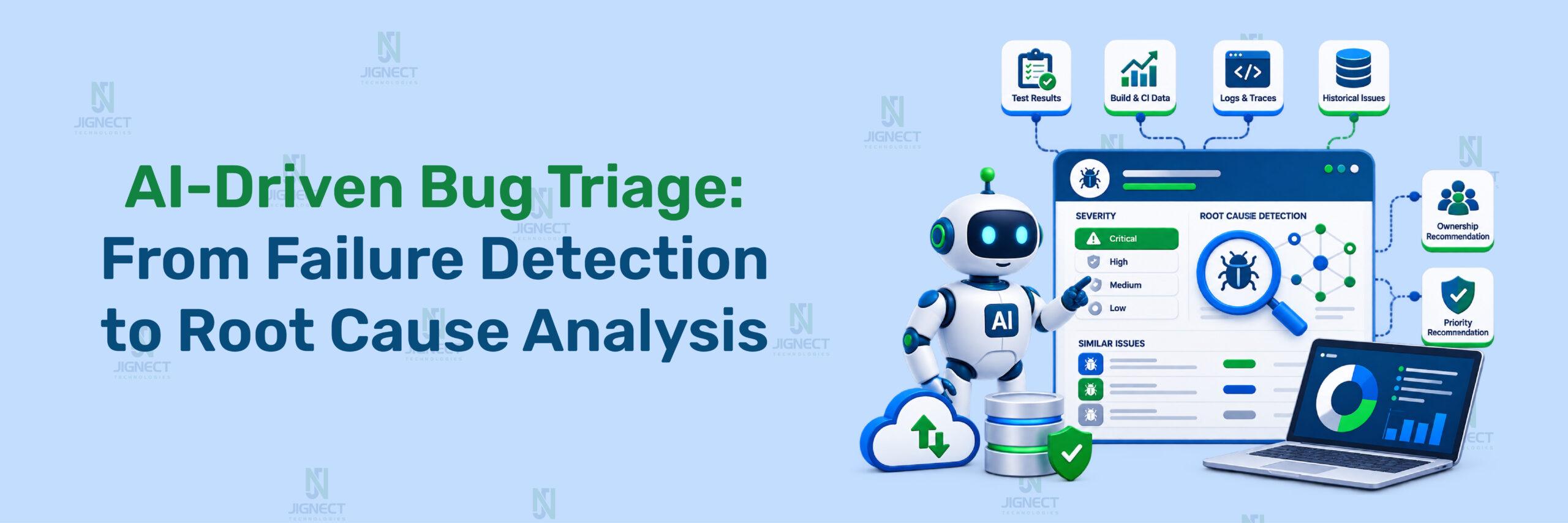
AI-driven bug triage uses machine-learning or generative-AI capabilities to analyze this information and produce recommendations. Depending on the implementation, it may summarize a report, suggest labels, identify similar historical issues, recommend severity or priority, assign ownership, or generate a probable root-cause hypothesis.
The system receives structured and unstructured evidence, such as a bug description, stack trace, test name, logs, screenshots, environment details, and previous issues. It then produces recommendations for fields such as component, severity, priority, duplicate likelihood, owner, and probable root cause.
The output is a recommendation, not automatically confirmed truth.
Core Capabilities
An AI-powered defect triage workflow can assist with:
- Failure classification: Categorizing a failure as an application, test-script, environment, network, data, or infrastructure problem.
- Bug severity classification: Estimating the operational or customer impact of a defect.
- Priority recommendation: Combining severity with customer impact, occurrence frequency, release risk, and service-level expectations.
- Duplicate detection: Comparing a new report with existing tickets, stack traces, error messages, and failure signatures.
- Ownership recommendation: Suggesting the responsible component or engineering team.
- Evidence correlation: Connecting logs, screenshots, network traces, stack traces, and execution history.
- Probable root cause analysis: Explaining which failure signal most likely caused the observed symptom.
For example, a checkout test may fail with an assertion that the confirmation page is missing. The visible symptom is a failed assertion. Additional evidence may show that the payment API returned HTTP 500, which is a stronger root-cause hypothesis than the assertion itself.
AI Triage Compared with Other Approaches
| Approach | Main strength | Main limitation | Suitable use |
|---|---|---|---|
| Manual triage | Handles ambiguous and high-impact cases with human judgment | Slow and difficult to scale | Security, production incidents, and unusual defects |
| Rule-based triage | Transparent and deterministic | Limited understanding of context and language variation | Stable routing rules and mandatory policy checks |
| Traditional ML | Efficient classification using historical data | Depends heavily on consistent labels and representative training data | Repetitive defect categories |
| LLM-assisted triage | Interprets unstructured descriptions and correlates multiple evidence types | Can produce unsupported explanations or excessive confidence | Evidence summarization and reviewer assistance |
| Hybrid triage | Combines deterministic controls with AI recommendations | Requires careful workflow design | Most production QA and engineering environments |
Choose rules when a decision must be deterministic. Choose AI assistance when the evidence is unstructured or distributed. Use a hybrid model when both auditability and contextual analysis are important, which is why many teams offering QA software testing services favor this approach for production-grade software testing pipelines.
Why AI-Driven Triage Matters
The Failure-Volume Problem
Modern teams collect failure data from CI pipelines, browser automation, mobile testing, API checks, observability systems, support channels, and deployment monitoring. A single failure may generate several alerts or tickets describing the same underlying problem.
Without intelligent defect management, engineers spend time on repetitive work:
- Reading the same stack trace across multiple tickets.
- Reproducing failures that are caused by a shared environment issue.
- Reassigning defects to the correct component.
- Separating flaky tests from product failures.
- Comparing new reports with historical incidents.
- Deciding whether a defect should block a release.
AI can reduce this initial analysis effort by extracting fields consistently and presenting the evidence that led to each recommendation.
The objective is not to eliminate triage. It is to move human attention toward uncertain, high-risk, or high-impact decisions, freeing engineers for deeper automation testing work.
Severity and Priority Are Different
Severity describes the effect of the defect. Priority describes how urgently the team should address it.
A data-loss issue may have critical severity and immediate priority. A minor visual defect may have low severity but receive higher priority before a customer demonstration. An AI workflow should store these fields separately rather than deriving one automatically from the other.
| Field | Question answered | Example |
|---|---|---|
| Severity | How serious is the technical or business impact? | Payment cannot be completed |
| Priority | How urgently should the team act? | Fix before today’s release |
| Reproducibility | Can the failure be reproduced consistently? | Fails on every run in staging |
| Component | Which area appears affected? | Payment API |
| Duplicate likelihood | Does a similar issue already exist? | Matches an open gateway timeout defect |
How AI-Driven Bug Triage Works
The Triage Pipeline
A practical automated bug triage workflow usually follows this sequence:
Failure or report intake
        ↓
Evidence normalization
        ↓
Failure classification
        ↓
Severity and priority recommendation
        ↓
Duplicate and similarity analysis
        ↓
Probable root cause analysis
        ↓
Owner recommendation
        ↓
Human approval or automated routing
        ↓
Feedback and evaluation
Each step should preserve the original evidence. The system should never replace the raw stack trace, logs, screenshots, or test artifacts with only an AI-generated summary.
AI Techniques Used in Triage
Different parts of the workflow can use different techniques.
- Natural language processing: Extracts meaning from titles, descriptions, comments, and support reports.
- Traditional classification: Predicts labels such as component, failure type, or severity from historical examples.
- Similarity search: Compares new reports with existing issues using text embeddings, stack traces, and error signatures.
- LLM analysis: Summarizes evidence, identifies relationships between signals, and generates a probable-cause explanation.
- Historical feedback: Uses reviewer corrections, resolution labels, and reopened issues to improve future recommendations.
A simple classifier may perform well when teams use stable categories such as frontend, backend, database, and infrastructure. An LLM may be more useful when reports contain varied language and multiple evidence types.
From Failure Evidence to Probable Root Cause
AI root cause analysis must distinguish between the first visible symptom and the event that most likely produced it.
Consider this chain:
Test assertion failed
        ↓
Confirmation page did not load
        ↓
Browser received HTTP 502
        ↓
Gateway could not reach payment service
        ↓
Probable cause: payment-service deployment or availability issue
The AI system should report this as a hypothesis supported by evidence. It should not state that the deployment is confirmed unless an engineer verifies deployment history, service health, and reproduction results.
A useful RCA output contains:
- Observed symptom.
- Relevant evidence.
- Candidate cause.
- Confidence or uncertainty indicator.
- Alternative explanations.
- Recommended next verification step.
- Related issues or historical failures.
Implementing an AI Bug Triage Workflow
The most reliable implementations begin with workflow design rather than model selection.
Standardize the Intake Schema
AI output quality is limited by input quality. A report containing only “checkout broken” gives the system little reliable context.
Use a structured record such as the following:
{
  "title": "Checkout confirmation page missing after payment",
  "description": "The order remains in processing after a successful card authorization.",
  "source": "automated-test",
  "environment": "staging",
  "build": "2026.08.24.1420",
  "component": "unknown",
  "severity": "unknown",
  "priority": "unknown",
  "steps_to_reproduce": [
    "Sign in as a customer",
    "Add an item to the cart",
    "Complete payment with an approved test card",
    "Observe the confirmation page"
  ],
  "expected_result": "The order confirmation page appears.",
  "actual_result": "The page remains in processing.",
  "evidence": {
    "status_code": 502,
    "error_message": "upstream connection failure",
    "test_name": "checkout_confirmation"
  }
}
Expected result: A downstream classifier can analyze consistent fields instead of extracting every detail from one unstructured paragraph.
Define Severity and Priority Rules
Create a written decision matrix before asking AI to predict labels.
For example:
- Critical: Data loss, security exposure, payment corruption, or a service-wide outage.
- High: A major workflow is blocked for many users, but a workaround may exist.
- Medium: A feature is degraded, with limited user or release impact.
- Low: Cosmetic, informational, or low-impact behavior.
Then define priority separately using factors such as:
- Customer impact.
- Number of affected users.
- Release proximity.
- Frequency.
- Workaround availability.
- Contractual or service-level obligations.
The AI may recommend values, but deterministic rules should override recommendations where policy requires it.
Add Classification and Duplicate Detection
Classification assigns a failure category. Duplicate detection compares the incoming report with historical issues.
A useful similarity record can include:
{
  "candidate_issue": "BUG-1842",
  "similarity_reasons": [
    "Same upstream connection failure",
    "Same payment-service component",
    "Same staging environment",
    "Same checkout test flow"
  ],
  "duplicate_likelihood": "high",
  "review_required": true
}
The system should not merge tickets solely because they contain the same phrase. “Timeout” may describe a browser wait, database query, network request, or test-runner problem. Similarity should consider component, evidence, environment, timing, and historical resolution.
Introduce Human Review
Human review should be mandatory when:
- Severity is critical or high.
- The confidence score is below the approved threshold.
- The report may expose customer, payment, or security information.
- The proposed owner differs from the established component owner.
- The AI suggests closing, merging, or deprioritizing an issue.
- The probable root cause has not been independently reproduced.
A reviewer should be able to see the input evidence, model output, confidence, alternatives, and final decision. This creates an audit trail and makes corrections useful for later evaluation.
Roll Out in Phases
A phased rollout limits operational risk:
- Shadow mode: Generate recommendations without changing tickets or routing.
- Assisted triage: Display suggestions to QA and engineering reviewers.
- High-confidence automation: Auto-populate low-risk labels or route repetitive issues.
- Expanded automation: Extend the workflow only after reviewing false positives, false negatives, and overrides.
Do not start with automatic closure or automatic reassignment of high-impact production incidents.
Practical Example: A Platform-Neutral Triage Classifier
A platform-neutral implementation should avoid pretending that a JSON object is a real vendor API request. The following example is a conceptual workflow record that can be mapped to Jira, GitHub Issues, ServiceNow, an internal defect system, or another platform.
Conceptual Input
This example demonstrates how a system might separate the visible symptom from evidence-based hypotheses.
{
  "failure_type": "application_or_infrastructure",
  "severity_recommendation": "high",
  "priority_recommendation": "high",
  "component_recommendation": "payment-service",
  "duplicate_likelihood": "medium",
  "probable_root_cause": "The payment service or its upstream dependency may be unavailable.",
  "supporting_evidence": [
    "The test received HTTP 502.",
    "The error message indicates an upstream connection failure.",
    "The failure occurs during payment confirmation."
  ],
  "alternative_hypotheses": [
    "Staging gateway configuration may be invalid.",
    "The test environment may have temporary network instability."
  ],
  "human_review_required": true,
  "next_verification_step": "Check payment-service health and deployment logs for the failing build."
}
Expected result: The record provides structured recommendations while explicitly retaining alternative explanations and a human-review requirement.
Decision Workflow
How it works: The severity_recommendation and priority_recommendation remain separate. The probable_root_cause is written as a hypothesis, and the next_verification_step tells the reviewer how to validate it.
Note: The JSON is conceptual. It is not a provider-specific API payload and should not be sent directly to a ticketing system without an integration contract.
Tools and Implementation Options
AI-driven triage is an approach rather than a single product. The correct option depends on where the evidence originates and which decisions need automation.
Issue-Management Triage
Issue-management workflows focus on incoming defect reports. They can classify descriptions, recommend severity, detect duplicates, and route issues to teams.
This category is useful when the largest problem is a growing backlog of manually reviewed tickets. The workflow should still preserve the original report and allow reviewers to override AI-generated fields.
Observability and Test-Failure RCA
Observability and test-intelligence tools focus on execution evidence rather than only ticket text.
These tools are not interchangeable:
| Category | Primary evidence | Main purpose | Example decision |
|---|---|---|---|
| Issue-management AI | Titles, descriptions, labels, comments | Classify and route defects | Assign to frontend team |
| Observability RCA | Errors, traces, releases, runtime context | Investigate production failures | Correlate error with release |
| Test-intelligence RCA | Test logs, screenshots, videos, DOM, network data | Explain automated test failures | Separate product defect from flaky test |
| Custom pipeline | Organization-specific historical data | Build tailored classification and routing | Predict component from internal labels |
Choose issue-management AI when ticket volume is the main bottleneck. Choose test-intelligence RCA when failure artifacts are rich and debugging automation failures consumes significant time. Use a custom pipeline when data residency, domain-specific labels, or internal routing logic requires tighter control.
Custom AI Pipelines
A custom architecture can combine:
- A structured intake service.
- A deterministic severity policy.
- A classifier for component and failure type.
- Similarity search for duplicate detection.
- An LLM for evidence summarization.
- A reviewer interface.
- An issue-management connector.
- Evaluation and audit storage.
Keep policy decisions outside the language model where possible. For example, a deterministic rule can prevent an AI recommendation from downgrading a confirmed security or data-loss issue.
Common Limitations and Pitfalls
Confusing Symptoms with Causes
A failed locator is often a symptom, not the root cause. The application may have changed its DOM, the page may not have loaded, or a backend request may have failed first.
The mitigation is to provide the AI with surrounding evidence, including network activity, screenshots, logs, test history, and application version information.
Incomplete Context and False Confidence
An AI system may produce a convincing explanation from incomplete data. Missing release information, absent logs, or an ambiguous error message can cause a wrong component or severity recommendation.
Use confidence thresholds, display supporting evidence, and require reviewers to approve uncertain decisions. A fluent explanation is not proof of correctness.
Flaky Tests and Duplicate Defects
Repeated failures do not automatically indicate a product defect. Timing issues, shared test data, browser instability, service dependencies, and infrastructure interruptions can create recurring failures.
Analyze failure history across runs and environments. A test that fails intermittently without a consistent product signal should be classified separately from a deterministic application failure.
Duplicate detection also requires caution. Similar wording does not guarantee the same underlying defect. Compare evidence and resolution history before merging or closing issues.
Sensitive Data and Permissions
Logs and screenshots may contain credentials, tokens, personal information, payment data, internal URLs, or customer identifiers.
Before sending evidence to an AI service:
- Redact secrets and authentication tokens.
- Remove unnecessary customer information.
- Apply least-privilege access.
- Restrict who can view production artifacts.
- Record what evidence was processed.
- Define retention and deletion rules.
- Prevent AI-generated actions from bypassing existing access controls.
Human approval does not replace security controls. It is an additional decision gate.
Best Practices for AI-Powered Defect Triage
Use the following practices when introducing intelligent defect management:
- Define labels before training or prompting: Document severity, priority, component, and failure-type definitions.
- Use structured inputs: Require reproducibility, environment, build, expected result, actual result, and evidence fields.
- Keep severity and priority separate: This prevents release urgency from being confused with technical impact.
- Preserve raw artifacts: Store original logs, screenshots, traces, and stack traces beside AI summaries.
- Use deterministic policy gates: Protect critical, security-sensitive, and data-integrity decisions from unrestricted model output.
- Start with recommendation-only mode: Measure quality before allowing automatic routing.
- Record confidence and rationale: Reviewers need to understand why a recommendation was made.
- Track overrides: A correction is valuable feedback about model or workflow quality.
- Separate test failures from product defects: Include environment, test, data, network, and infrastructure categories.
- Review high-impact actions manually: Do not automatically close, merge, downgrade, or suppress important issues.
- Redact sensitive evidence: Minimize data before it reaches an external model.
- Re-evaluate after system changes: New services, ownership changes, release patterns, and label definitions can reduce model accuracy.
- Integrate evidence sources carefully: More data is useful only when it is relevant, trustworthy, and correctly correlated.
Measuring Triage Quality
AI bug triage should be evaluated as a workflow, not only as a model.
Model and Workflow Metrics
| Metric | What it measures | Failure it reveals |
|---|---|---|
| Classification accuracy | Percentage of correct labels | General misclassification |
| Precision | Percentage of predicted labels that are correct | Excessive false assignments |
| Recall | Percentage of relevant cases correctly identified | Missed defects or duplicates |
| Duplicate-detection precision | Correctness of duplicate suggestions | Incorrect merges |
| Severity precision | Correctness of predicted severity labels | Over-escalation or under-escalation |
| Routing accuracy | Correctness of team or owner recommendations | Misassigned work |
| False-negative rate | Important cases missed by the system | Hidden defects or missed escalations |
| Human override rate | Frequency of reviewer corrections | Weak recommendations or unclear policy |
| Time to triage | Time from report creation to accepted classification | Workflow efficiency |
| Evidence completeness | Availability of supporting artifacts | Unverifiable recommendations |
Use a representative evaluation set containing normal bugs, flaky tests, infrastructure failures, duplicate reports, high-severity incidents, and ambiguous cases.
Review false negatives separately from false positives. A wrong low-severity recommendation for a cosmetic issue is not equivalent to missing a data-loss defect.
Human Review Metrics
Track whether reviewers can validate recommendations efficiently:
- Percentage of recommendations accepted without edits.
- Percentage escalated because evidence was insufficient.
- Time spent validating a recommendation.
- Frequency of incorrect root-cause hypotheses.
- Number of reopened or reclassified tickets.
- Frequency of duplicate merges that required reversal.
- Number of automated actions blocked by approval gates.
Review metrics over time rather than relying on a single evaluation period. Changes in the application, test suite, ownership model, and defect taxonomy can change results.
Real-World Use Cases
Production Error Triage
A production monitoring system detects a rise in failed requests after a deployment. AI groups similar errors, correlates the timing with the release, summarizes the affected endpoint, and recommends the responsible service.
The engineering reviewer should verify deployment history, service health, and impact before treating the recommendation as a confirmed root cause. Automated grouping can reduce repetitive investigation, but it should not suppress unrelated incidents that share only a generic error message.
Automated Test-Failure RCA
A CI pipeline reports a failed checkout test. The evidence includes a screenshot, browser console output, network requests, a stack trace, and the test’s recent run history.
AI categorizes the failure as a likely application or infrastructure issue, identifies the failed payment request, checks whether similar failures occurred in other tests, and suggests a probable cause. The QA engineer then verifies whether the payment service was unavailable or whether the test environment was misconfigured.
Customer-Reported Defect Routing
A support report says that users cannot export monthly reports. AI extracts the affected feature, customer impact, reproduction details, and likely component. It compares the report with open defects and recommends routing to the reporting or data-processing team.
The support or QA reviewer should confirm the customer impact and remove sensitive information before the report is processed. Priority should reflect affected customers, contractual obligations, and release commitments rather than the wording of the report alone.
Conclusion
AI bug triage can assist across the complete defect workflow: failure classification, bug severity classification, priority recommendation, duplicate detection, evidence correlation, probable root cause analysis, and routing. The most reliable workflow separates severity from priority, symptoms from causes, and recommendations from confirmed diagnoses.
Start with structured intake data and deterministic policy rules. Then introduce AI in shadow mode, measure classification and routing quality, and gradually automate low-risk decisions. Keep human review for high-impact, uncertain, security-sensitive, or potentially destructive actions.
The right approach is usually hybrid: use rules for policies that must be predictable, AI for unstructured evidence and similarity analysis, and experienced reviewers for final decisions, backed by a dependable QA company offering managed testing services that understands both automation and engineering judgment.
Witness how our meticulous approach to tools, technologies, and quality engineering can support reliable QA workflows through Tools & Technologies and QA Services.
If you would like to learn more, reach out to us.
Happy Testing 🙂