
Starting a career in Quality Assurance (QA) can feel overwhelming. You learn tools, workflows, and testing terms but real confidence comes from practicing the same scenarios users face every day.
Testing scenarios are practical, real-world situations that help you validate product behavior, uncover defects, and confirm the app meets user expectations. Whether you’re testing a login form manually or running automated regression suites, scenarios help you build strong testing instincts.
In this guide, you’ll learn the most essential QA test scenarios, how to apply them, how to prioritize them, and which beginner-friendly tools can help you practice faster.
Why Every QA Should Learn Common Testing Scenarios
The process of becoming a Quality Assurance (QA) engineer brings you to an exciting starting point which also presents some challenges. You must study numerous tools while memorizing their many terms and tracking their fast-changing technologies. The reality is that testing excellence requires testers to develop their skills through testing experience which they can gain from practical testing situations.
The foundation of QA work rests on testing scenarios. The testing scenarios show the actual conditions that customers will encounter when they use your software. The practice of these scenarios will establish you as a confident worker who develops skills to identify problems before they reach production.
You can view it this way:
- Do users of banking applications enter their passwords correctly when they log in? Users do not enter their passwords correctly. Your job as a QA requires you to test the outcomes when users enter their password incorrectly or when they cannot remember their password or when they make several incorrect attempts.
- The Black Friday shopping app will experience heavy usage throughout the entire sale. Many customers will proceed to purchase items at exactly the same time through the “Buy Now” option. Your application will face a disastrous crash because of this untested situation which represents the most critical moment for your customer operations.
The practice of these common testing scenarios enables you to develop software that operates correctly while delivering dependable performance which can handle real-world situations.
How Practicing Scenarios Builds Confidence and Skills
Your process of testing real-world situations requires more than checklist procedures because you need to develop your testing instinct. Your analytical thinking skills will improve through your study of each scenario, which also helps you predict problems better and work together with developers and stakeholders more effectively.
The following process shows how consistent practice transforms novices into proficient quality assurance testers.
- Build a Strong Foundation
You will achieve software behavior understanding through initial testing which includes basic functional testing that checks login processes and form validation and data entry procedures. The basic testing foundation enables smoother learning for advanced testing methods which include API testing and performance testing and security testing.
- Example: Testing a registration form through manual testing allows you to check its ability to accept valid email addresses and its capacity to block weak passwords while it fails to process incomplete registration forms.
- Improves Bug Detection Skills
The practice of repeating scenarios improves your ability to think like users while you develop skills to identify rare usage situations that most people fail to notice.
- Example: Testing a flight-booking application requires you to test more than ticket booking functionality. The production environment becomes vulnerable to these bugs because people fail to identify them during testing.
- Boosts Confidence with Tools and Automation
The test results of your automated scripts will show their actual performance when you create tests which have real value.
- Example: Pre-coded tests usually contain too many redundant assertions. Running through test cases manually often remediates much of that issue.
- Enhances Collaboration and Communication
Your QA credibility increases when you explain testing scenarios to developers and product managers and clients. The solution enables teams to resolve problems more quickly while it also prevents miscommunication during both sprint reviews and release planning sessions.
- A competent QA professional uses this statement to describe checkout failures on the website: “When a user enters an invalid promo code during checkout, the system doesn’t display the expected error message – it shows a blank page instead.”
- Prepares You for Real-World Challenges
Every project has its own distinct requirements. The more testing scenarios you practice, the better you will handle unique challenges on new projects which involve testing a fintech app and a gaming platform and an e-commerce site during its peak sales period.
- Example: A QA who has worked load testing for a news site can easily transfer his skills to test an educational application which needs to support thousands of students logging in during examination times.
Key Takeaway
Testing scenarios serve as the connection point which links theoretical knowledge with practical application. The platform provides novice users a secure environment which enables them to acquire knowledge while experimenting and developing their skills. The testing environment allows experienced QAs to improve their operational skills while maintaining their expertise in an industry which undergoes daily changes.
The process of practicing common testing scenarios together with their analysis and repetition helps you develop into an exceptional QA engineer who identifies problems before they arise and delivers top-quality software that meets user standards.
QA Basics for Beginners
Before testing cases, it is necessary to master QA fundamentals. The protection of software systems requires knowledge of QA engineer duties and SDLC operations and the identification of differences between test scenarios and test cases and test scripts.
What Does a QA Engineer Do?
The QA engineer protects software quality through all stages of software development which includes their work with testing and their testing evaluation process. The team needs to verify that all software releases operate correctly and deliver dependable performance while creating an optimal user experience.
Great QA engineers demonstrate their skills through their ability to find bugs and their user-centered approach which they use to develop solutions that prevent production problems from occurring.
Key responsibilities of a QA engineer include: –
- It is crucial that the team put their requirements to be tested by their tests that point out potential risks and absent requirements.
- All team members insisted that a decently comprehensive test plan was quickly crafted with a redoubtable variety of manually executed and automated testing scripts.
- The testing process verifies if the software is running as per the intended design. The team has to prepare bug reports that provide clear information to assist the developers. The testing process verifies if the software is running as per the design specifications established. The team has to prepare bug reports that provide clear information to assist the developers.
- Collaboration is a team member requirement to drive quality improvements along with engineers, designers, and product managers towards team objectives.
- Example: Suppose a banking app is about to roll out a new functionality for transferring funds across the globe. As a QA engineer, your job is not only to verify whether the “Send Money” button is functional but also to test the following:
- The exchange rates are shown correctly.
- The transaction is successful even when the internet speed is slow.
- The user gets the correct error messages when they enter incorrect account details.
- The main job of QA engineers involves solving problems which they need to accomplish as their primary work duty. When testing real-world problems, they must use solutions testing method which helps them to enhance product quality. Simultaneously, software protection must be ensured for the end users; it should be done within the confines of the safety benchmarks they work with.
Understanding the Software Development Life Cycle (SDLC)
To be an effective QA professional, you need to learn the complete knowledge of the SDLC, which defines the software development life cycle and how software development takes place from concept to delivery.
The SDLC process and its testing elements, which encompass QA, can be explained as follows:
- Planning: Influence on the team – strategy, objectives, and goals of the project.
- QA Role: Once there is the gathering, make any interpretation or differential risk arising seen.
- Design: Architects and designers formulate blueprints to build the application.
- QA Role: One can start to prepare advanced-level test mock-ups grounded on early portable schemes.
- Development: Therefore, developers write code and turn it into main features.
- QA Role: Working closely with developers to create testing environments and prepare required testing data.
- Testing: A QA team responsible for validating application behavior, performance, security, and usability.
- QA Role: The process requires executing both manual tests and automated tests while documenting all identified bugs and conducting tests again after developers implement their solutions.
- Deployment: The software is deployed to the production environment and made available to end users.
- QA Role: Conduct smoke tests or sanity checks to verify that the release is stable.
- Maintenance: Continuous monitoring and updates are carried out after the launch.
- QA Role: Validate new patches, updates, and bug fixes to ensure ongoing quality.
- Example: Let’s say your company is building an e-commerce platform. As the app moves through each SDLC phase, you’re there ensuring that:
- Requirements match user needs during planning.
- Payment workflows are covered in design scenarios.
- Cart functionality and discounts are tested during development.
- Post-release, bug fixes like incorrect coupon codes are validated quickly.
- Understanding the Software Development Life Cycle (SDLC) is an important skill that informs one about the testing needs and helps in developing cases rather than just reacting to issues when they appear.
The Difference Between Test Scenarios, Test Cases, and Test Scripts
For beginners, these terms can be confusing – but understanding them is crucial because they form the language of QA.
- Test Scenarios
A Test Scenario is a high-level description of what you are looking to test. It focuses on what to test, rather than how to test it.
- Example: “verify that the login functionality of the application is working.”
- Why It’s Important: It’s the test scenarios that assist in understanding all the potential flow in the user´s viewpoint.
- Test Cases
A test case is a detailed set of steps to validate a specific function or feature. It includes the input data, expected output, and actual results.
- Example:
- Scenario: Verify login functionality
- Test Case:
- Open the login page.
- Enter a valid email and password.
- Click on the “Login” button.
- Verify that dashboard loads successfully.
- Why It’s Important: Test cases do the job of making your testing exercises repeatable as well as reliable in such a manner as to guarantee uniform quality across multiples builds.
- Test Scripts
The test script functions as a coding element which operates through an automated system to execute predefined test cases with Selenium, Cypress, or Playwright.
- Example: The automated system runs the login test case through complete credential input and login button activation, which leads to automatic page verification.
- Why It’s Important: Test scripts deliver time savings and operational efficiency because they complete repeated tests with greater speed and precision than human testers.
Quick Comparison Table
| Aspect | Test Scenario | Test Case | Test Script |
| Definition | High-level description of what to test | Step-by-step instructions for testing | Automated code to execute test cases |
| Focus | What to test | How to test | Automating the how |
| Example | Verify login functionality | Steps to test login manually | Code to test login automatically |
| Complexity | Low | Medium | High |
Pro Tip for Beginners
Start by writing clear test scenarios and test cases manually before jumping into automation. This approach helps you understand the logic and flow of the application, making your future automated scripts far more effective and meaningful.
Common Testing Scenarios to Master
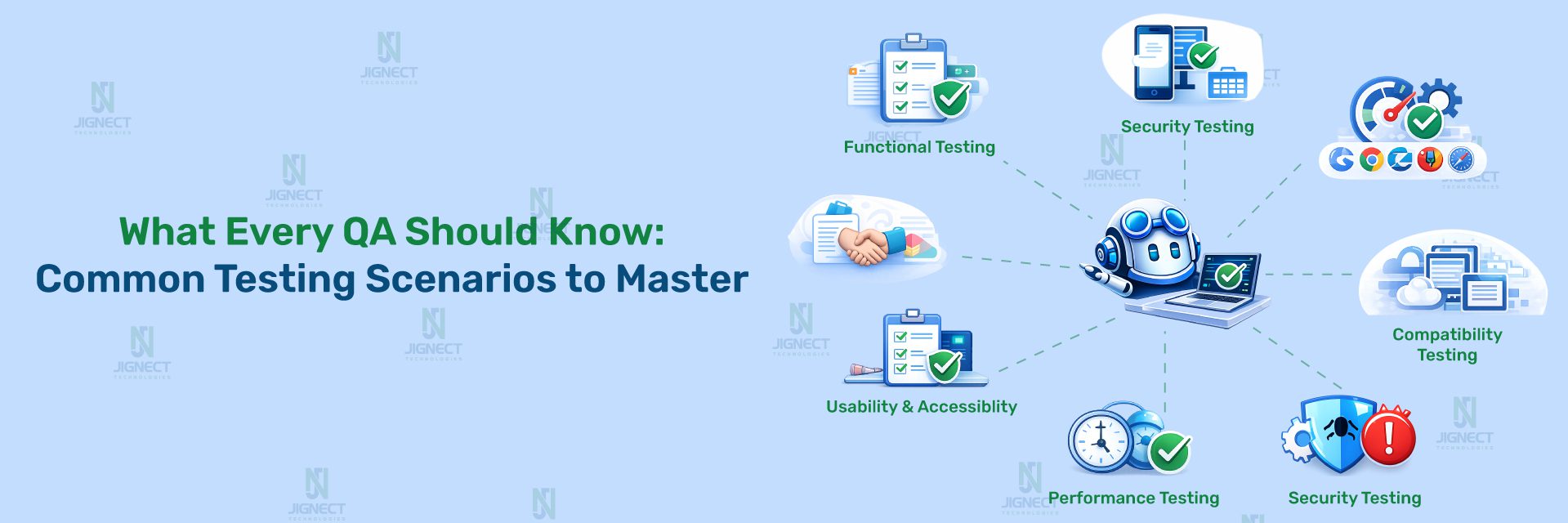
If you want to grow as a QA engineer, mastering real-world testing scenarios is non-negotiable. These scenarios prepare you to identify bugs faster, build reliable workflows, and deliver quality software users can trust.
Below, we’ll explore the most common testing scenarios, explain why they matter, and share practical examples to help you understand how to apply them in everyday QA tasks.
Functional Testing Scenarios
Functional testing ensures that the application does what it’s supposed to do. It focuses on validating features, workflows, and business requirements.
- Login and Signup Validations
Every application today – from banking apps to e-commerce platforms – relies on authentication. As a QA engineer, your job is to validate that login and signup workflows work correctly and securely.
- Key scenarios to test:
- Valid credentials allow users to log in successfully.
- Invalid credentials trigger proper error messages.
- Password reset and email verification flows function correctly.
- Account lockout after multiple failed attempts.
- Example:
Imagine testing an online learning platform. You’d check not only if a student can log in with valid credentials, but also what happens when:
- They forget their passwords.
- They try to log in using the wrong email format.
- They attempt to log in after their account is locked due to suspicious activity.
- Form Field Validations
Forms are everywhere – contact forms, checkout pages, and onboarding flows. Testing form validation ensures accurate data input and error handling.
- Key scenarios to test:
- Required fields cannot be left blank.
- Correct input formats (e.g., email, phone, postal code) are enforced.
- Error messages are clear and specific.
- Boundary conditions, minimum and maximum character lengths.
- Example:
- While testing a job portal, you might validate that:
- The email field rejects inputs without @.
- Passwords meet strength requirements.
- Phone numbers are validated for country codes.
- Data Entry and Output Checks
This scenario focuses on validating that data entered into the system is stored, processed, and displayed accurately.
- Key scenarios to test:
- Data is saved correctly in the database.
- Output matches input when retrieved.
- System handles large datasets without errors.
- Example:
When testing a hospital management system, entering a patient’s medical details should result in the exact same data appearing in reports, dashboards, or exports – without corruption or truncation.
Usability Testing Scenarios
Usability testing ensures that your application is user-friendly, intuitive, and efficient to navigate.
- Testing Navigation and User Flows
A good application flow helps users’ complete tasks without confusion. As a QA, you need to test if menus, buttons, and workflows are easy to understand and use.
- Example:
- On a shopping site, check that:
Adding products to the cart is straightforward.
- Users can find the checkout button easily.
- There are no dead-end pages or broken links.
- Verifying Responsiveness Across Devices
Modern users access applications on phones, tablets, desktops, and even smart TVs. Testing responsiveness ensures the interface looks and works perfectly everywhere.
- Example:
Testing a travel booking website on:
- A desktop browser with a large monitor.
- A mid-range Android phone.
- An iPad in portrait and landscape mode.
- Ensuring Accessibility for Every User
Accessibility testing ensures your app can be used by people with disabilities, creating an inclusive experience.
- Example: For an education platform, verify that:
- Screen readers can interpret the content correctly.
- Keyboard navigation works for all actions.
- Color contrast is suitable for visually impaired users.
Performance Testing Scenarios
Performance testing ensures that your software performs reliably under expected and extreme conditions.
- Basic Load Testing
Load testing checks how the system behaves under normal usage conditions.
- Example:
For a music streaming app, simulate 1,000 users of streaming songs simultaneously to ensure consistent playback quality.
- Stress and Endurance Testing for Beginners
Stress testing pushes the system beyond its limits, while endurance testing checks long-term stability under continuous load.
- Example:
- Stress test: Push a news website with 10x normal traffic during a breaking news event.
- Endurance test: Simulate consistent traffic over 48 hours to monitor memory leaks or slowdowns.
Security Testing Scenarios
Security testing ensures that your application is safe from vulnerabilities and threats.
- Checking Authentication and Authorization
Authentication ensures users are who they say they are, while authorization ensures they only access what they’re allowed.
- Example:
In a banking app: – Ensure customers cannot access another user’s account data. – Verify that expired sessions log users out automatically.
- Awareness of SQL Injection and XSS
Cybersecurity risks like SQL injection and Cross-Site Scripting (XSS) can lead to data leaks or account takeovers.
- Example:
When testing a search box, input malicious code snippets to ensure they are properly sanitized and don’t expose sensitive data.
Compatibility Testing Scenarios
Compatibility testing ensures your software works seamlessly across different browsers, operating systems, and devices.
- Cross-Browser Checks
Test your app across multiple browsers to ensure consistent performance.
- Example:
Check that a signup page renders correctly on Chrome, Firefox, Safari, and Edge – with all buttons and fields functional.
- Device and Operating System Variations
Different devices and OS versions can cause unexpected bugs if not tested properly.
- Example:
A fitness app may behave perfectly on iOS 17 but crash on Android 12 if compatibility testing is skipped.
Integration Testing Scenarios
Integration testing validates that different modules and services work together smoothly.
- Testing APIs and Web Services
APIs connect your app to databases, payment systems, and third-party services. Testing APIs ensures data flows correctly between systems.
- Example:
For a food delivery app, test the API flow for:
- Placing an order.
- Updating delivery status.
- Processing refunds.
- Validating Third-Party Integrations
Many applications rely on external services – like payment gateways or email providers – that need thorough testing.
- Example:
In an e-commerce app, validate that the PayPal integration:
- Redirects users correctly.
- Handles declined transactions gracefully.
- Send accurate payment confirmation details.
How to Prioritize Your Testing Scenarios
As a QA engineer, one of the most important skills you’ll develop is knowing what to test first. Not every bug is equally critical, and not every feature needs the same level of attention during testing.
By learning to prioritize your testing scenarios, you can make sure you’re spending your time and resources on the areas of the application that impact users and the business the most. Here’s how to do it effectively:
Identifying Critical User Journeys
Every application has core workflows – the paths users take to achieve their primary goals. These workflows are called critical user journeys, and they should be your top priority during testing.
How to identify critical journeys:
- Talk with product managers and developers to understand which features drive the most value.
- Analyze user behavior or analytics data to find the most commonly used paths.
- Look for workflows that, if broken, would cause immediate frustration or financial loss.
- Examples:
- In an e-commerce app: Browsing → Adding items to the cart → Checkout → Payment confirmation.
- In a banking app: Logging in → Checking balance → Transferring money → Logging out.
- In a learning platform: Logging in → Starting a course → Tracking progress → Taking quizzes.
By focusing on these critical paths first, you ensure that the core functionality users rely on is always stable, even if less-used features need more time for testing.
Risk-Based Testing for Beginners
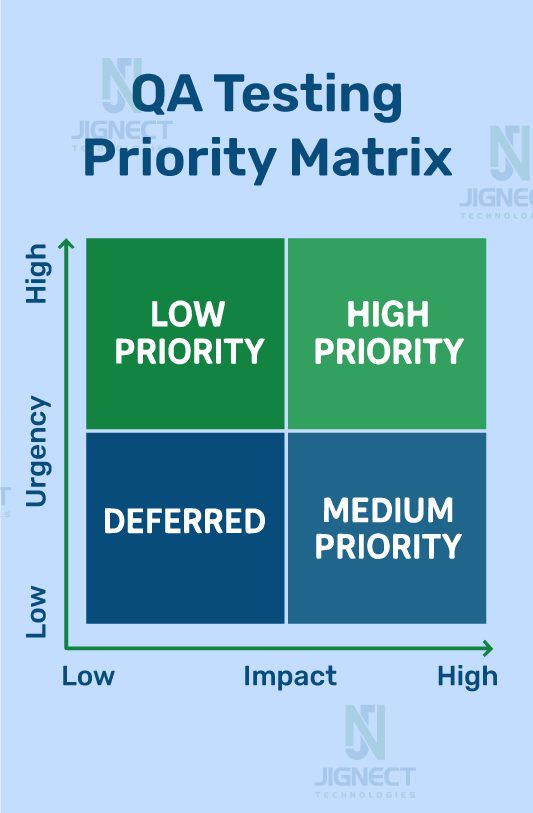
Not all features have the same risk level. Risk-based testing is a strategy where you prioritize testing scenarios based on the likelihood of failure and the impact of failure.
How to apply risk-based testing:
- Identify high-risk areas
Look for modules with frequent changes, complex code, or integrations with other systems.
- Assess impact
Ask yourself:
- Will a bug here affect revenue?
- Could it compromise security or user trust?
- Does it affect a high percentage of users?
- Prioritize accordingly
Test high-risk, high-impact areas first, then medium-risk, and finally low-risk areas if time permits.
Example:
Imagine you’re testing a fintech app that has both a balance inquiry feature and a fund transfer feature.
- If a balance inquiry fails, users might be slightly inconvenienced.
- But if fund transfers fail, the business risks losing trust and revenue.
In this case, the fund transfer feature would take top priority for thorough testing.
Pro Tip: Keep a risk matrix – a simple chart mapping features by risk and impact – to help your team visualize and agree on priorities during planning.
Mapping Scenarios to Business Goals
Great QA testing isn’t just about finding bugs; it’s about ensuring the software supports business objectives. Mapping your scenarios to the company’s goals keeps your testing aligned with the bigger picture.
How to align testing with business goals:
- Understand key performance indicators (KPIs) for the project.
- Identify features tied to revenue, customer satisfaction, or compliance.
- Ensure high-priority scenarios test those mission-critical areas thoroughly.
Examples:
- E-commerce site: If the goal is to increase conversions, prioritize testing the checkout experience, payment integrations, and coupon logic.
- Healthcare portal: If compliance with regulations like HIPAA is the priority, focus on data security and privacy testing.
- SaaS platform: If the goal is to improve user retention, prioritize testing onboarding flows and core engagement features.
When your testing scenarios are mapped to business goals, your role as a QA becomes more strategic. You’re not just finding bugs; you’re helping the business achieve success through quality.
Quick Takeaways :
- Always start with critical user journeys to secure essential workflows.
- Use risk-based testing to decide where to focus on limited time and resources.
- Align testing priorities with business goals to deliver meaningful results.
Building Strong QA Habits
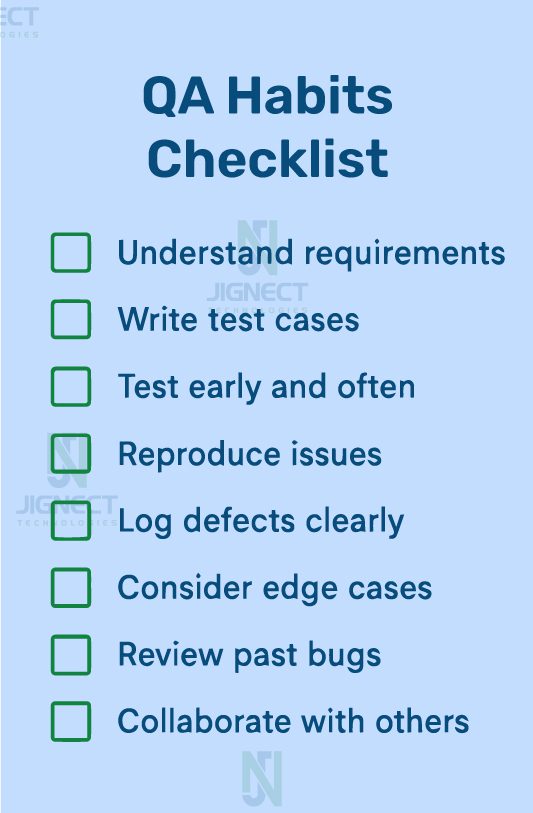
Becoming a great QA engineer isn’t just about learning tools or writing perfect scripts – it’s about building strong habits that make your testing organized, efficient, and valuable to your team. Good habits don’t just help you catch bugs faster; they help you grow from a beginner tester into a trusted QA professional.
Here are three key habits that every QA engineer should master:
Keeping Test Scenarios Organized and Updated
Your test scenarios are like your toolbox – they need to be well-organized and kept up to date to be effective. As applications evolve, old test cases can quickly become outdated, leading to wasted effort or missed bugs.
How to stay organized:
- Use test management tools like TestRail, Zephyr, or even simple spreadsheets for smaller projects.
- Group scenarios logically – for example, by modules like Login, Payments, or User Dashboard.
- Review and update your scenarios regularly, especially after every sprint or major release. – Archive or label outdated scenarios so you’re not running irrelevant tests.
Example:
Imagine you’re testing an e-commerce website. Initially, your checkout scenarios cover credit card payments only. But now, the platform supports wallets, coupons, and gift cards. If you don’t update your test scenarios, you might miss critical issues, like a coupon failing during checkout or a wallet payment not processing.
Pro Tip: Treat your test scenarios like living documents. Regular reviews keep them accurate, saving time, and preventing confusion in fast-moving projects.
Documenting Results Clearly
Clear and detailed documentation is the difference between a good QA engineer and a great one. Developers, managers, and even clients rely on your bug reports and test results to make data-driven decisions.
What clear documentation includes:
- Summary of the issue – short and to the point.
- Steps to reproduce – numbered, clear steps that anyone can follow.
- Expected vs. actual results – to highlight the gap clearly.
- Screenshots, videos, or logs – visual proof that speeds up debugging.
Example:
Instead of writing:
“The payment page is broken.”
Write:
“When a user applies a coupon during checkout and clicks ‘Pay Now’, the payment page freezes and does not redirect to the confirmation page. This occurs on Chrome 116 and Safari 17, but not Firefox. Logs attached.”
This clear documentation allows developers to reproduce and fix the bug faster, saving everyone time.
Communicating Effectively with Developers and Stakeholders
Testing is a team sport. A strong QA doesn’t just find bugs; they communicate effectively with everyone – developers, designers, product managers, and sometimes even clients – to ensure issues are understood and resolved efficiently.
How to communicate better:
- Be specific and constructive when reporting issues – avoid blaming language.
- Prioritize bugs by explaining their impact on users or the business.
- Keep stakeholders updated on testing progress, especially during critical release phases.
- Join sprint planning and daily stand-ups to stay aligned with the team.
Example:
Bad communication:
“The profile update feature isn’t working. Fix it.”
Good communication:
“The profile update form is not saving changes when the email field includes a plus sign (e.g., john+test@gmail.com). This is blocking sign-ups for users using Gmail filters and impacts ~15% of our user base.”
This approach makes you a valuable collaborator, not just someone reporting problems.
Why These Habits Matter
Building these habits doesn’t just make you a better tester – it makes you a key contributor to your team’s success.
- Organized scenarios save time and effort.
- Clear documentation leads to faster bug fixes.
- Effective communication builds trust and collaboration across teams.
Think of it this way: a QA engineer with strong habits is like a good pilot – organized, clear, and collaborative, ensuring a smooth journey for the entire team.
Tools Every Beginner QA Should Try
No matter how skilled you are, a QA engineer is only as good as the tools they use. The right tools help you work smarter, faster, and with greater accuracy, even when you’re just starting your QA journey.
In this section, we’ll explore beginner-friendly tools across three categories:
- Functional and API testing
Each tool listed here is easy to learn, popular in the industry, and perfect for beginners who want to build confidence without feeling overwhelmed.
Simple Tools for Manual Testing
When you’re new to QA, manual testing is where you’ll build your foundation. Manual testing tools are simple to use and help you organize test cases, document results, and track bugs efficiently.
- Asana (for test planning)
If you’re starting out and need to organize test scenarios without complex platforms, Asana is perfect.
- Use Case: Create projects for modules like Login, Payment, or Checkout to track test progress visually with tasks, assignees, and due dates.
- Why It’s Great: Simple, visual, and free to use for beginners — with built-in task tracking, progress views, and team collaboration features.
- Example: You can set up a Board view in Asana to track testing tasks:
- To Do → In Progress → Blocked → Completed.
- Google Sheets or Excel (for test case management)
Spreadsheets are classic for writing and tracking test cases, especially for small projects.
- Use Case: Document test case IDs, steps, expected results, and status in a clean, shareable format.
- Why It’s Great: Familiar interface and easy collaboration for teams. Example: Create a sheet for login scenarios with columns like:
- ID | Scenario | Steps | Expected Result | Status.
- Jira (with Zephyr or Xray plugins) (for bug tracking) Even as a beginner, learning Jira is valuable because it’s used by most QA teams globally.
- Use Case: Log bugs, assign tasks, and track progress during sprints.
- Why It’s Great: Industry-standard integrates with other tools and prepares you for real-world workflows.
Example: Instead of sending bugs over email, log them in to Jira with clear steps, attachments, and priority tags for developers.
Easy-to-Use Tools for Functional and API Testing
As you grow, you’ll need to validate application functions and APIs. Here are beginner-friendly tools that don’t require deep coding knowledge.
- Postman (for API testing)
Postman is the go-to tool for API testing and an absolute must-learn for QA engineers.
- Use Case: Validate endpoints, send requests, and verify responses.
- Why It’s Great: Easy-to-use interface and plenty of tutorials for beginners.
- Example: If you’re testing a food delivery app, you can use Postman to:
- Fetch the restaurant list.
- Place an order using an API request.
- Check if the payment response is correct.
- Swagger (Open API) (for API documentation and testing)
Swagger helps you understand and interact with APIs easily.
- Use Case: Review API endpoints and test them directly through a user-friendly interface.
- Why It’s Great: Great for beginners to explore how APIs work without writing complex scripts.
Beginner-Friendly Automation Options
Once you’ve mastered manual and basic functional testing, it’s time to dip your toes into automation. Automation testing helps you run tests faster, more consistently, and at scale.
- Selenium WebDriver (for browser automation)
Selenium is the foundation of modern automation and a skill every QA engineer should know.
- Use Case: Automate repetitive test cases like login, form submissions, or cart flows.
- Why It’s Great: Free, open-source, and widely used in the industry.
- Example: Automate a checkout flow: add an item to the cart, apply a coupon, complete the payment, and verify the confirmation page.
- Cypress (for modern web testing)
Cypress is loved for its simple setup and powerful features, especially for testing modern web apps.
- Use Case: Test end-to-end workflows with real-time debugging.
- Why It’s Great: Developer-friendly, fast, and easy to learn.
- Example: Test a signup flow in an e-commerce app while watching the steps execute in real time in the browser.
- Playwright (for cross-browser automation)
Playwright is a new-generation automation tool that supports multiple browsers and devices.
- Use Case: Automate scenarios for web apps on Chrome, Firefox, and Safari.
- Why It’s Great: Easy for beginners but powerful enough for advanced workflows.
Tips for Choosing the Right Tool
- Start simple: Begin with tools like Google Sheets, Postman, or Katalon before moving to advanced automation tools.
- Focus on your project’s needs: E-commerce? Learn Postman and Cypress. Banking app? Focus on security testing tools.
- Learn gradually: Master one tool at a time rather than trying to learn everything at once.
Pro Tip
Don’t just learn the tool – practice with it. Pick a project – even a simple to-do list app – and build real test cases. The more you practice, the more confident you become, and your portfolio will reflect your hands-on skills.
Leveling Up as a QA
Mastering the basics of manual testing is just the beginning of your journey as a QA engineer. To truly grow and stand out, you need to level up your skills – moving beyond basic scenarios into automation, data-driven testing, metrics analysis, and continuous learning.
Think of this phase as the bridge between being a beginner tester and becoming a high-value QA professional that teams rely on for quality, efficiency, and innovation.
When to Start Automating Your Scenarios
Automation is one of the most valuable skills for QA engineers today. But the key is knowing when to start. Rushing into automation without a strong understanding of manual testing workflows often leads to brittle scripts and wasted time.
When you’re ready to start automation:
- You can write and follow clear test cases manually.
- You understand the core flows of your application, including edge cases.
- You’ve practiced organizing your scenarios to match business needs.
Where to start:
- Begin with repetitive test cases that consume a lot of manual time, such as login tests, checkout flows, or form validations.
- Use beginner-friendly tools like Katalon Studio or TestProject to build confidence.
- Gradually transition to more advanced frameworks like Selenium, Cypress, or Playwright.
Example:
If you test a shopping cart manually every day – adding products, applying discounts, and checking out – it’s time to automate that scenario. Your script can run in minutes and free you to focus on exploratory or high-risk testing.
Pro Tip: Always prioritize stable, predictable workflows for automation first. Complex or frequently changing modules should be left for manual testing until they stabilize.
Learning to Analyze Test Results and Metrics
As you grow in QA, it’s not just about finding bugs – it’s about understanding and interpreting test results to help your team make better decisions. Data-driven insights separate average QAs from great ones.
Key metrics to monitor:
- Pass/Fail Ratios: Know how many tests are passing vs. failing during each run.
- Defect Density: Understand how many bugs exist per feature or module.
- Test Coverage: Identify gaps in your scenarios to prevent missed defects.
- Execution Time: Measure how long manual and automated runs take to optimize efficiency.
Example:
During a sprint review, imagine telling your team:
“Out of 120 automated regression tests, 10 failed, and 8 of those are tied to the payment gateway module. This indicates a recurring issue after the last API update.”
That level of detail earns trust and helps developers fix issues faster and smarter.
Tools to help analyze results:
- TestRail or Zephyr: For structured reporting.
- Jenkins dashboards: For tracking automation runs.
- Allure Reports or ExtentReports: For visual, easy-to-read reports.
Continuous Learning and Staying Up to Date with QA Trends
The QA world evolves fast. New tools, frameworks, and techniques appear every year. To stay relevant and grow in your career, continuous learning is not negotiable.
How to keep learning:
- Follow QA Communities: Join platforms like Ministry of Testing or Reddit QA forums for discussions and resources.
- Enroll in Courses: Platforms like Udemy, Coursera, or Test Automation University offer beginners to advanced QA courses.
- Read and Research: Follow QA blogs, tool documentation, and official release notes.
- Attend Meetups or Conferences: Networking exposes you to real-world challenges and new solutions.
Example:
A QA engineer who stayed up to date with Cypress when it gained popularity was able to transition their team to faster, more reliable automation, while others still struggled with legacy tools.
Pro Tip:
Set aside 30 minutes a day to learn something new – a new command, a framework feature, or even just reading case studies from industry leaders.
Mindset for Growth
To truly level up, adopt a growth mindset:
- Be curious and ask questions.
- Experiment with tools and frameworks in a sandbox environment.
- Treat every bug report or failed test as an opportunity to learn.
Quote to Remember:
“A great QA isn’t defined by how many bugs they find, but by how well they help prevent them.”
Conclusion
In today’s fast-paced world of software testing, mastering common testing scenarios is the foundation of becoming a reliable QA engineer. It’s not just about running scripts – it’s about understanding workflows, anticipating user behavior, and testing with purpose.
Start by building strong manual testing skills, practicing real-world scenarios like logins, API validations, and performance checks, and then gradually moving toward automation and data-driven testing. This approach keeps your skills sharp, and your testing frameworks flexible as projects evolve.
Great QA engineers don’t just find bugs – they prevent them. By staying curious, practicing consistently, and adopting smart testing habits, you’ll grow from a beginner to a trusted quality advocate, ensuring every product you test is reliable, scalable, and user-friendly.
Witness how our meticulous approach and cutting-edge solutions elevated quality and performance to new heights. Begin your journey into the world of software testing excellence. To know more refer to Tools & Technologies & QA Services.
If you would like to learn more about the awesome services we provide, be sure to reach out.
Happy Testing 🙂