
Something predictable happens in QA teams about six months after they adopt AI tools. Initial excitement gives way to quiet frustration. Engineers use the tools for a sprint or two, get mixed results, and slowly drift back to their old workflows. By the time leadership notices, the tools are barely being used at all.
Ask those engineers what went wrong and you hear a familiar answer. The output was too generic. It did not understand their application. They spent more time editing than it would have taken to write it themselves.
They are not wrong. But the diagnosis is incomplete.
The AI tool is not the failure. The approach to using it is. This is a point we explored in depth in our guide to prompt engineering for QA, and it holds true regardless of team size or industry. And the gap between those two things is significant enough to determine whether AI becomes a real productivity multiplier for your team or just an expensive experiment that quietly fades.
Here is the pattern we see most often. A QA engineer types something like “Generate test cases for the payment module” and gets back a tidy list of scenarios. Happy path covered. A few negative cases. Looks reasonable at first glance. But when you look closely, there is nothing about your multi-currency rules, nothing about retry logic after gateway timeout, nothing about the edge case where a discount brings the order total below the minimum threshold. The model gave a perfectly generic answer to a perfectly generic question.
That is not a capability problem. It is a context problem.
AI is not failing QA teams. The absence of structured, reusable, governed prompt systems is. Individual engineers using AI well is an experiment. Teams using it consistently and measurably is a capability. The difference between those two things is a prompt library.
This playbook is about building that capability. It is written for QA engineers, QA managers, leads, CTOs, and product teams at any stage of growth, because the need for structured AI-driven testing is not a size problem. A startup shipping every week and a scaling engineering organisation running complex release trains face the same core challenge: how do you make AI assistance in QA reliable enough to trust and specific enough to act on?
The answer is a well-built prompt library backed by a governance model and integrated into the QA process at the right lifecycle stages. That is what this article builds, end to end.
- From Ad-Hoc Prompts to Scaling Systems: The Evolution Every QA Team Passes Through
- What Makes a Prompt Production-Ready: The Difference That Actually Matters
- The COPILOT Framework: A Structured Model for QA Prompt Engineering
- Prompt Libraries Across the QA Lifecycle: The Core Playbook
- 1. Requirement Analysis: Catching Defects Before They Are Written
- 2. Test Design: Building Coverage That Reflects Real Risk
- 3. Automation Development: Playwright and Cypress AI Testing Support
- 4. Test Execution and Debugging
- 5. Test Data and Environment
- 6. Regression and Impact Analysis
- 7. QA Reporting and Sign-Off: The Stage Most Prompt Libraries Ignore
- End-to-End Sprint Flow: What Prompt-Driven QA Actually Looks Like
- Building a Prompt Library System: Governance, Ownership, and Versioning
- Measuring ROI: Numbers That Matter to Decision-Makers
- Why AI Adoption Fails in QA: The Real Reasons
- The Future of AI-Driven Quality Engineering: Where This Is Going
- Conclusion: The Playbook Is Not Theoretical
From Ad-Hoc Prompts to Scaling Systems: The Evolution Every QA Team Passes Through
Every team that gets real value from AI in QA goes through the same progression. Recognizing where you are in it is the first step to moving forward deliberately.
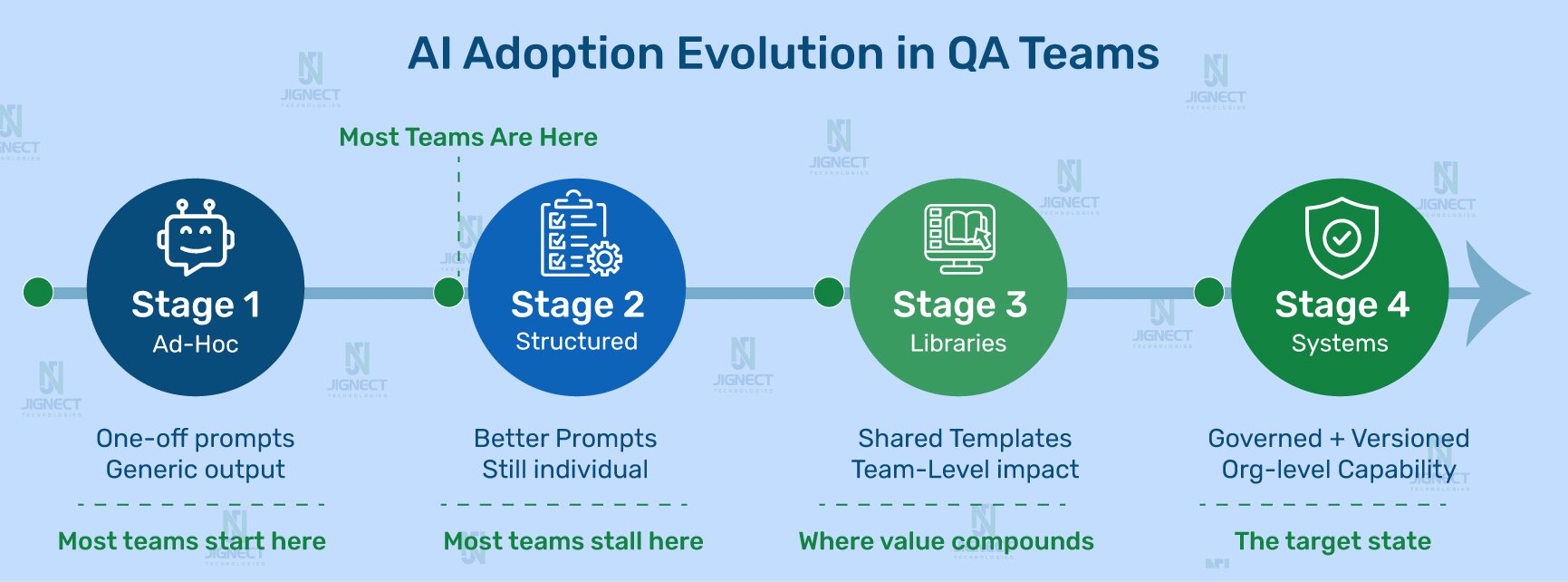
Stage 1 is where most teams start. Engineers use AI tools individually, with whatever prompt comes to mind. Some outputs are useful. Most need significant rework. There is no shared infrastructure, so the knowledge one engineer develops stays with that engineer.
Stage 2 happens when someone on the team figures out that better-framed questions get better answers. Their personal output quality improves noticeably. But this knowledge lives in their head, maybe in a personal notes file. It does not transfer.
Stage 3 is where the real shift happens. The team starts capturing prompts that work, organises them by QA lifecycle stage, and makes them available to everyone. Coverage consistency improves. New engineers ramp up faster.
Stage 4 is the target. The prompt library is versioned, governed, and woven into the QA process itself. Specific prompts are designated for specific lifecycle stages. There is an ownership model. Prompts get updated when the application changes. AI adoption is sustainable because it is structural, not dependent on individual motivation.
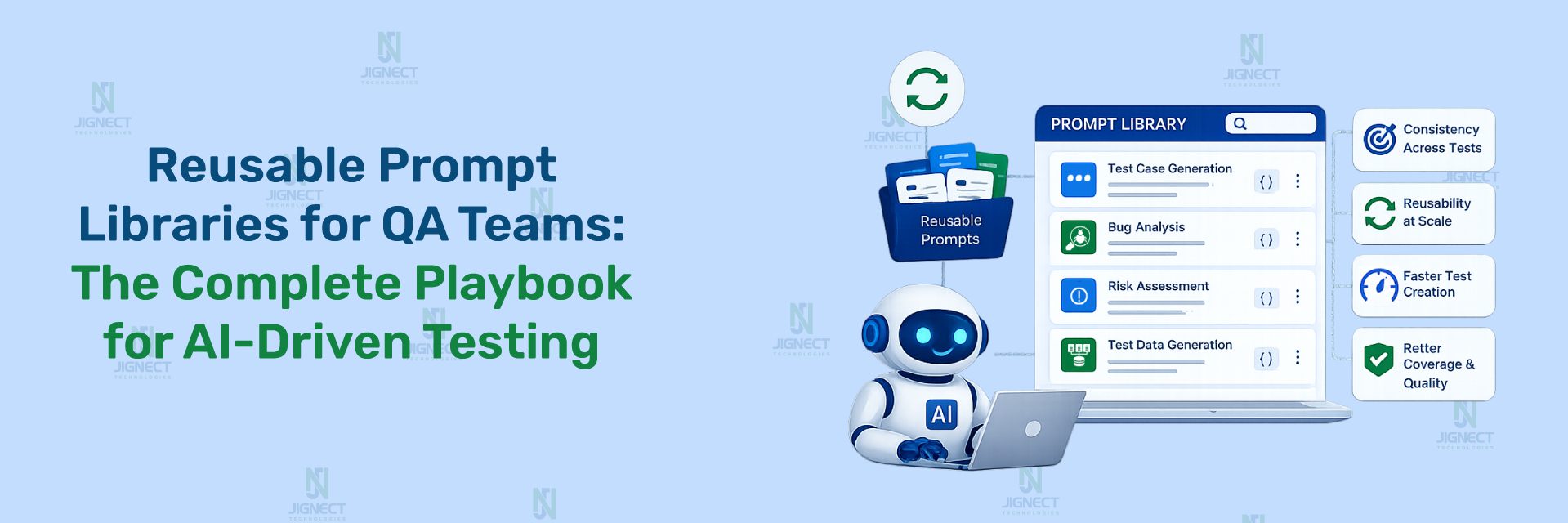
The prompt library is not an accessory to your QA process. It is the scaling layer for it. Just as a well-designed automation framework multiplies the output of your automation engineers, a well-maintained prompt library multiplies the output of every QA engineer on your team, every sprint, regardless of who is running the prompt on a given day.
What Makes a Prompt Production-Ready: The Difference That Actually Matters
The most instructive way to understand this is through direct comparison. Here is the same request framed as a weak prompt and as a production-ready one.
Weak Prompt
Generate test cases for user registration.Output: Generic list. Empty fields, invalid email, password mismatch. Nothing about your business rules, role model, or compliance context. No engineer would use this directly.
Production-Ready Prompt
You are a senior QA engineer with B2B SaaS HR experience.

Feature: Self-registration for a corporate HR platform.

Context:
- Invitation link required (tied to company account)
- 3 roles: HR Admin, Manager, Employee (separate flows)
- SSO: Google Workspace / M365 users cannot use standard form
- GDPR consent for EU locale
- Links expire after 72 hours
- Password: 12 chars min, no reuse of last 5 passwords

Exclude happy path scenarios.
Generate negative, boundary, and edge cases only.
Format: TC-ID | Title | Preconditions | Steps | Expected Result | Risk (H/M/L)
Output: SSO domain conflict, GDPR consent by locale, invitation tampering, password history edge case, role-specific registration differences.
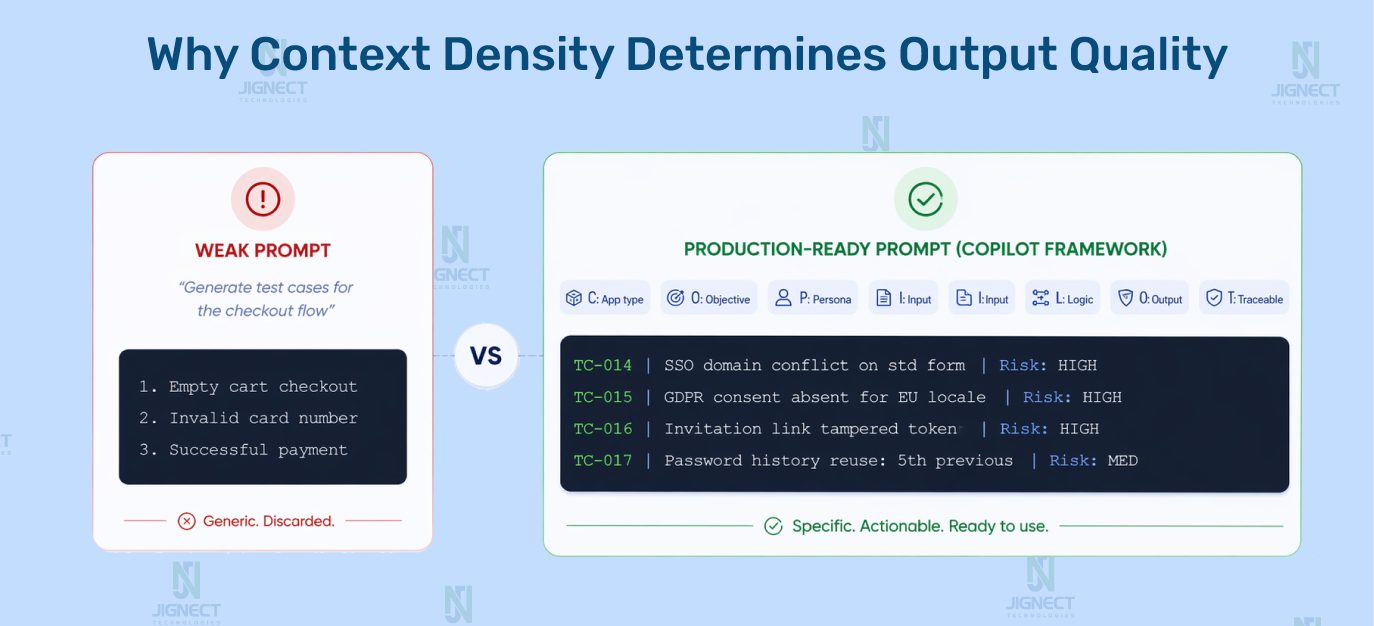
The difference is not AI capability. It is context density. The model can only work with what you give it. Give it the business domain, the user role model, the relevant constraints, and a precise instruction about what type of scenarios you need, and the output changes completely.
In one engagement with a FinTech client, a QA team was using AI-assisted test case generation with ad-hoc prompts. Coverage count looked healthy on paper. What was missing was any coverage of multi-currency rounding rules, because no prompt had ever included the fact that the platform handled transactions in 14 currencies. A systematic rounding defect escaped to production. It was not caught during testing because no test covered that scenario. The prompt was generic. The gap was invisible. A production-ready prompt library prevents exactly this because the right context is in the template, not dependent on whether a specific engineer remembered to include it on a given sprint day.
The COPILOT Framework: A Structured Model for QA Prompt Engineering
Over multiple delivery engagements, we refined our prompt construction approach into a framework we call COPILOT. Having a consistent anatomy for prompt construction makes it faster to build new prompts, easier to review existing ones, and simpler to onboard new QA engineers into the practice.
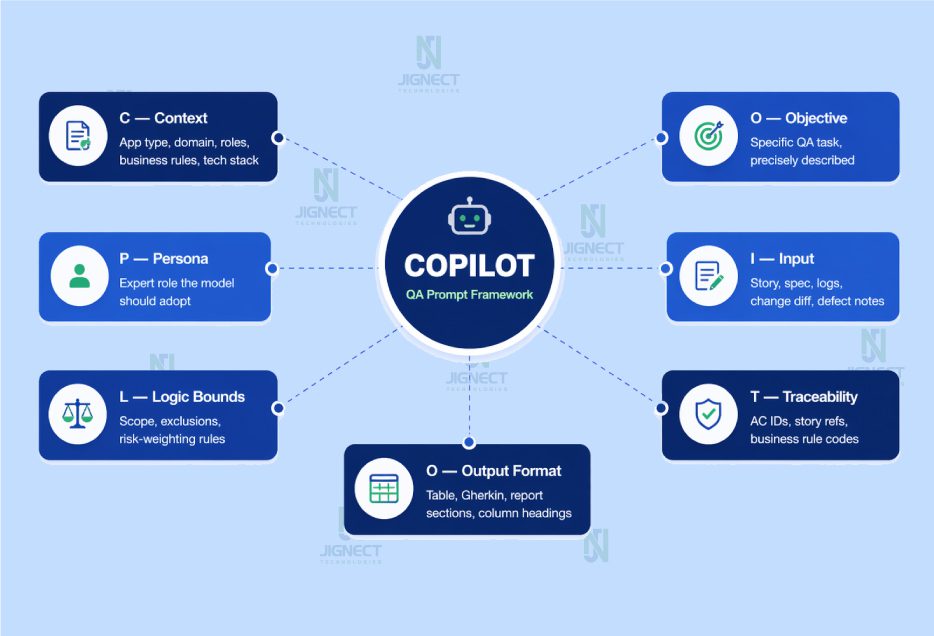
| Component | What It Covers | What Happens Without It |
|---|---|---|
| C — Context | App type, domain, roles, business rules, tech stack, compliance constraints | Model produces generic output applicable to any system |
| O — Objective | The specific QA task, precisely described | Model misinterprets scope or attempts too broad a task |
| P — Persona | Expert role the model should adopt | Output lacks the depth and vocabulary of domain expertise |
| I — Input | Story, spec, logs, change diff, defect notes | Model invents application details it cannot know |
| L — Logic Boundaries | Scope, exclusions, risk-weighting rules | Output includes out-of-scope or already-covered scenarios |
| O — Output Format | Table, Gherkin, report sections, column headings | Output needs full reformatting before it can be used |
| T — Traceability | AC IDs, story refs, business rule codes | Coverage is unauditable; gaps remain invisible |
Here is what each component means in practice:
- C — Context: Application type, business domain, user roles, business rules, tech stack, compliance constraints. The model cannot infer any of this. Missing context is the single most common reason prompts produce generic output.
- O — Objective: The specific QA task, precisely described. Not “help me with testing” but “generate boundary value test cases for the discount calculation logic, covering the threshold where the order total drops below the minimum.”
- P — Persona: The expert role the model should adopt. “Act as a senior QA engineer in a FinTech SaaS environment” produces substantially different output than no persona instruction at all.
- I — Input: The actual artifact the model should work from: a user story, an API spec, a defect log, a change diff. The model cannot invent your application details. Feed it the real documents.
- L — Logic Boundaries: What to include, what to exclude, how to weight by risk. “Exclude happy path scenarios, which are already in the existing test suite” saves the model from filling your output with scenarios you already have.
- O — Output Format: Gherkin, table with specific columns, structured report sections. Specifying format reduces reformatting time to near zero and makes it easier to pipe output directly into your test management tool.
- T — Traceability Hook: A reference back to acceptance criteria IDs, story references, or business rule codes. This is what makes AI-generated coverage auditable, not just a collection of scenarios floating in a document.
Every production-ready prompt in our library contains all seven components. When a prompt produces weak output, the first diagnostic step is to check which COPILOT component is missing. It is almost always the answer.
Prompt Libraries Across the QA Lifecycle: The Core Playbook
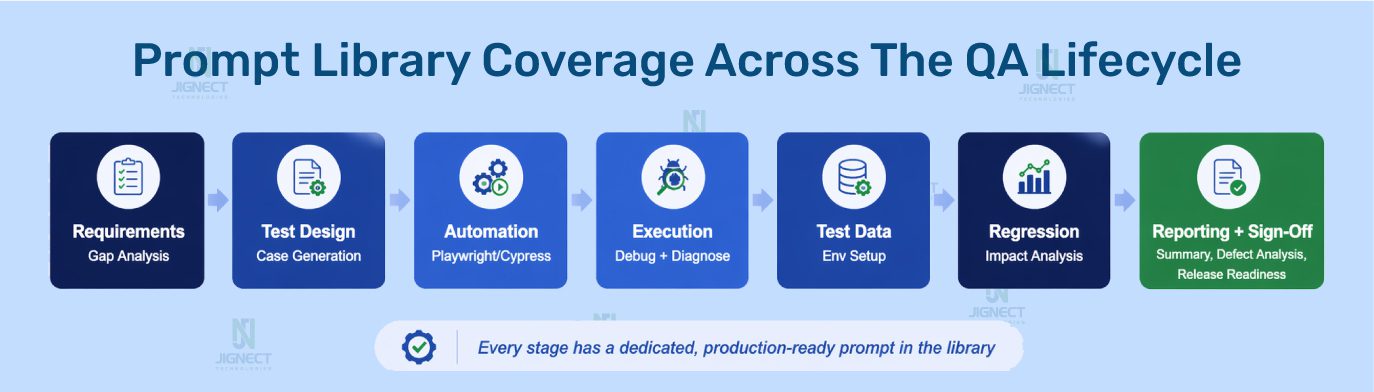
This is the core of the article. For each stage of the QA lifecycle, you will find the context that makes the stage distinct, a production-ready prompt you can adapt and use immediately, and an explanation of what the prompt does and why it is constructed the way it is.
1. Requirement Analysis: Catching Defects Before They Are Written
Requirements that arrive in a sprint with ambiguities cause defects three weeks later. The cost of catching one during refinement is a five-minute conversation. The cost of discovering it during regression is a missed release date.
AI-assisted requirement review accelerates the analysis by systematically checking requirements against predictable categories of failure: unstated assumptions, missing edge conditions, undefined error states, and conflicts between adjacent features.
PROMPT: Requirement Gap Analysis
# JIGNECT PROMPT LIBRARY — Requirement Analysis v1.2

Act as: Senior QA analyst, 10 years in [application domain]
Task: Pre-sprint requirement gap analysis for refinement session

Application context:
[App type, business domain, user roles, architectural facts
that affect requirement interpretation — auth model,
multi-tenancy, compliance constraints]

User Story: [Paste full user story]
Acceptance Criteria:
AC-01: [...]
AC-02: [...]

Analyse across 7 dimensions. For each gap provide:
- The exact question to raise in the refinement meeting
- The test risk it mitigates if answered before dev begins
- Priority: Critical / High / Medium

1. Ambiguous terms — conflicting interpretations that create risk
2. Missing acceptance criteria — implied but uncovered scenarios
3. Unstated developer assumptions — what dev assumes when silent
4. Role-specific gaps — behaviour differences by role not addressed
5. Integration and data dependency gaps
6. Security and validation gaps
7. Observable edge cases — valid inputs producing undefined behaviour
Why it works: The seven-dimension structure ensures the analysis covers predictable categories of requirement failure systematically. The output is not assertions about your system. It is questions for humans to answer, which means the risk of acting on wrong AI output is minimal. This is one of the highest-ROI prompts in the library because it catches the most expensive defects at the cheapest possible moment.
2. Test Design: Building Coverage That Reflects Real Risk
A well-structured test design prompt produces a first-pass scenario set in a fraction of the time, with coverage breadth that manual work under sprint time pressure rarely matches. The key is specificity. The model produces exactly the level of domain-specific coverage that the prompt asks for. This matters especially for functional testing, where scenario breadth and business-rule coverage are the primary quality measures.
PROMPT: Test Case Generation (Risk-Weighted)
# JIGNECT PROMPT LIBRARY — Test Design v2.1

Persona: Senior QA engineer, [application domain]
User Story: [Paste] | Acceptance Criteria: AC-01: [...] AC-02: [...]

Context:
- Application: [Brief description]
- User roles: [List with relevant permissions]
- Platform: [Web / iOS / Android / API]
- Business rules not in AC: [Add domain constraints]
- Historical defect patterns: [Add if known]
- Compliance requirements: [GDPR / HIPAA / PCI / None]
- Integration dependencies: [External APIs this feature touches]

Generate across 6 categories:
1. Positive: valid permutations beyond the obvious (3-5 cases)
2. Negative: one per distinct validation rule + invalid inputs per field
3. Boundary: min, max, one below, one above per constrained field
4. Edge cases: valid but unusual sequences, concurrent actions
5. Role-based: behaviour differences by role, access boundaries
6. Degraded-state: feature behaviour when a dependency fails or
   responds slowly

Format:
TC-[ID] | Title | Type | Risk (H/M/L) | Preconditions |
Steps | Test Data | Expected Result | AC Reference

After test cases, list requirement gaps found as specific questions.
Why the degraded-state category matters: This single category catches a class of defect that is systematically underrepresented in manually written test suites. Most engineers, under time pressure, design for the happy path and its obvious failures. They do not naturally ask what happens to this feature when the payment gateway responds in 8 seconds instead of 200ms. That question belongs in every test design prompt for any feature that touches an external service.
3. Automation Development: Playwright and Cypress AI Testing Support
QA engineers building Playwright or Cypress automation spend a significant fraction of their time on mechanical work: scaffolding Page Object classes, writing boilerplate selector logic, building data factory structures. Each of these is a strong candidate for AI assistance, not to replace engineering judgment, but to compress the implementation work so engineers can focus on the parts that actually require thought.
PROMPT: Playwright Page Object Generation
# JIGNECT PROMPT LIBRARY — Automation Dev v1.4 (Playwright)

Framework: Playwright TypeScript, Page Object Model

Conventions in use:
- All Page Objects extend BasePage (wraps Playwright Page)
- Primary selector strategy: data-testid attributes
- Fallback: getByRole, getByLabel (no XPath)
- All methods async/await, each handles its own waiting
- Custom Logger utility class for action logging

Module: [Name, e.g. "Invoice Creation Form"]
Description: [What this page/component does]

HTML structure / key UI elements:
[Paste HTML snippets or describe:
- Form fields with labels/IDs
- Button labels and roles
- Table columns, dynamic elements]

Required interactions:
[What testers need: fill fields, submit, select, assert states]

Generate:
1. Complete Page Object class following conventions above
2. JSDoc comments for each public method
3. List of assumed data-testid values — flag assumptions
   needing DOM verification
4. Three example test calls showing usage in a spec file
PROMPT: Flaky Test Root Cause Analysis (Cypress / Playwright)
# JIGNECT PROMPT LIBRARY — Debug v1.3

Framework: [Cypress 13 / Playwright] with TypeScript
Application: React SPA, client-side routing

Test description: [What the test does and the flow it validates]
Failing assertion: [Exact assertion or description of comparison]
Failure mode: [Error message + observed app state on failure]
Failure pattern: [Fails X% of CI runs / passes on retry / parallel]
Recent changes before flakiness appeared: [App or infra changes]
Test code (10-20 lines around failing assertion): [Paste code]

Provide:
1. Top 3 root cause hypotheses ordered by probability
   - Evidence from details above supporting each
   - Diagnostic step to confirm or rule out
2. Recommended fix for each hypothesis if confirmed
3. Test resilience improvement regardless of root cause
4. Anti-patterns in pasted code contributing to fragility
4. Test Execution and Debugging
During test execution, things fail in ways that are not immediately obvious. A test that passed yesterday fails today. A feature that works in isolation breaks in a specific sequence. Debugging these is some of the most cognitively demanding work in QA, and it is exactly where AI assistance as a structured thinking partner adds real value.
PROMPT: Execution Failure Diagnosis
# JIGNECT PROMPT LIBRARY — Debug v2.0

Feature under test: [Feature + brief description]
Test type: [Manual / Automated UI / API / Performance]
Environment: [Dev / Staging / UAT, version, build]
What I was testing: [Specific test scenario]
What happened: [Precise actual behaviour]
What should have happened: [Expected per AC or test case]

Context:
- Reproducibility: [Always / Intermittent at ~X% / Specific conditions]
- Recent changes: [Deployments, config, data changes]
- Observed pattern: [Specific data, sequence, environment]
- Error output or logs: [Paste relevant errors, API response]

Provide:
1. Top 3 failure causes ordered by probability with reasoning
2. Diagnostic step to confirm or eliminate each
3. Likely fix for each if confirmed
4. Adjacent scenarios to test for scope of impact
5. Bug report summary line if confirmed as product defect
5. Test Data and Environment
Test data problems cause more execution failures than most teams account for. Edge case scenarios cannot be validated because the required data state does not exist. Performance tests cannot run because there is no realistic data volume. Building good test data is tedious and systematically under-resourced. It is also a strong fit for AI assistance.
PROMPT: Test Data Generation
# JIGNECT PROMPT LIBRARY — Test Data v1.1

Feature: [Feature and what data states it depends on]
Data model: [Relevant entities, fields, relationships]
Scenarios needing specific states:
[Edge cases, boundary values, error states needing setup]

Constraints: Synthetic only | [GDPR / HIPAA / PCI / None]
Encoding: Unicode, international chars needed
Volume: [For performance scenarios if applicable]

Generate:
1. Standard valid profiles (3-5 realistic datasets)
2. Boundary values: min and max for every constrained field
3. Edge case data:
   - Strings with Unicode, apostrophes, hyphens,
     leading/trailing whitespace
   - Dates at month/year boundaries, leap year, timezone edges
   - Currency values with 3 decimal places
   - Empty-but-valid optional fields
4. Negative data: values triggering specific validation errors
5. State-dependent: expired records, locked accounts,
   partially completed workflows

Format: table or JSON for direct import into [your data tool].
Flag any dataset requiring manual environment setup.
6. Regression and Impact Analysis
Regression scope decisions under sprint pressure default to “test what changed.” This misses a systematic category of defect: functionality that was not touched directly but shares infrastructure, data, or business logic with what changed. Impact analysis done thoroughly takes hours. Done with a well-constructed prompt, it takes minutes.
PROMPT: AI Regression Impact Analysis
# JIGNECT PROMPT LIBRARY — Regression v2.2

Application: [Name + brief description]
Core user journeys (list 6-8 most critical end-to-end flows):
[Describe each, specific enough to identify which components]

Shared infrastructure:
[Auth system, shared UI library, common data services]

Changes in this release:
[Paste release notes or developer change summary.
Be specific about what changed technically.]

Generate a 4-section regression impact analysis:

Section 1 — Direct impact
Areas whose code was directly modified. Why regression needed.

Section 2 — Indirect impact
Areas sharing components, data flows, or API contracts with
what changed. Include the specific dependency creating risk.

Section 3 — Integration risks
External integrations and downstream systems affected.

Section 4 — Data integrity risks
Schema changes, migrations, shared-state modifications.

Prioritised execution list:
- Must test before release
- Should test if capacity allows
- Can defer to next cycle

Format Sections 1-4 as tables:
Area | Change/Dependency | Risk | Priority (H/M/L) | Focus
7. QA Reporting and Sign-Off: The Stage Most Prompt Libraries Ignore
This is where most prompt libraries stop before they should. Test execution is only half the QA lifecycle. What gets communicated to stakeholders, how risk is articulated, and how sign-off decisions get documented are equally important and equally time-consuming.
PROMPT: Sprint Test Summary Report
# JIGNECT PROMPT LIBRARY — Reporting v1.5

Audience: [CTO / Product / Release Management]
Sprint: [Number / Name] | Release: [Version]

Raw execution data:
- Total: [n] | Passed: [n] | Failed: [n] (Blocking [n], Deferred [n])
- Blocked: [n] | Not executed: [n]
- Automation pass rate: [x%]
- New defects: [n] | Resolved: [n]
- Open by severity: Critical [n], High [n], Med [n], Low [n]

Coverage: Fully tested [list] | Partial [list+reason] | Not tested [list]
Outstanding risks: [Unresolved risks, deferred defects]

Write a structured report:
1. Executive Summary (4-5 sentences): risk characterisation
   in plain language, not a recitation of numbers
2. Execution Summary table
3. Defect Status: severity breakdown + commentary on Critical/High
4. Coverage Assessment: thorough, partial, uncovered with risk
5. Outstanding Risks: with rating and owner
6. QA Recommendation:
   Release with confidence / Release with caution (specify) /
   Hold pending [specific item]
PROMPT: QA Sign-Off Email + Release Readiness
# JIGNECT PROMPT LIBRARY — Sign-Off v1.0

Sign-off email:
- Recipient: [Release Manager / CTO / Product Head]
- Application: [Name + version] | Release type: [Major/Patch/Hotfix]
- Pass rate: [x%] | Critical outstanding: [n + desc]
- High severity outstanding: [n + desc]
- Features tested: [list] | Known limitations: [list]
- Decision: [Approve / Approve with conditions / Hold]

Write with:
- Subject: [App] [Version] — QA Sign-Off: [Status]
- First sentence states the QA decision clearly
- Evidence supporting the decision in 2-3 sentences
- Clear conditions or caveats
- Next step and who owns it

Release readiness evaluation:
Evaluate across 5 dimensions:
1. Coverage completeness: proportionate to release risk?
2. Defect risk: acceptable residual risk for production?
3. Regression confidence: pass rate sufficient?
4. Operational risk: deployment / migration / rollback concerns?
5. Knowledge gaps: untested areas due to coverage limits?

Conclude:
- Rating: Green / Amber / Red
- Single most important risk for the release decision-maker
- Recommended action if Amber or Red

Tone: professional, direct, accurate.
This email may be referenced in a post-incident review.
QA sign-off is not a formality. When something escapes to production and the post-incident review asks what the sign-off documented, the quality of that documentation determines whether QA is seen as a delivery partner or an afterthought. Well-constructed sign-off documents, produced consistently, build the professional credibility of the QA function over time.
End-to-End Sprint Flow: What Prompt-Driven QA Actually Looks Like
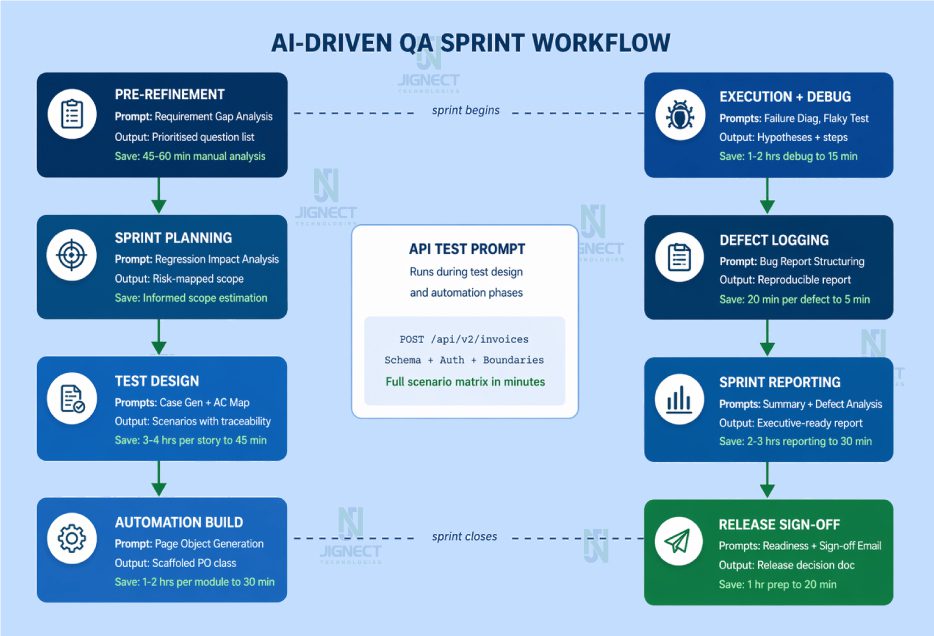
Here is how these prompts integrate into a real sprint, not in theory, but as a practical sequence your team can follow starting next sprint.
| Sprint Phase | Prompt Used | Output | Time Saving |
|---|---|---|---|
| Pre-Refinement | Requirement Gap Analysis | Prioritised question list for planning session | 45-60 min manual analysis to 10 min review |
| Sprint Planning | Regression Impact Analysis | Risk-mapped regression scope | Informed, accurate estimation |
| Test Design | Case Gen + AC Coverage Map | Scenario set with traceability | 3-4 hrs per story to 45 min |
| API Testing | API Scenario Matrix | Complete endpoint scenario matrix | 2 hrs per endpoint to 20 min |
| Automation Build | Page Object Generation | Scaffolded PO class per team conventions | 1-2 hrs per module to 30 min |
| Execution + Debug | Failure Diagnosis, Flaky Test | Root cause hypotheses + diagnostic steps | 1-2 hrs debugging to 15 min |
| Defect Logging | Bug Report Structuring | Professional, reproducible defect report | 20 min per defect to 5 min |
| Sprint Reporting | Summary + Defect Analysis | Executive-ready report | 2-3 hrs reporting to 30 min |
| Release Sign-Off | Readiness + Sign-off Email | Structured release decision documentation | 1 hr preparation to 20 min |
The prompt library does not make QA faster at the cost of thoroughness. It makes thoroughness affordable within the sprint cadence that teams actually operate in.
Building a Prompt Library System: Governance, Ownership, and Versioning
A collection of prompts stored in a shared document is a starting point, not a system. A prompt library that sustains and improves over time requires deliberate choices about storage, versioning, governance, and ownership.
Storage and Organisation
For most QA teams, a Git repository is the right structural choice. Prompts are versioned, changes are reviewed via pull request, and the history of what changed and why is preserved.
Repository Structure
/qa-prompt-library
  /requirement-analysis     v1.2 — gap-analysis.md
  /test-design              v2.1 — test-case-gen.md
                             v1.0 — ac-coverage-map.md
  /api-testing              v1.3 — api-scenario-matrix.md
  /automation               v1.4 — page-object-playwright.md
                             v1.3 — flaky-test-debug.md
  /test-data                v1.1 — data-generation.md
  /regression               v2.2 — impact-analysis.md
  /reporting                v1.5 — sprint-summary.md
                             v1.2 — defect-analysis.md
  /sign-off                 v1.0 — sign-off-email.md
                             v1.3 — release-readiness.md
  /README.md               Usage guide + contribution standards
Each prompt file should include the prompt itself, a metadata header with use case, intended audience, context requirements, and last reviewed date, plus usage notes explaining when it works best and at least one example output from a real usage instance.
Versioning
Prompts are living artifacts. A prompt that works well for your application today may produce subtly wrong output after a major architectural change. Version prompts alongside the features they relate to. Use v1.0 for first stable production use, v1.x for refinements, v2.0 for substantive changes to approach or output format.
Governance and Contribution Standards
Not every prompt an engineer experiments with belongs in the shared library. A contribution-worthy prompt must have been used successfully on at least one real sprint task, reviewed and validated by a senior engineer, and include context requirements documentation so users know what inputs it needs.
Making It Structural, Not Optional
The most important governance decision: prompt usage should be structural, not discretionary. Define the lifecycle stages where a specific prompt runs as a standard part of the process. “The requirement gap analysis prompt runs before every refinement session” is a process decision. “Engineers can use AI if they feel like it” is not. The difference in adoption consistency between these two positions is substantial.
Measuring ROI: Numbers That Matter to Decision-Makers
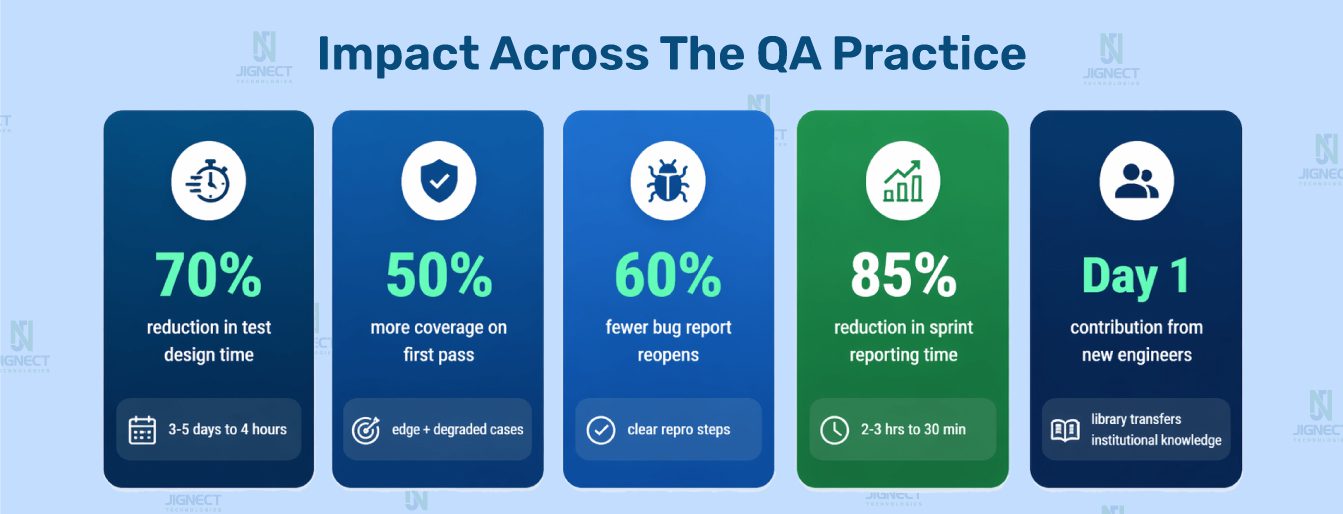
| Metric | Without Prompt Library | With Structured Prompts | Improvement |
| Test case creation time | 3 to 5 days per feature cycle | Under 4 hours per feature cycle | ~70% reduction |
| First-pass coverage breadth | Baseline | 30 to 50% more scenarios | Concentrated in negative, boundary, degraded-state |
| Requirement defects pre-dev | Baseline | 35 to 50% increase in catch rate | Found during refinement, not regression |
| Bug report reopen rate | Baseline | 40 to 60% reduction | Better steps, clearer expected behaviour |
| Sprint reporting time | 2 to 3 hours manual | 20 to 30 min AI-assisted | ~85% reduction |
| New engineer ramp-up | Knowledge in individual heads | Library transfers institutional knowledge | Consistent output from sprint one |
Why AI Adoption Fails in QA: The Real Reasons
After multiple engagements where we have been brought in to diagnose stalled AI adoption in QA teams, the causes concentrate into three categories that repeat with remarkable consistency.
The Prompt Problem
Engineers adopt AI tools with genuine intent, use generic prompts, receive generic output, conclude that AI is not ready for serious QA work, and stop using it. The same engineers, with structured prompts and application context, would get outputs they could use directly. The capability was never the issue. The framing was.
The Governance Problem
Teams achieve strong individual AI adoption but fail at team-level adoption because there is no shared infrastructure. Everyone reinvents the same prompts independently. When the engineer who built excellent personal prompt discipline leaves, their knowledge leaves with them. AI adoption that lives in individual heads does not scale and does not survive attrition.
The Blind Trust Problem
A team adopts AI-generated test cases without adequate human review. An AI-generated scenario includes a subtly wrong expected behaviour for a business-critical feature. The test passes against the wrong expected behaviour. A defect escapes. The post-mortem concludes that AI-generated testing is unreliable. The review process was the failure, not the AI, but that is the conclusion that gets acted on, and AI adoption rolls back by months.
All three failure modes have structural solutions. The prompt library solves the first. The governance model solves the second. An explicit, well-designed human review standard solves the third.
Teams looking to go further with the governance and execution layer are increasingly turning to agentic AI platforms built specifically for quality engineering workflows. Orkestraa by AI-driventesting.ai is one such platform, built around the idea that AI agents working across a QA lifecycle need project-level context, defined skills, and structured rules to produce consistent output at team scale, rather than every engineer starting from a blank prompt each time. It is not a prompt template repository. It is an agentic layer where AI understands your project, your standards, and your workflow before the first interaction begins. To understand the full scope of what AI-driven quality engineering looks like at an organisational level, that article is worth reading alongside this one.
The Future of AI-Driven Quality Engineering: Where This Is Going
The prompt library is not the destination. It is the current form of something that will continue to evolve as AI capabilities mature and as QA teams accumulate experience using them systematically.
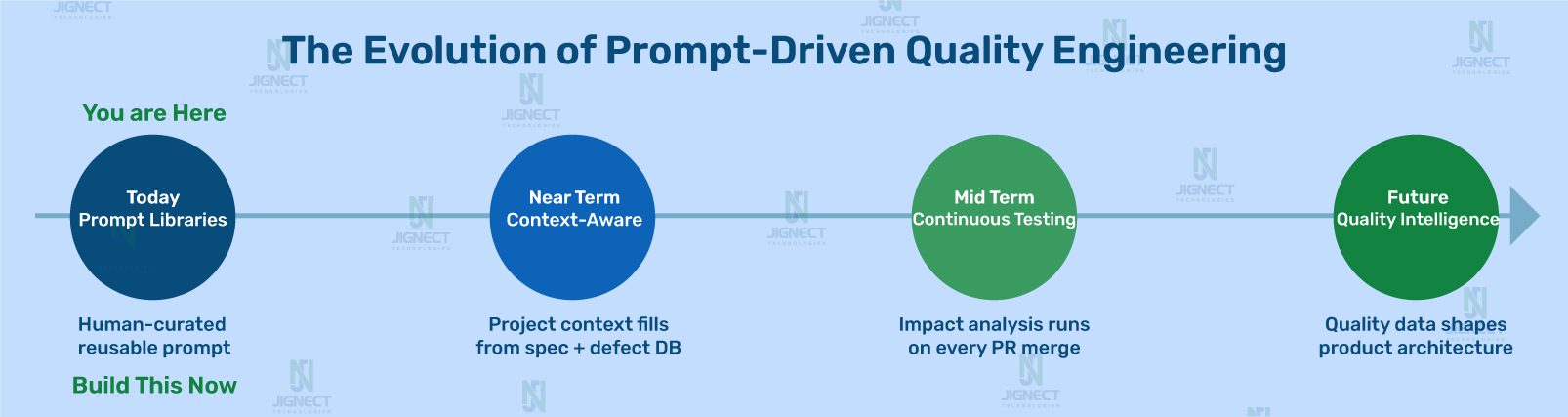
In the near term, prompt libraries become context-aware. Teams that have already made the shift from automation-first to AI-first quality engineering are already seeing what this looks like in practice. Rather than a QA engineer selecting the right prompt and filling in context manually, the prompt system has access to the application’s specification, the team’s historical defect database, and the current sprint’s change log. Context fills automatically.
In the medium term, prompt-driven quality systems become continuous. Not a QA engineer running a regression impact analysis before a release, but a system that runs it automatically when a pull request is merged, surfaces the impact analysis in the QA dashboard, and flags it for human review before testing begins.
The core insightPrompt-driven quality engineering is not a productivity tool. It is the architecture of AI-ready QA. The teams that build this now will not be scrambling to catch up in eighteen months. They will be the benchmark others are measured against.
Conclusion: The Playbook Is Not Theoretical
Everything in this article has been built, refined, and validated in real sprint environments across FinTech, healthcare, e-commerce, and SaaS. The prompts are not illustrative examples. They are the actual templates that QA teams use in real delivery. The governance model is not a whiteboard framework. It is the operational structure that separates teams with sustainable AI adoption from teams with stalled experiments.
The insight at the center of all of it is straightforward but has significant implications for how QA teams invest their time.
AI gives back exactly what you put in. A generic prompt returns generic output. A production-ready prompt, grounded in real application context, governed by a review standard, and integrated into the QA process at the right lifecycle stages, returns production-ready value.
The teams that understand this are not treating AI as a tool their engineers use when convenient. They are treating it as infrastructure, with the same discipline they would apply to choosing a test automation framework or a defect tracking system.
Building a prompt library does not require a large project. It starts with identifying the one QA lifecycle stage where your team spends the most time on mechanical work and building one well-constructed, production-ready prompt for it. Use it in the next sprint. Review the output rigorously. Refine the prompt based on what was missing. Share it with the team. Build from there.
The compounding value is real. But it only compounds if the foundation is structural.
Witness how our meticulous approach and cutting-edge solutions elevated quality and performance to new heights. Begin your journey into the world of software testing excellence. To know more refer to Tools & Technologies & QA Services.
If you would like to learn more about the awesome services we provide, be sure to reach out.
Happy Testing 🙂