


Software testing has become the backbone of high-quality application delivery in today’s digital world where rapid changes are the order of the day. In every area of the product, such as performance, security, and user experience, effective testing has been the determining factor. Whether it is a mobile app, a SaaS platform, or a complex enterprise system that you are developing, then adopting a quality software assurance (QA) strategy is the only way to go.
On the other hand, the testing of software has reached such a large number that from functional testing to non-functional testing, automation testing to API testing, and even advanced continuous testing in DevOps, there are more than a hundred types of software testing! Picking the right method for your project can be incredibly tricky even for experienced QA engineers and developers if they don’t have a clear understanding of the testing methods.
This ultimate guide to software testing types will be a go-to resource for you as it clears the confusion. The guide not only uncovers the purpose of each testing type but also provides real-world examples to demonstrate the way they are being used. Moreover, it presents the most recommended practices to adhere to and the foremost instruments that are the most trusted by the top-quality assurance teams. Once you read the guide, you will have a transparent and practical framework for enhancing your trial procedures and raising the quality of every release.
The moment has arrived to get into the depths of the different types of software testing and understand them so well that you will be able to conduct tests in an intelligent way, allowing faster releases and finally getting software that end-users would appreciate.
What is Software Testing?
Just imagine an app that is nothing short of miraculous, ready for launch after a long period of development. The look is fabulous, the features are cutting-edge, and the developers are really looking forward to the release. Nevertheless, the app does not go as expected, and users start to complain about it. The application is crashing, buttons on some devices are not working at all, and the people with disabilities are totally excluded from your website.
The case here calls for software testing as a solution.
On the whole, the testing of software is the very technique of evaluating your product to determine whether it always works as expected for all users or not. It enables the development teams to discover and rectify bugs, performance issues, and security vulnerabilities before the product is released into the market, hence saving both time and money.
You can think of it as a safety net in the software development life cycle (SDLC). Regardless of whether you are building a simple mobile app, a widely used web store, or a complicated enterprise system, a well-done quality assurance (QA) will let your customers enjoy a non-stop, reliable, and safe experience.
There are several benefits of software testing like: – The issuing of bug-free applications with impressive performance – Reduction of maintenance costs that last a long time – Improvement of customer satisfaction and loyalty – Faster and more trustworthy releases are supported.

Why Understanding Types of Testing Matters
Testing is a necessity that varies with the project. The selection of the right approach could be the main reason for a successful launch or a costly mistake.
For instance, security testing is an absolute must for a banking application because of its sensitive data handling. Conversely, an online shop might prioritize testing performance during major sales periods to cope with a large number of users. Besides, accessibility testing not only makes the software available and easy to use for the disabled but is also considered a compliance and ethical standard nowadays.
The knowledge of testing types benefits QA engineers, developers, and project managers in the following ways: – Formation of a strategic testing roadmap – Selection of the right tools and techniques for the job – Identification of issues in the early stages thus saving time and resources – Delivering products that please the user as well as compliant with the industry quality standards.
This manual will provide you with an exact understanding of all major testing types, their usage and timing, and the good practices for their effective incorporation in your development and QA workflows through the guide.
Core Testing Categories
Software testing mainly consists of two types which are Functional Testing and Non-Functional Testing.
Knowing these types along with their subtypes is the main factor that shapes a good quality assurance strategy, giving at the end a software product with the features of being reliable, scalable, and having an excellent user experience.
Functional Testing
Functional testing is the foundational activity in every quality assurance process, and it is mainly focused on validating software functionality. It guarantees the compliance of the documented requirements, specifications, or user stories that were initially set during the planning stage of the software development lifecycle (SDLC) for each feature, module, and workflow respectively.
Unit Testing : Unit testing is the process of testing the smallest pieces of your code – that is, functions, methods, or modules – independently from each other. Generally, it is done within the development process and aids in discovering software defects at an early stage, preventing them from affecting the other parts of the application.
- Illustration: Verifying that the “add to cart” button on an online shop properly reflects the shopping cart total with quantities, discounts, and taxes.
- The most efficient method: Test division into minimal, independent ones with brief execution periods will allow for their application at the very start of the development pipeline or CI/CD process. Consequently, the confirmation of every code change will take place right away, and costly regressions will be avoided.
Unit testing is a necessity in agile and DevOps settings where the quality of the code needs to be verified quickly and reliably with every frequent code change.
Integration Testing : Integration testing is done in a practical way to verify the interworking of different parts of the application. Even if the single units are perfect and clean, errors in connection may still happen due to data mismatches, interface problems, or workflow issues.
- Example: A situation where the correct communication takes place between the online store’s payment gateway and order management system in processing transactions accurately and vice versa.
- Best Practice: Carry out integration testing gradually with two or three modules at a time for quicker detection of issues. It is a usual practice in QA pipelines to automate integration testing in such a way that it runs with every build and gives early feedback.
System Testing : System testing is regarded as a complete validation of the application, thus affirming the successful accomplishment of both functional and non-functional requirements. This type of test simulates the real usage case and is conducted in a setting that is almost like the one in which the product is used.
- Example: Overall customer experience tested through the complete travel booking process that includes searching for flights, selecting seats, payment processing, and receiving booking confirmation, etc.
- The most efficient method: It is good to use a combination of manual and automated testing methods, in addition to simulating real data and user scenarios, to find edge cases for maximum coverage.
Acceptance Testing : Acceptance testing is one way to verify that the software product is equipped with the features requested and is in a stage where it can be released. Normally, this phase is carried out by stakeholders, clients, or users who would like to be completely sure about the product’s behaving expectations before it goes to public access.
- As an example, imagine a customer examining a payroll management system to ensure that not only salary payments but also taxes, deductions, and compliance reports are accurately calculated and produced.
- The best advice would be to very carefully check the acceptance criteria established during the planning phase and then to thoroughly record the results for approval. In agile processes, this step is often referred to as User Acceptance Testing (UAT) and it is the final checkpoint before the product is launched.
Non-Functional Testing
Non-functional testing shifts the focus from functionality to performance of the software. It measures the above-mentioned factors along with the application’s overall quality in terms of smooth, reliable, and user-friendly experience during all conditions.
To QA teams, non-functional testing is as important as functional testing, since it assesses the actual performance and user satisfaction, thus helping the organizations to come up with great applications ready for production.
Performance Testing : Performance testing is among the most vital techniques to analyze an application regarding its performance under variable situations. Moreover, it underlines the aspects which influence the user experience like bottlenecks, response time, and system reliability.
Basically, this type of test is divided into the following key subcategories:
- Load Testing: This ensures that the software performance is according to the predicted traffic.
- Stress Testing: This increases the level of load on the system till a point where it completely breaks down.
- Endurance Testing: Under conditions of heavy loading for an extended time, finding problems hidden from the view-like slow memory recovery or degradation in performance.
Performance testing would, for example, include running a ticket reservation application at peak sales on demand to ensure that the application supports thousands of users simultaneously without crashing. Performance testing of the system should basically be done under the quality assurance point of view while it undergoes the SDLC and then often repeated to ensure readiness for upsurge and thus avoid expensive production downtime.
Security Testing : Security testing uncovers possible weaknesses, risks, and maybe even points where attackers can get in and break or violate the system.
Still, this means not only securing the data for Q.A. of the applications but also having the industries that are controlling the data like GDPR, HIPAA, or PCI DSS waiving their requirements at the same time.
- An example: The verification process to check whether the banking app was encrypting sensitive transactions and was protected from threats like SQL injection and cross-site scripting (XSS) attacks.
- QA Perspective: Security testing and other related activities must be part of the DevSecOps pipeline to guarantee the security of each release before the deployment.
Usability Testing : Usability testing is all about the user experience (UX) and is thus a very important aspect of the application lifecycle.
To accessibility testers, a usability test is a release of the product into the market with corresponding user feedback that is useful in making the interface design, navigation, and workflows easy for users.
- Scenario: Watching users as they interact with a newly introduced dashboard for SaaS in order to pinpoint menu structures that are hard to understand or call-to-action buttons that are not clear.
The approach from the quality assurance department is that using sessions, recorded videos, heatmaps, and surveys combined with usability testing will give both quantitative and qualitative insights into user behavior.
Accessibility Testing : The process of verification has proved that this is a user-friendly application and follows either the guidelines called Web Content Accessibility Guidelines or Section 508 guidelines. The process has proved that this application is usable for people with visual, hearing, motor, and cognitive impairments.
- For instance, the university portal should cater to some of the requirements such as assisting screen readers, supporting keyboard navigation with clear focus indication, and providing appropriate color contrast ratios for the sight-impaired audience.
- From a Quality Assurance Perspective: Hence, it will be a good practice to perform Accessibility testing along with design and development activities right from the beginning stages. Also, testing with actual users with disabilities, not only will you get the best possible feedback, but you will simultaneously prevent the risk of being non-compliant or excluding users.
Compatibility Testing : The prime aim of this compatibility testing process is to ensure an equivalent level of application performance under a variety of different platforms, devices, browsers, and networks.
- For example: The compatibility of the responsive web app on Chrome, Firefox, Safari, & Edge browsers is guaranteed to be flawless on desktop computers, tablets, & mobile phones.
- From the standpoint of QA: “User-base analytics maintains a device/browser matrix that allows testing to replicate actual usage patterns.”
Scalability Testing : Scalability testing helps ensure that your software application will work well regardless of growth in volumes or usage.
This is type of testing essential where the application may require scaling up as the business grows.
- Example: During live coverage of an important sports game, ensuring that the live stream service is able to handle the simultaneous presence of millions of viewers and does not impact video quality and buffering conditions.
- QA Perspective: Scalability testing should be done concurrently during architecture development stages to prevent costly modifications due to scalability issues.
Localization & Internationalization Testing : Localization and internationalization testing make it possible for your application to get an international audience by adjusting to different languages, cultures and formats that are used all over the world in different regions.
- Example: Testing a shopper’s website to guarantee appropriate currency conversion, date & time format, and language translation.
- QA Perspective: Native speakers should always be involved in the process of providing feedback on the translation and also in confirming that the layout is adjusted correctly for different lengths of strings.
How Tests Are Executed
Knowing about the testing of software programs is as important as recognizing the types of testing. The testing method adopted for its execution can have a huge impact on your testing process in terms of its accuracy, efficiency, and speed.
In the QA domain, testing activities can be categorized into two prominent methodologies: Manual vs. Automation Testing and Black-Box, White-Box, and Grey-Box Testing. These testing methodologies can be combined in order for the QA team to do some testing strategy planning.
Manual vs. Automation Testing
Manual Testing : Manual testing means to test the software by executing the test cases manually, that is, the use of automated running tools or scripts is not involved and it is mainly done in those testing areas where human instinct and exploratory testing methods are applied.
- When It’s Used:
- The main purpose is to carry out a usability study and assess the overall experience of the users.
- It is appropriate in the following cases:
- “Small projects or applications where automating would be too costly”
- Ad-hoc and exploratory testing during the very early stages of development.
- QA Insight: By the help of manual testing, the quality assurance engineer can use the mentality of the final user while testing; therefore, he can see the usability problems which the automation script might not detect. It is a time-consuming process, though, and not a good fit for larger or more complex projects.
Automation Testing : Automation testing involves running test cases automatically with the help of scripts, frameworks, and tools. It is mainly used for monotonous, high-volume or regression testing tasks where speed and accuracy are the deciding factors.
- When It’s Used:
- Regression testing throughout the whole continuous integration (CI/CD) process.
- Testing for load, performance, and scalability.
- Cases that have high risk and are of critical importance that are subjected to continuous, repeatable checks.
- QA Insight: Automation brings about quicker release cycles, better test coverage, and less human mistakes. It is true that the initial setup and maintenance take up a lot of resources, but it is worth the teams employing Agile or DevOps practices.
Black-Box vs. White-Box vs. Grey-Box Testing
The given strategies explain the level of understanding that a tester possesses regarding the application’s internal structure during the phases of test design and execution.
Black-Box Testing : In black box testing, the testing is done without any knowledge about or insight into the code or architecture of the software/system being tested. The only point of reference is input and output.
- Example: Authentication Form testing by submitting valid and invalid account credentials to check for expected outcomes.
- QA Insight: Black-box testing is best suited for functional testing as well as user acceptance testing. This is because it imitates reality.
White-Box Testing : White-box testing provides complete visibility to the test engineer regarding the code base and internal workings of an application. It is carried out by development or tech QA engineers to ensure the internal workings of an application are functioning correctly.
- Example: Validating the logic of the function used to calculate payments and test the application of taxes and discounts.
- QA Insight: The white-box test is more accurate at pointing out hidden bugs at the code level.
Grey-Box Testing : Grey box testing takes advantages of black box testing and white box testing. Testers have controlled access to internal data to create test cases.
- For example: Functional testing of e-commerce sites with knowledge of the API layout from which the tester can verify both the front-end and back-end functionality.
- QA Insight: While grey-box testing offers a good mix of black-box testing for user-centric approaches with the depth of white-box testing, the case for using it is weakened by its expensive nature.
Key Takeaway
Usually, the best QA approaches consist of mixing manual and automated testing, black-box, white-box, and grey-box testing methods. This combined approach provides the highest coverage possible, the quickest feedback, and the highest confidence in every release.
Emerging & Specialized Testing Types
With the ever-changing landscape of software development, the art of testing is also improving. The latest applications, ranging from microservice-based platforms to artificial intelligence-based applications, require customized testing techniques, which are different from the functional and non-functional testing carried out in the past.
There are some key types of testing that emerge, which every QA engineer ought to be aware of. They are:
API Testing
With the advent of microservices and cloud-based architectures, API testing has become an indispensable quality assurance activity in the development process. It verifies the functionality, stability, and security of APIs, which are the mainstay of the software ecosystems of modern times, and it is through them that users and other services interact with the applications.
- What It Covers:
- It verifies that the API endpoints return the right response for both the valid and the invalid requests.
- It checks the accuracy, format, and integrity of the data communicated between the services.
- It evaluates the performance when there is an overload of requests and the recovery capability during the failure.
- Example: The testing of the payment API of an online shopping site to ensure the correct handling of transactions with responses, managing errors, and the timing of responses during peak traffic events.
- QA Insight: API testing provides the opportunity for early detection of defects, and this is sometimes even before the user interface (UI) is ready. It easily fits into the automation pipelines, thus cutting down the time for testing while at the same time boosting the confidence of the releases.
Mutation Testing
Mutation testing is an advanced technique that evaluates the effectiveness of your test suites. By introducing small, intentional changes called mutants into the source code, mutation testing checks whether existing tests can detect these changes.
If the mutated code passes without triggering test failures, it highlights gaps in the test coverage.
- What It Covers:
- Detects weak or ineffective unit tests.
- Ensures test cases are comprehensive and robust.
- Improves overall code quality through stronger test coverage.
- Example: In a financial app, mutation testing might slightly alter the interest calculation formula. If tests fail, it confirms strong coverage; if they pass, the team knows the test cases need improvement.
- QA Insight: While mutation testing is resource-intensive, it’s invaluable for mission-critical applications where high-quality, failure-resistant code is non-negotiable.
Continuous Testing
Continuous testing is a cornerstone of modern DevOps and Agile workflows. It integrates automated testing directly into the CI/CD pipeline, ensuring that every code change is validated early and continuously throughout the development cycle.
- What It Covers:
- Executes automated tests on every commit or build.
- Provides real-time feedback to developers and QA teams.
- Detects issues earlier, reducing the cost and time to fix bugs.
- Example: A SaaS platform implementing continuous testing automatically validates new features, performs regression tests, and checks performance before every deployment to production.
- QA Insight: Continuous testing accelerates release cycles, supports shift-left testing, and ensures higher software quality by catching defects before they reach production.
Why These Specialized Tests Matter
Incorporating API testing, mutation testing, and continuous testing into your QA strategy provides:
- Early bug detection for faster, safer releases.
- Stronger test coverage, reducing the risk of production failures.
- Better alignment with modern software delivery models, such as Agile and DevOps.
By adopting these advanced practices, QA teams not only keep pace with evolving technologies but also deliver high-quality, scalable, and secure applications in a competitive market.
Best Practices for Each Testing Type
Successful software testing isn’t just about knowing the different types of tests it’s about knowing when to use each type, how to use it effectively, and how to avoid common mistakes. This section highlights QA best practices, actionable tips, and strategic insights to help teams get the most value from their testing efforts.
When to Use What
Understanding when to apply each testing type ensures maximum efficiency and accuracy in your QA process.
- Unit Testing : Run unit testing during the early stages of development. It’s your first line of defense for validating that individual components or functions are working as intended.
- When to Use: While writing or updating code, especially during feature development or bug fixes.
- Integration Testing : Perform integration testing when multiple modules or APIs are ready to work together. This ensures that combined parts of the system interact correctly without conflicts.
- When to Use: After unit tests pass and modules are connected in a development or staging environment.
- System Testing : Run system testing once the full application is assembled to check the end-to-end workflow in a production-like setup.
- When to Use: Before staging or final user acceptance testing to validate that all functional and non-functional requirements are met.
- Acceptance Testing : Use acceptance testing just before release to confirm that the software meets business requirements and user expectations.
- When to Use: At the final stage of the testing cycle before the production launch.
- Performance Testing (including Load, Stress, and Endurance) : Schedule performance testing to ensure the software is fast, stable, and responsive under different loads.
- When to Use: Before major releases, during infrastructure changes, or after significant updates.
- Security Testing : Perform security testing early in development and repeat it regularly during updates to detect and fix vulnerabilities.
- When to Use: Throughout development, during code audits, and after new features or integrations are deployed.
- Usability Testing : Conduct usability testing early ideally during design and prototyping to make sure the product is intuitive and user-friendly.
- When to Use: During UI/UX design, alpha testing, and before major updates.
- Accessibility Testing (Ensuring usability for people with disabilities) : Include accessibility testing throughout the QA process to build inclusive, compliant software.
- When to Use: During UI design, development, and final testing cycles before launch.
- Compatibility Testing : Perform compatibility testing to ensure the software behaves consistently across devices, browsers, and operating systems.
- When to Use: Before release and after any UI or functionality changes.
- Scalability Testing : Run scalability testing during early planning stages and revisit it with every major system enhancement to validate the app’s ability to grow under increasing demand.
- When to Use: During architecture planning and before significant product rollouts.
- Localization & Internationalization Testing : Use localization and internationalization testing when preparing your software for global markets.
- When to Use: During feature development for new markets or before launching international updates.
Tool Recommendations
Choosing the right tools can make your QA process faster, more accurate, and more efficient. Here’s a breakdown of the best tools for each software testing type to help you streamline your workflow and improve product quality.
- Unit Testing – Best tools for testing individual components or modules:
- JUnit – Perfect for Java applications.
- NUnit – Popular for .NET projects.
- PyTest – Ideal for Python-based testing.
- Jest – Great for testing JavaScript and React applications.
- xUnit – Versatile for multiple programming environments.
- Integration Testing – For validating interactions between modules, services, or APIs:
- System Testing – For complete end-to-end testing of applications:
- Selenium – Open-source and perfect for web automation.
- Katalon Studio – User-friendly tool with automation capabilities.
- TestComplete – Great for UI and functional testing.
- Ranorex – Ideal for enterprise-grade system testing.
- Acceptance Testing – Tools for validating business requirements and user acceptance:
- Cucumber – Popular behavior-driven development (BDD).
- FitNesse – Lightweight, collaborative acceptance testing.
- TestRail – Excellent for managing, documenting, and tracking UAT cases.
- Zephyr – Perfect for Jira-integrated test management.
- Performance Testing (including Load, Stress, and Endurance) – Tools for testing speed, scalability, and stability under load:
- Apache JMeter – Open-source and highly flexible for performance testing.
- LoadRunner – Enterprise-grade tool for load and stress testing.
- Gatling – Developer-friendly with powerful scripting support.
- BlazeMeter – Cloud-based platform for load and endurance testing.
- k6 – Modern, open-source tool for performance testing in CI/CD pipelines.
- Security Testing – Top tools for identifying vulnerabilities and ensuring secure applications:
- OWASP ZAP – Free, open-source vulnerability scanner.
- Burp Suite – Industry standards for penetration testing.
- Acunetix – Advanced scanning for complex web apps.
- Fortify – Enterprise-level security testing for applications and APIs.
- Usability Testing – Tools to enhance user experience testing:
- Hotjar – Heatmaps, session recordings, and behavior analytics.
- Lookback – Real-time user feedback during usability sessions.
- Optimal Workshop – Great for research and usability studies.
- Crazy Egg – Visual behavior tracking with scroll maps and click analysis.
- UserTesting – Real user feedback for design and UX improvements.
- Accessibility Testing (Ensuring usability for people with disabilities) – Tools for testing compliance with WCAG and accessibility standards:
- Axe – Easy-to-use accessibility testing tool.
- WAVE – Browser-based accessibility checker.
- Lighthouse – Built into Chrome for performance and accessibility audits.
- JAWS – Screen reader testing for visually impaired users.
- NVDA – Free screen reader for accessibility validations.
- Compatibility Testing – Tools for ensuring cross-platform, browser, and device compatibility:
- BrowserStack – Cloud-based real device testing platform.
- Sauce Labs – Automated testing across browsers and operating systems.
- LambdaTest – Easy integration with CI/CD for compatibility checks.
- CrossBrowserTesting – Reliable for real-device and visual regression testing.
- Scalability Testing – Tools for testing how applications handle growth and increased demand:
- Apache JMeter – Great for simulating large-scale loads.
- BlazeMeter – Scalable cloud-based performance testing.
- k6 – Lightweight, scripting-friendly performance testing.
- LoadNinja – Simplified, cloud-based load and scalability testing.
- Localization & Internationalization Testing – Tools for validating language, format, and regional adaptations:
- Lingobit Localizer – Streamlines translation and localization testing.
- SDL Passolo – Industry-standard for localization workflows.
- Alchemy Catalyst – Enterprise solution for software globalization.
- Crowdin – Cloud-based platform for managing multilingual projects.
- Transifex – Perfect for managing dynamic, ongoing localization processes.
Common Pitfalls and Tips
Even seasoned QA teams encounter challenges. Avoid these common pitfalls to keep your testing process efficient and effective:
- Skipping Early Testing
Waiting until the end of development to test leads to costly defects and delays. Adopt a shift-left testing approach, starting QA early in the lifecycle. - Unclear Test Cases
Vague or poorly documented test cases create inconsistent results. Write clear, detailed, and repeatable test cases for better accuracy. - Neglecting Non-Functional Testing
Teams often focus only on functionality. Don’t overlook performance, security, and accessibility testing – these are critical for user satisfaction and trust. - Over-Automating
Automation is powerful, but not every scenario needs it. Automate repetitive and high-volume tasks while keeping manual testing for exploratory, usability, and ad-hoc checks. - Ignoring Real-World Scenarios
Testing only under ideal conditions can miss critical edge cases. Simulate real-world environments – different devices, browsers, and network speeds – for more reliable results. - Outdated Test Suites
Not updating test cases when the application evolves can create false positives or missed bugs. Review and update your test scripts regularly to stay aligned with product changes.
Pro Tip
A balanced testing strategy is the secret to building high-quality, reliable software while maintaining speed and efficiency in delivery. Instead of relying solely on manual testing or automation, the most successful QA teams combine both approaches and integrate continuous feedback loops into their workflow.
Start with early manual testing during the design and development phases. This helps catch usability issues, logical errors, and edge cases that automated scripts may overlook. As your application grows, introduce robust automation for repetitive and high-volume tasks, such as regression testing, performance validation, and integration checks. Automation ensures faster test execution, higher consistency, and quick detection of issues during CI/CD deployments.

Finally, integrate continuous feedback loops. Encourage collaboration between developers, testers, and stakeholders, so that every test run – whether manual or automated – provides actionable insights. This approach accelerates time-to-market, reduces production defects, and improves customer satisfaction by ensuring that each release is both stable and user-friendly.
Building a Testing Strategy
A strong software testing strategy isn’t about using every possible test; it’s about designing a balanced, scalable, and efficient approach that ensures quality, reliability, and speed throughout the software development lifecycle (SDLC).
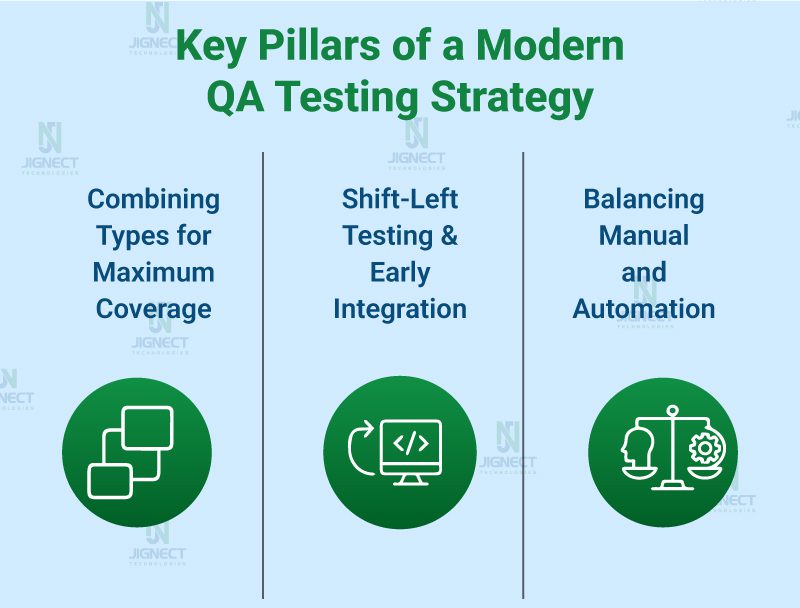
Here are the three key pillars of a modern QA testing strategy:
Combining Types for Maximum Coverage
No single type of testing is enough to guarantee bug-free, high-quality software. A comprehensive testing strategy combines functional and non-functional testing to cover every angle of quality assurance.
- Layer your tests: Start with unit and integration testing to validate code accuracy and interactions early. Follow up with system and acceptance testing to validate workflows and business requirements.
- Don’t skip non-functional checks: Performance, security, and accessibility testing ensure that your software isn’t just functional, but also fast, secure, and user-friendly.
- Align testing with risks: Prioritize testing based on critical features and potential impact on users or the business.
A blended approach gives QA teams maximum coverage, reduces post-release defects, and builds confidence in every deployment.
“Shift-Left” Testing and Early Integration
In modern Agile and DevOps workflows, speed and quality go hand-in-hand. The “shift-left” approach means integrating testing early in the SDLC instead of waiting until the end.
- Start testing early: Incorporate unit and integration testing during development to catch bugs before they become expensive issues.
- Continuous integration: Use CI/CD pipelines to run automated tests with every commit, ensuring code changes don’t break existing functionality.
- Collaborative QA: Involve developers, QA engineers, and stakeholders early to align on quality standards and acceptance criteria.
This proactive approach reduces the time, cost, and risk of late-stage bugs and helps deliver faster, more stable releases.
Balancing Manual and Automation
Automation testing is a game-changer in QA, but manual testing is still essential for areas where human judgment and intuition are required. A balanced approach ensures the best of both worlds: – Manual testing: Ideal for exploratory testing, usability checks, and one-off scenarios where user experience and creativity are key. – Automation testing: Best for repetitive, regression, performance, and integration tests, where consistency and speed are critical. – Smart automation: Focus on automating high-value, repeatable tests first. Maintain your scripts regularly to keep them reliable and efficient.
By combining manual expertise with smart automation, QA teams can deliver high coverage, faster feedback, and higher confidence in every release.
Pro Insight
A successful testing strategy is not static. It should evolve with your product, your team, and your technology stack. Regularly review your test coverage, tools, and processes to ensure your QA efforts continue to align with your business goals and user needs.
Tools & Resources by Testing Type
Quick reference table or list
| Testing Type | Recommended Tools & Resources | Why It’s Useful |
| Unit Testing | JUnit, NUnit, PyTest, Jest, xUnit | Validates individual code components early for faster debugging. |
| Integration Testing | Postman, SoapUI, TestNG, Karate, Citrus | Ensures smooth communication between modules, APIs, or third-party services. |
| System Testing | Selenium, Katalon Studio, TestComplete, Ranorex | Provides full end-to-end validation of workflows in production-like environments. |
| Acceptance Testing | Cucumber, FitNesse, TestRail, Zephyr | Validates business requirements and supports stakeholder sign-off. |
| Performance Testing (Load, Stress, Endurance) | Apache JMeter, LoadRunner, Gatling, BlazeMeter, k6 | Measures system performance, stability, and scalability under different loads. |
| Security Testing | OWASP ZAP, Burp Suite, Netsparker, Acunetix, Fortify | Detects vulnerabilities and ensures compliance with security standards. |
| Usability Testing | Hotjar, Lookback, Optimal Workshop, Crazy Egg, UserTesting | Gathers real user insights to enhance usability and user experience. |
| Accessibility Testing (for people with disabilities) | Axe, WAVE, Lighthouse, JAWS, NVDA | Ensures compliance with WCAG standards and inclusive usability. |
| Compatibility Testing | BrowserStack, Sauce Labs, LambdaTest, CrossBrowserTesting | Validates app functionality across multiple devices, browsers, and OS versions. |
| Scalability Testing | Apache JMeter, BlazeMeter, k6, LoadNinja | Tests system growth capacity and performance under scaling demands. |
| Localization & Internationalization Testing | Lingobit Localizer, SDL Passolo, Alchemy Catalyst, Crowdin, Transifex | Verifies translations, formats, and cultural adaptations for global markets. |
Conclusion
Software testing is no longer just a step in the development process – it’s the backbone of delivering high-quality, reliable, and user-friendly software. From unit and integration testing to performance, security, accessibility, and scalability checks, every testing type plays a critical role in building applications that users can trust.
By understanding the different types of software testing and knowing when and how to apply them, QA teams can create a balanced and efficient testing strategy. Combining manual testing for creativity and usability with automation for speed and accuracy ensures faster releases, fewer bugs, and a superior user experience.
As software evolves, so should your testing approach. Regularly review your QA processes, tools, and strategies to align with new technologies, user needs, and business goals. Remember, great testing isn’t about doing everything – it’s about doing the right tests at the right time to maximize quality and efficiency.
With the right testing strategy, tools, and mindset, your team can confidently deliver high-performing, scalable, and accessible applications that meet – and exceed – user expectations.
Witness how our meticulous approach and cutting-edge solutions elevated quality and performance to new heights. Begin your journey into the world of software testing excellence. To know more refer to Tools & Technologies & QA Services.
If you would like to learn more about the awesome services we provide, be sure to reach out.
Happy Testing 🙂